What's New
The release introduces the following new functionality.
Note
Some of these changes might not apply to your organization's use of ProLinkAIM. Please contact us if you have questions about whether and how a particular change affects your organization.
Entity Updates
This section describes entity-related updates.
Lock Entity Name for "Complete" Entities
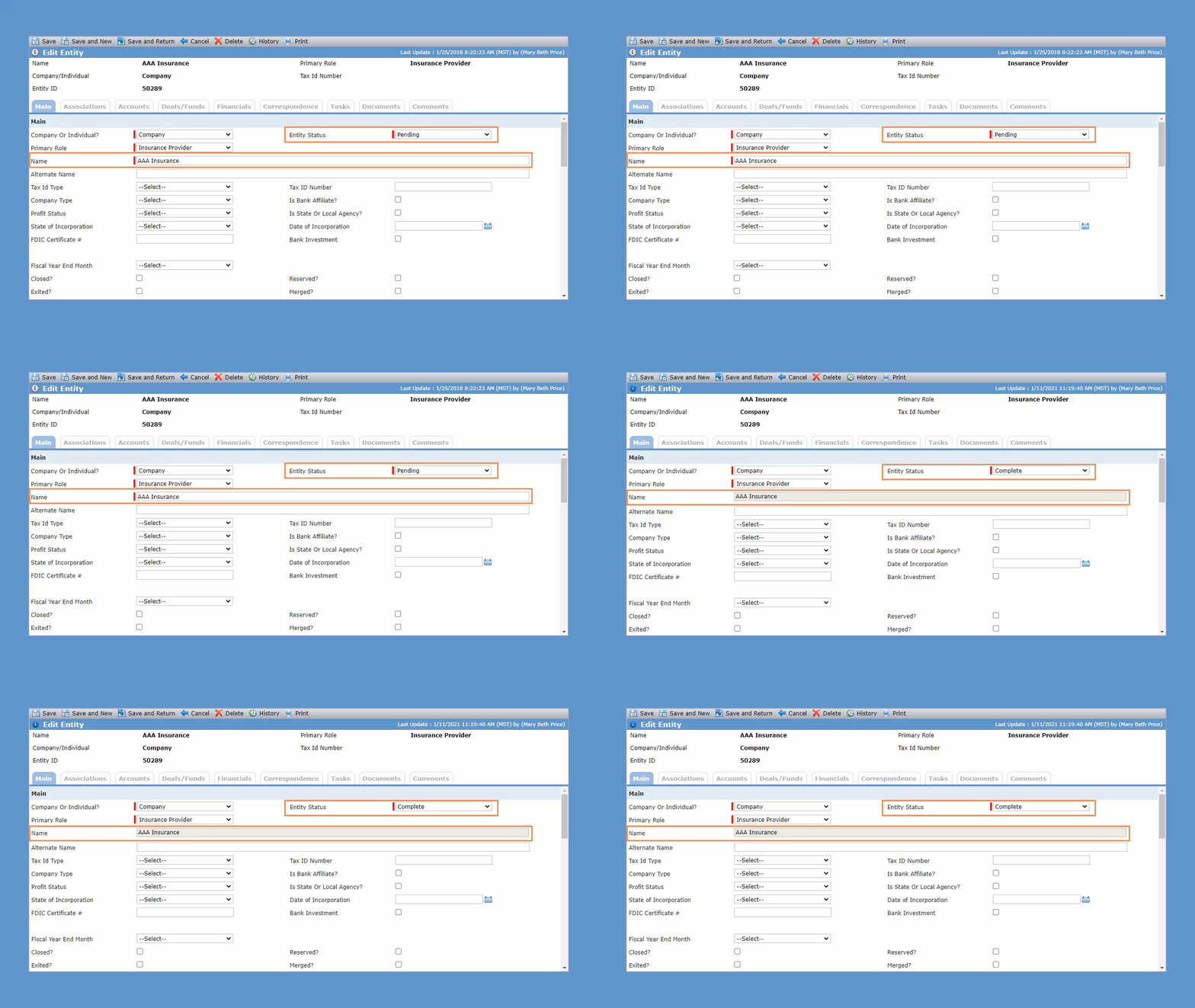
When you save an entity with the Entity Status of Complete, the entity name becomes read-only to prevent accidental updates after an entity is marked as Complete. To edit the name, first change the Entity Status to Pending and save the record.
This change applies to both individual entities (Title, First, MI, Last, and Suf fields) and company entities (Entity Name field).
Admin Updates
This section describes admin-related updates.
Copy Private Data View as a Public Data View
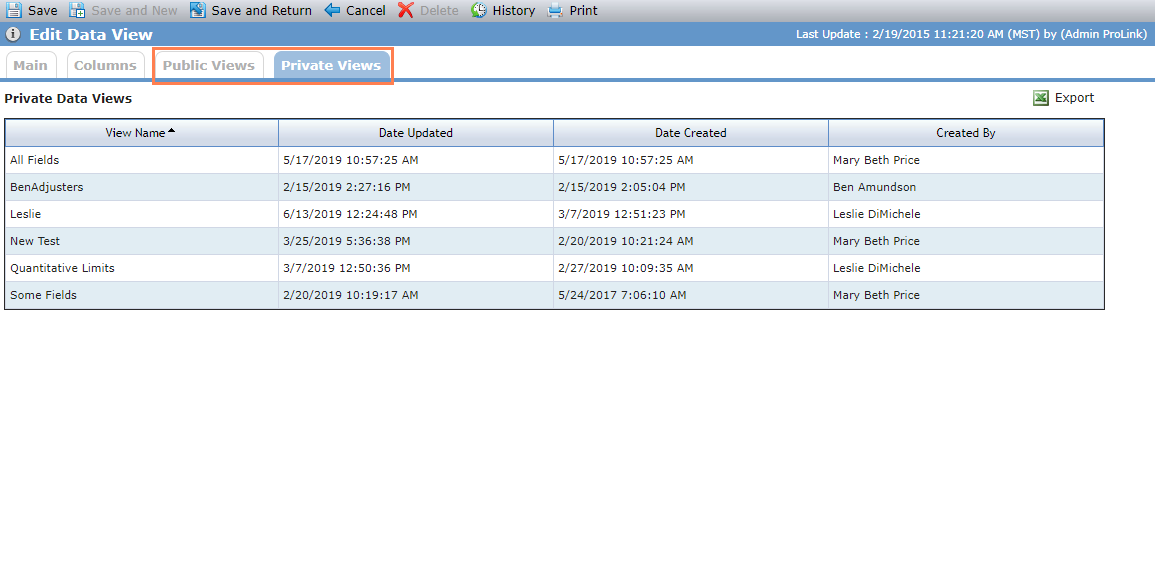
The Edit Data View Admin screen includes a new tab called Private Views, which shows all private data views for the selected object. When you select a view, the applicable Edit View screen opens. Options include:
Cancel—Returns to the previous list screen.
View Manager—Allows you to view and edit the private view.
Caution
Keep in mind a user created the private view to meet their reporting needs. We recommend exercising good judgement when determining whether to edit another user's private view; for example, to help troubleshoot an issue the user is having with the view.
Copy—Creates a copy of the private view. The copy becomes a private view belonging to the admin user who copied it.
Delete—Deletes the private view.
Warning
Keep in mind a user created the private view to meet their reporting needs. We do not recommend using this option.
Create Public Copy—Creates a new public view with the same name and setup as the private view. This option is helpful when a user has a private view needs to be made available to other users.
As part of this change, the current Views tab on the Edit Data View Admin screen has been renamed to Public Views.
Copy Workflows
Admin users can copy an existing workflow so that they do not have to start from scratch when building a workflow that is similar to another workflow. The copied workflow is not active until you select the Is Active checkbox.

Deal Updates
This section describes deal-related updates.
Added PPC to NMTC Total Benefits
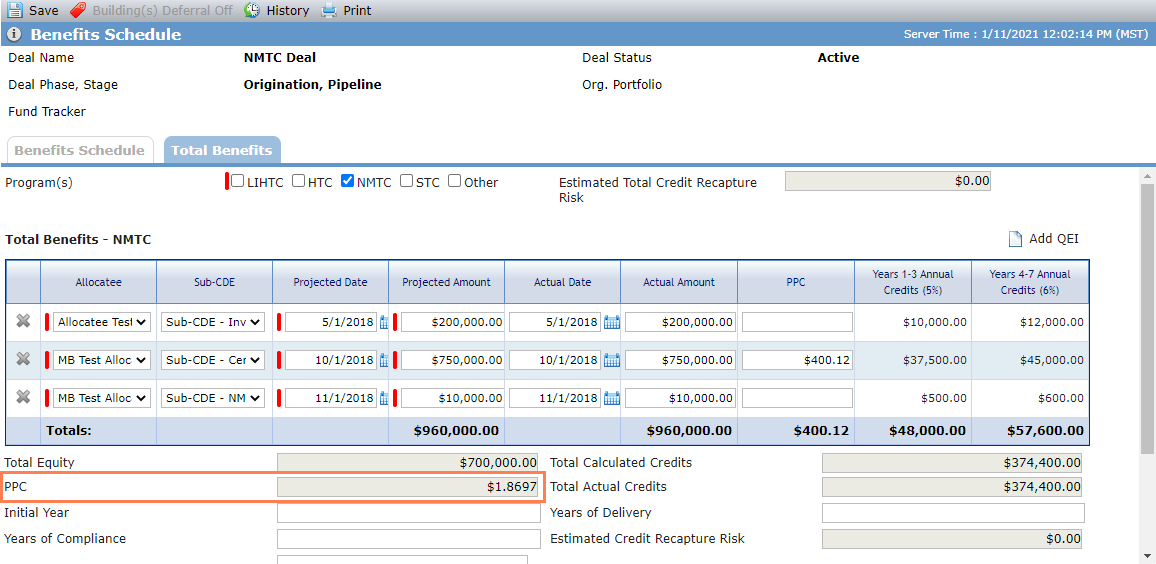
ProLink added the PPC field to the Total Benefits screen for NMTC deals so that your organization can track Price Per Credit at the QEI level. The field is included in workflow, the QEI data view, and SmartDox (QEI node of the Deal schema).
Added NMTC Fields to the Deals Data View
The following fields are now available in the Deals data view:
Total NMTC Credits
Total Leveraged Debt
(NMTC) Federal Equity
(NMTC) State Equity
NMTC PPC
Added Fields to the Pre-Dev Commitments Data View
The following fields are now available in the Pre-Dev Commitments data view:
Total Draws
Total Repayment
Total Write-Off
Outstanding Balance
Added Fields to the New Deal Screen
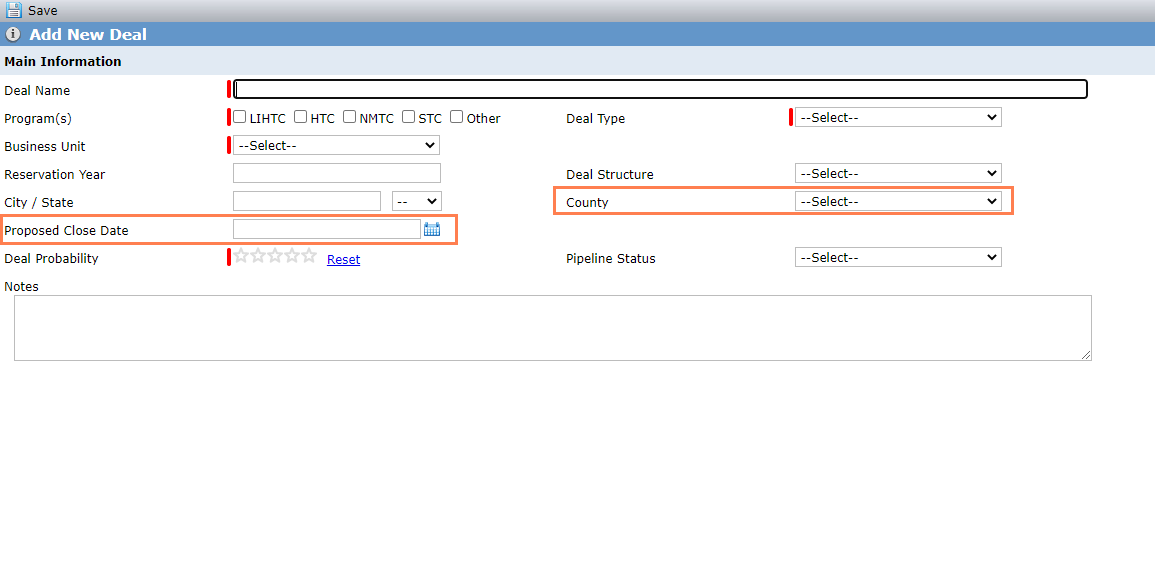
The New Deal screen now includes the following fields:
County—The system copies the value to the Property screen.
Proposed Close Date—The system populates the Estimated Actual Closing Date (Deal Status History grid) with the same value.
Updates to Insurance Policy Tracking in ProLinkAIM
ProLink made some changes to Insurance Policy record tracking.
The Edit Insurance Policy screen now includes the following fields:
Master Policy Approved
Master Policy Named Insured
Coverage Type—Only editable when the Insurance Type is General Liability.
Maximum Aggregate Cap—Only editable when the Insurance Type is General Liability.
The fields are included in workflow, the Insurance data view, and SmartDox (Deal schema).
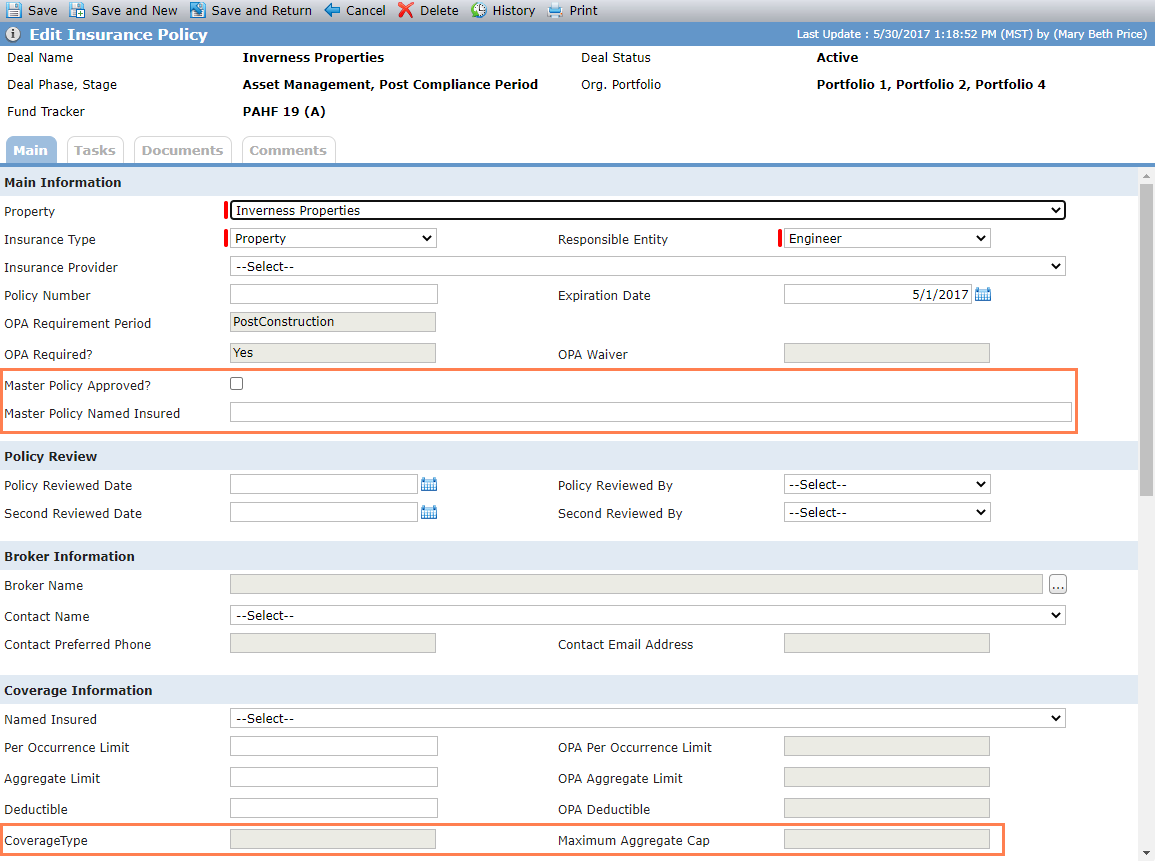
We also changed the format of the Per Occurrence Limit and Deductible fields (Edit Insurance Policy screen, data views, workflow, and SmartDox).
The Actual Construction Completion Date is included in the Insurance data view. The data view record will show the date from the property that is associated with the insurance policy.
Lastly, we updated the Insurance Type (PL_InsuranceType) picklist values as follows:
Added Pollution/Environmental
Added Deductible Buyback
Added Mine Subsidence
Added Named Storm
Renamed Boiler & Machine to Equipment Breakdown
Renamed Wind and Named Storm to Wind & Hail
Block Forecast Updates for Cash Flow through SmartDox
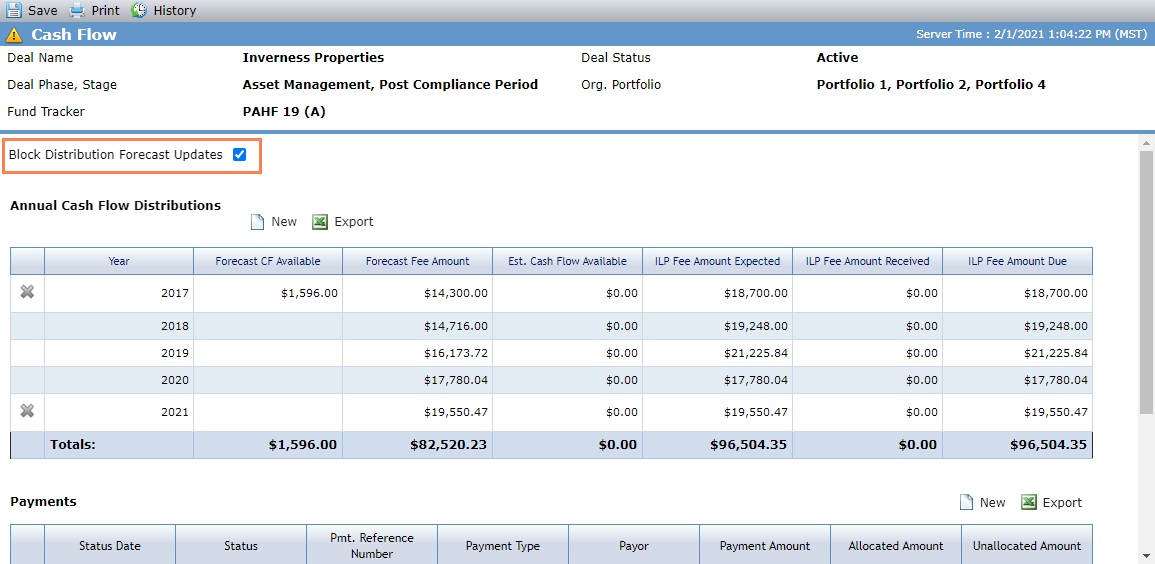
The Block Distribution Forecast Updates checkbox is now available on the Cash Flow screen. When you select the checkbox, cash flows will not be updated through the Financial Forecast ProLinkAIM schema.
Updates to the Pipeline Report Items
The Pipeline Report Items tab, located on Deal Details, has been updated for ease of use. ProLink has added several new fields, removed a few fields, and organized the fields into sections.
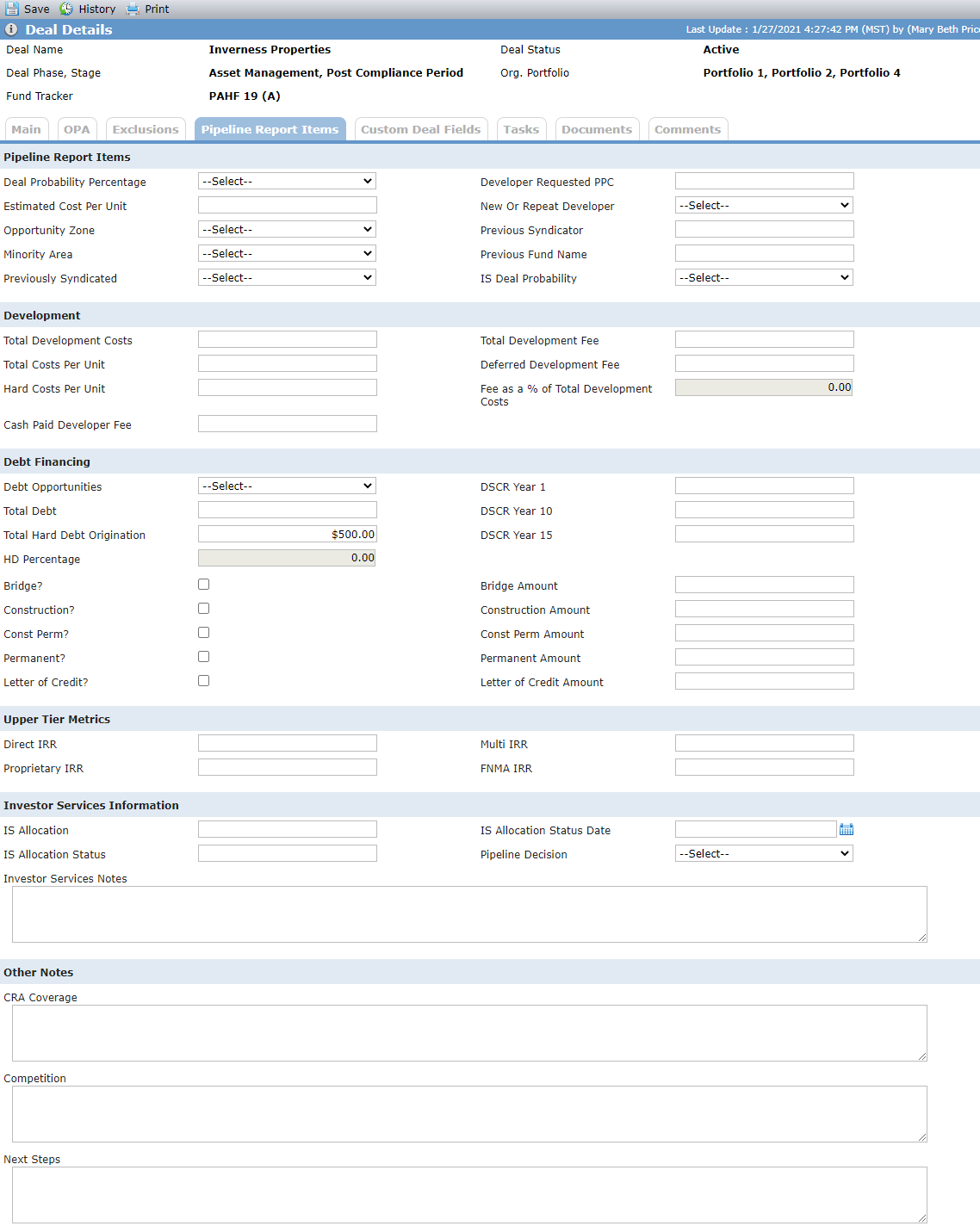
The Deals data view and Workflow functionality also reflect these field changes. Added fields are available through the SmartDox Deal schema. And removed fields are no longer available through the SmartDox; if a user attempts to get or send data on a previously mapped template, SmartDox indicates the field no longer exists and un-maps the field.
The following table describes the field level changes.
New Fields | Removed Fields | Renamed Field |
|---|---|---|
Deal Probability Percentage (non-system picklist) | Current Deal Status | Pipeline Report Notes renamed to Investor Services Notes |
Estimated Cost Per Unit (currency) | Direct (checkbox) | |
Opportunity Zone (non-system picklist) | Proprietary (checkbox) | |
Minority Area (picklist) | Multi (checkbox) | |
Previously Syndicated (picklist) | Debt SI (checkbox) | |
Developer Requested PPC (currency) | Direct Load | |
New or Repeat Developer (non-system picklist) | Proprietary Load | |
Previous Syndicator (alphanumeric) | Multi Load | |
Previous Fund Name (alphanumeric) | Debt SI Amount | |
IS Deal Probability (non-system picklist) | ||
Total Development Costs (currency) | ||
Total Costs Per Unit (currency) | ||
Hard Costs Per Unit (currency) | ||
Cash Paid Developer Fee (currency) | ||
Total Development Fee (currency) | ||
Deferred Development Fee (currency) | ||
Fee as a % of Total Development Costs (calculated field = Total Development Fee / Total Development Cost) | ||
Debt Opportunities (picklist) | ||
Total Debt (currency) | ||
Total Hard Debt Origination (currency) | ||
HD Percentage (calculated field = Total Hard Debt Origination / Total Debt) | ||
DSCR Year 1 (decimal) | ||
DSCR Year 10 (decimal) | ||
DSCR Year 15 (decimal) | ||
Letter of Credit Amount (currency) | ||
FNMA IRR (percentage) | ||
IS Allocation (alphanumeric) | ||
IS Allocation Status (alphanumeric) | ||
IS Allocation Status Date (date) | ||
Pipeline Decision (non-system picklist) |
Fund Updates
This section describes fund-related updates.
Updates to the Fund Overview Screen
When an investor has an exit date that is less than or equal to the current date, the system removes the Units, Ownership %, and K1% from the grid, including the totals line, on the Fund Overview screen.
Updates to the Fund LT Deals Screen
We updated the Middle Tier field on the Fund Lower Tier Deals screen to show the middle tier related to the fund being viewed instead of the middle tier related to the deal.
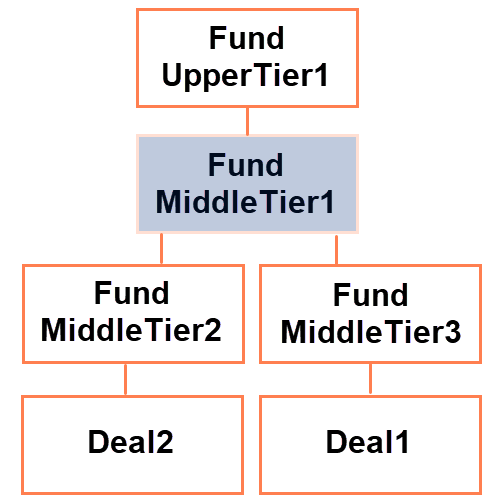
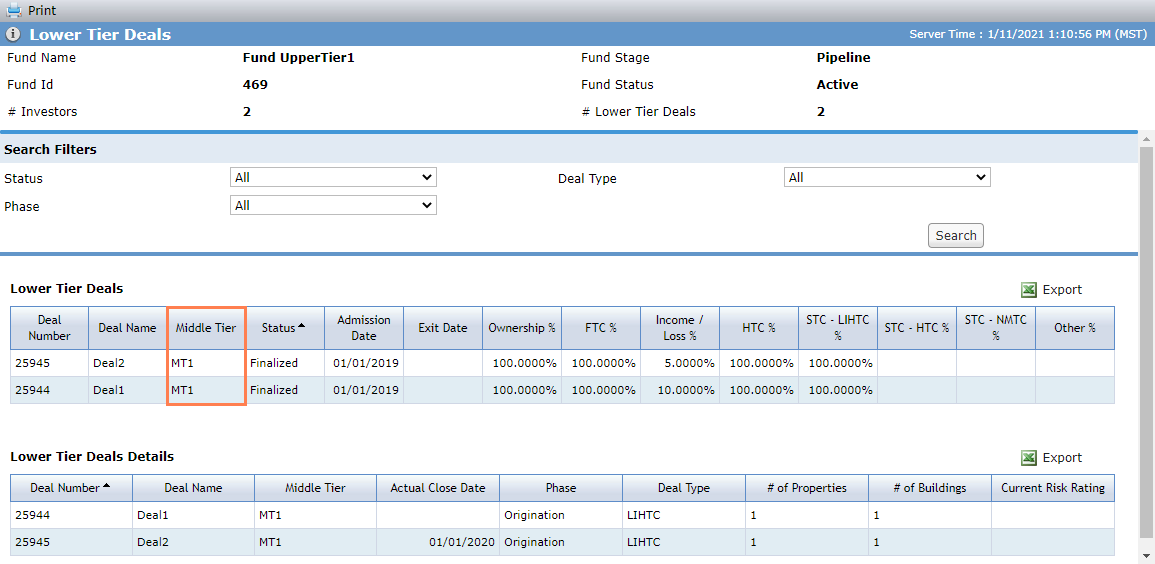
Fund/deal hierarchy; Middle Tier displayed
Help Updates
The Help Center includes the following new content:
Fund Introduction—Creating a Fund and Details
In addition, you can now access the AIM Data Dictionary from the AIM Help Center. The AIM Data Dictionary is a Microsoft Excel file that lists all ProLinkAIM fields.