About Occupancy - Lease Up Notes
Use the the Lease Up Notes tab on the Occupancy screen to record notes about the lease up reporting periods.
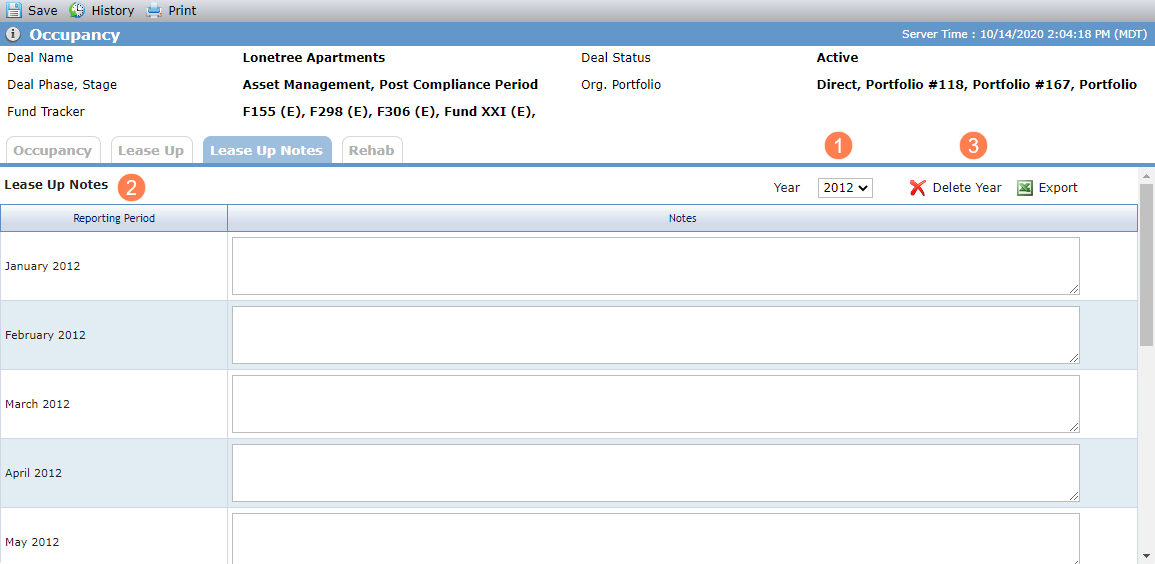
Year—Select from all years for which a Lease Up Notes record has been created. The Year defaults to the current year, if present in the list; otherwise, it defaults to the first item in the list.
The system creates a new year record each time the corresponding Lease Up record is created.
Lease Up Notes—The grid displays a list of all Lease Up Notes records where the Year of the Lease Up record matches the year selected.
Delete Year—You can delete the records for an entire year (not individual months). After a year is deleted, you must delete and re-add the Lease Up year in order to re-add the Lease Up Notes year.