About Benefits Schedule - Low Income Housing Tax Credits (LIHTC)
You can view the fund-level (all investors) or individual investor values at an annual or quarterly level.
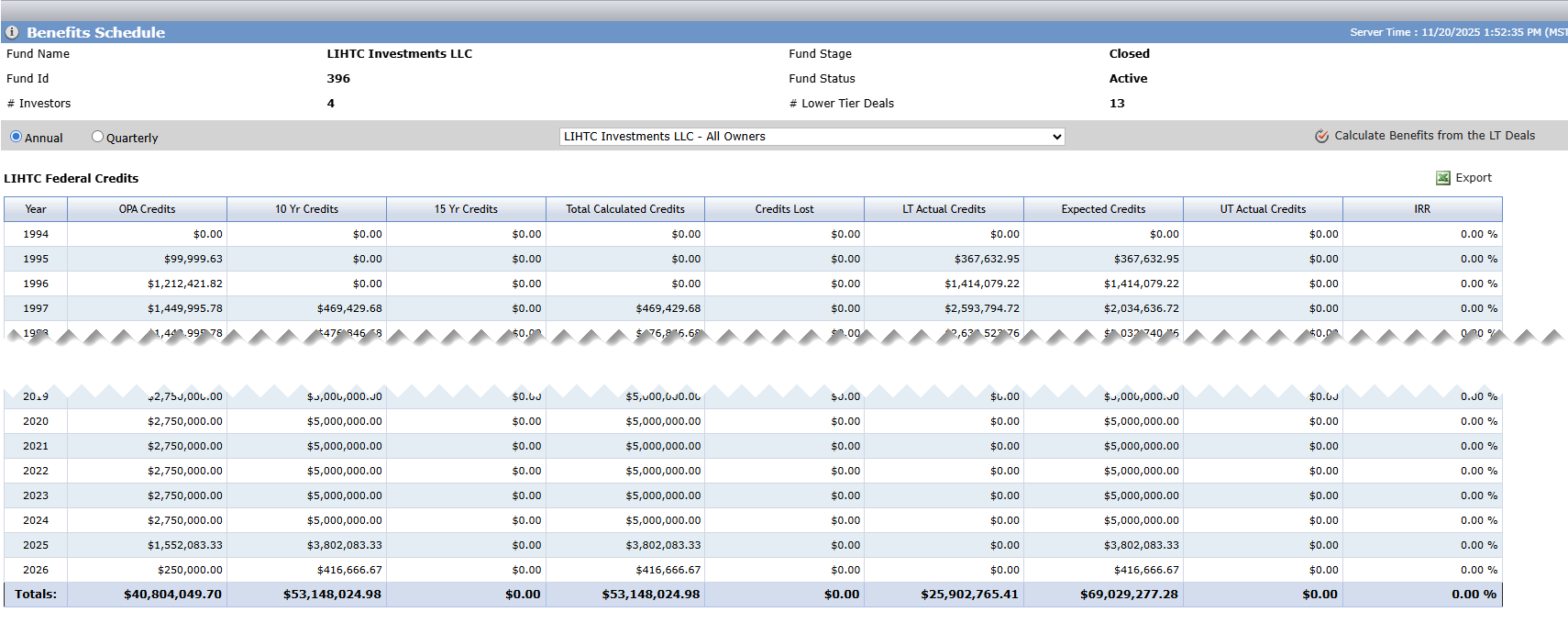
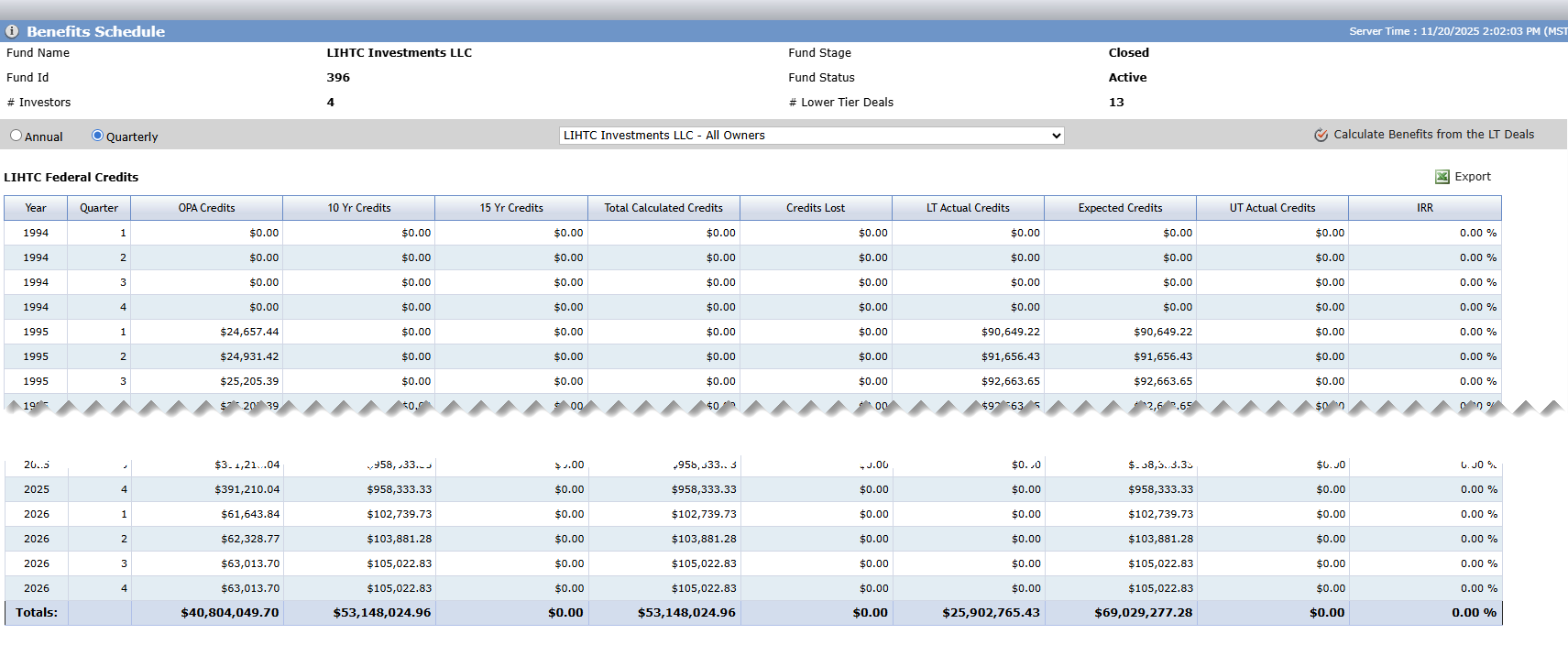
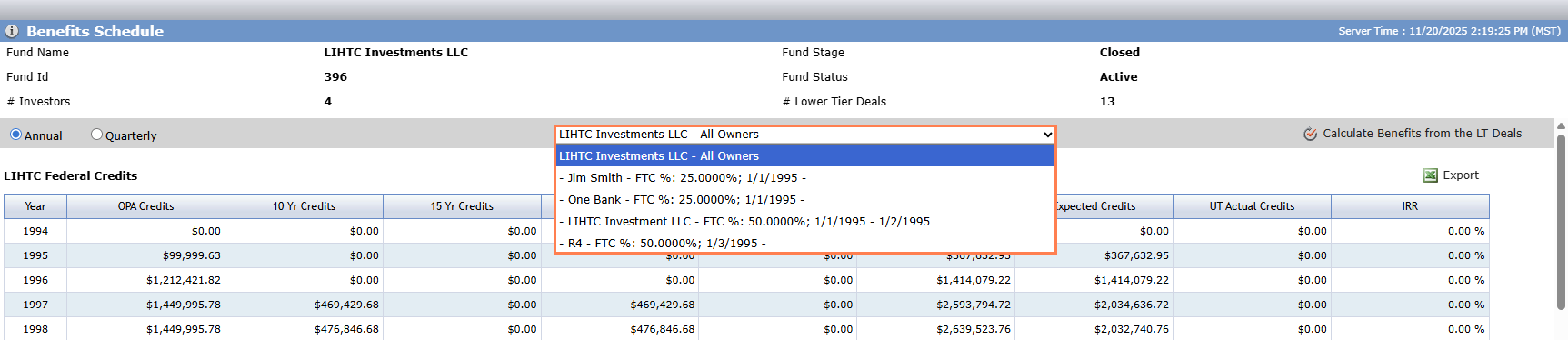
The list at the center of the screen defaults to the fund. However, you can select to view benefits by investor. The Investor list shows the active and exited investors for finalized ownership schedules.
All ownership schedules—both upper tier and lower tier—should be finalized. The finalized schedules at the upper tier control which investors are shown, and the finalized schedules at the lower tier control the actual values calculated in the Benefits Schedule grids.
Investor-level values are calculated based on the Investor's ownership percentage in the Ownership Schedule (based on the value populated for the FTC%). If part of the period being calculated overlaps with the ownership period, the calculated values are pro-rated. If the investor has multiple ownership periods within the same schedule, all ownership periods and their corresponding ownership percentages are calculated and summed for the value of the periods.
Tip
It's a good idea to wait to calculate the upper tier benefits until the Asset Manager has completed the benefit numbers for the lower tier deals. You might use workflow notifications to help manage this part of your organization's processes.
When you access the Benefits Schedule for a fund for the first time, the screen might be empty. To populate the screen, you need to tell the system to calculate and sum the benefits from the lower tier deals in a Finalized Ownership Schedule of the fund. You can also do this at any time to refresh the data.
Navigate to the fund, and then select Benefits Schedule in the left navigation menu.
The Benefits Schedule screen opens.
Click Calculate Benefits from the LT Deals.
A popup opens.
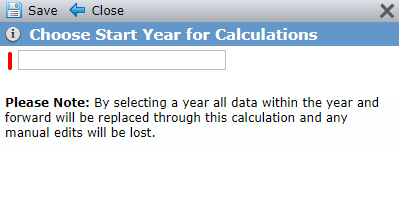
Enter the starting year for calculations, and then click Save.
Caution
The system will delete and replace the values from the selected year and forward. Any manual edits will be lost.
Although benefits are calculated using the fund's lower tier deal benefit amounts, you may find you need to modify the amount at the fund level.
Click a Benefit Year row in the grid to open the corresponding edit screen.
See Edit the Benefits Schedule for more information about the edit screen.
The benefit year stream is determined by the years in the lower tier schedules that are rolled into the upper tier schedule. The earliest year in the upper tier benefit stream is the earliest year in the associated deals; the latest year is the latest year in the associated deals.
Column | Description |
|---|---|
Year (annual view) | Listing of all benefit years for the owned lower tier deals |
Year/Quarter (quarterly view) | Listing of all quarter for all benefit years for the owned lower tier deals |
OPA Credits | The sum of OPA values of the owned lower tier deals |
10 Yr Credits | The sum of 10 year values of the owned lower tier deals |
15 Yr Credits | The sum of 15 year values of the owned lower tier deals |
Total Calculated Credits | The sum of total calculated values of the owned lower tier deals |
Credits Lost | The sum of credits lost values of the owned lower tier deals |
LT Actual Credits | The sum of LT Actual values of the owned lower tier deals |
Expected Credits | The sum of expected credits values of the owned lower tier deals |
UT Actual Credits | The sum of UT Actual values of the owned lower tier deals The visibility of this column is controlled by an Admin configuration setting. |
IRR | The Internal Rate of Return value is user-entered, not calculated. |
Column | Description |
|---|---|
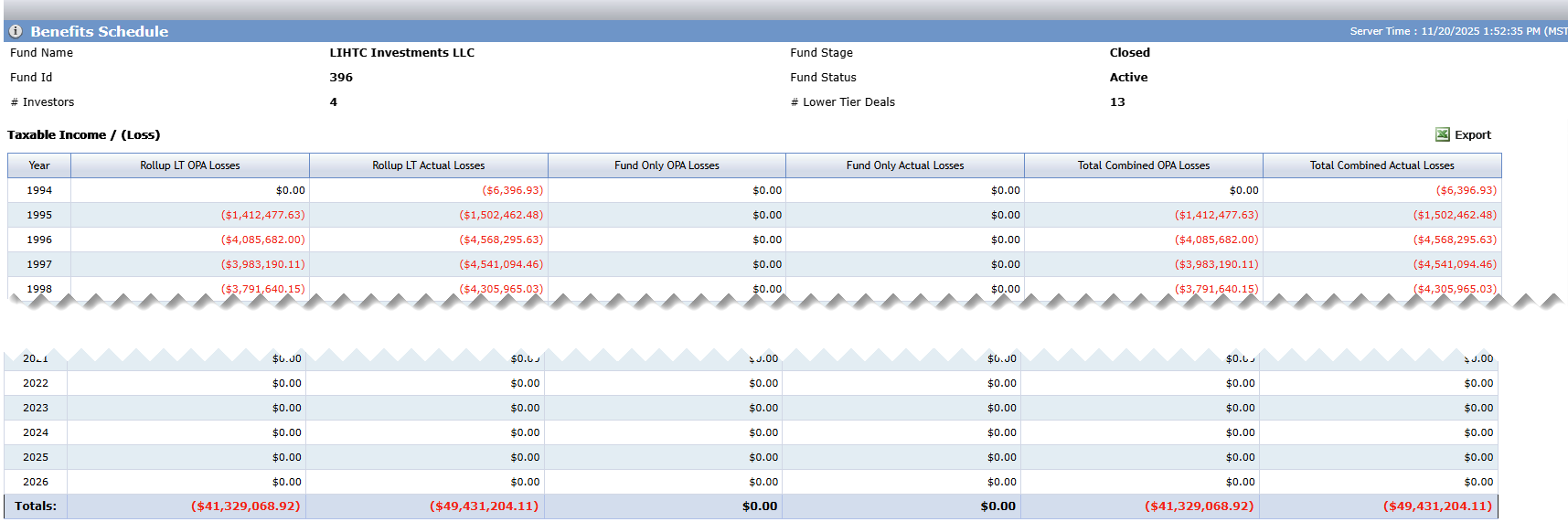
Year (annual view) | Listing of all benefit years for the owned lower tier deals |
Year/Quarter (quarterly view) | Listing of all quarter for all benefit years for the owned lower tier deals |
Rollup LT OPA Losses | Annual—Sum of the OPA Losses for the Fund's Deals for a given year accounting for entry/exit dates Quarter—Calculated value equal to 25% of the year’s Rollup LT OPA Losses value accounting for entry/exit dates When an individual investor is selected, this cell is blank. |
Rollup LT Actual Losses | Annual—Sum of Actual Losses for the Fund's Deals for a given year accounting for entry/exit dates Quarter—Calculated value equal to 25% of the year’s Rollup LT Actual Losses value accounting for entry/exit dates When an individual investor is selected, the value shows the investor's share of the Rollup LT Actual Losses based on their Income / Loss % as defined in the ownership structure and their entry/exit dates to the fund. |
Fund Only OPA Losses | Annual—Fund Only OPA Losses for that year accounting for entry/exit dates Quarter—Calculated value equal to 25% of the year’s Fund Only OPA Losses value accounting for entry/exit dates Benefits recalculation will not change this value. When an individual investor is selected, this cell is blank. |
Fund Only Actual Losses | Annual—Fund Only Actual Losses for that year accounting for entry/exit dates Quarter—Calculated value equal to 25% of the year’s Fund Only Actual Losses value accounting for entry/exit dates Benefits recalculation will not change this value. When an individual investor is selected, the value shows the investor's share of the Fund Only Actual Losses based on their Income / Loss % as defined in the ownership structure and their entry/exit dates to the fund. |
Total Combined OPA Losses | Annual—Sum of Rollup LT OPA Losses and Fund Only OPA Losses for the year. Quarter—Calculated value equal to the sum of that quarter’s Rollup LT OPA Losses and Rollup LT Actual Losses When an individual investor is selected, this cell is blank. |
Total Combined Actual Losses | Annual—Sum of Rollup LT Actual Losses and Fund Only Actual Losses for the year. Quarter—Calculated value equal to the sum of that quarter’s Total Combined Actual Losses When an individual investor is selected, the value shows the sum of Rollup LT Actual Losses and Fund Only Actual Losses for the investor. |
You can view fund benefits information across all of the funds through data views:
Fund Benefits Schedule - Annual—View and report on all Fund Annual Benefits fields. Click a row to access the corresponding Edit Fund Benefits screen.
Fund Benefits Schedule - Quarterly—View and report on all Fund Quarterly Benefits fields. Click a row to access the corresponding Edit Fund Benefits screen.