About Occupancy - Lease Up Details
The Lease Up tab on the Occupancy screen is where Lease Up records for the deal's buildings are stored.
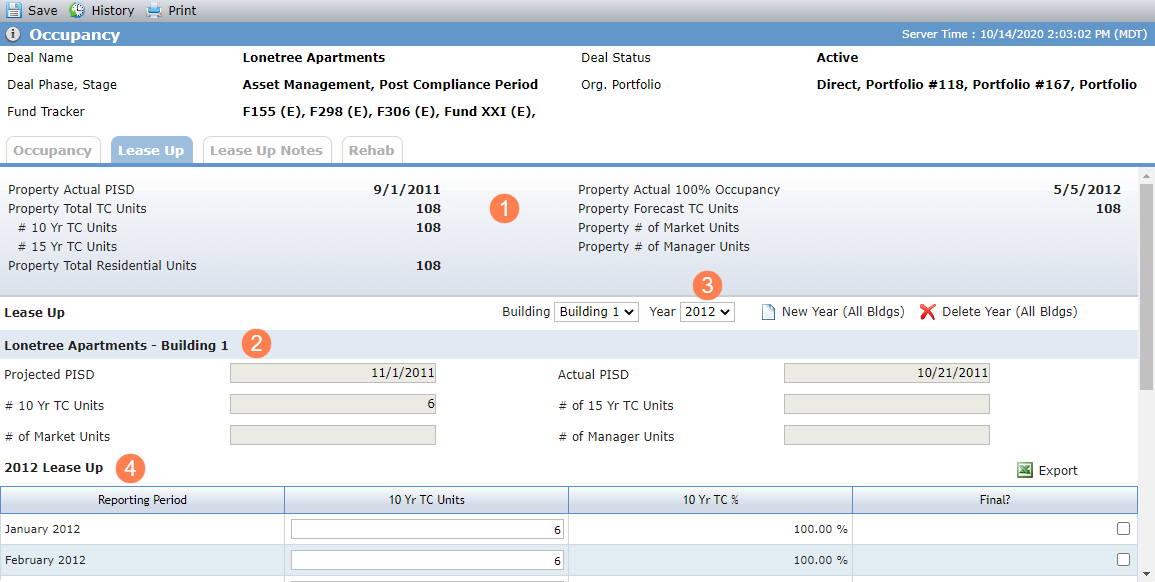
Property—The read-only fields in the Property section at the top of the page are displayed from Edit Property.
Building—Select from all buildings associated with all properties on the deal.
The read-only fields in the Property - Building section are displayed from the Edit Building record that corresponds to the building selected.
Year—Select from all years for which Lease Up records have been created for the selected building. The Year defaults to the current year, if present in the list; otherwise, it defaults to the first item in the list.
Lease Up—The grid displays all Lease Up records associated with each building on the deal where the year of the Lease Up record matches the year selected, and the Building associated with the Lease Up record matches the building selected.
Note
The 15 Yr columns—15 Yr TC Units, 15 Yr TC %, and Final—will be displayed only if one of the following conditions is met:
The value in Lease Up # of 15 Year TC Units is greater than 0 on any Building on the Deal.
The value in Lease Up 15 Yr TC Units is greater than 0 on any Lease Up reporting Period for any Building on the Deal.
The value in Lease Up 15 Yr TC Units is greater than 0 on any Occupancy record.
The value in the Property # of 15 Yr TC Units is greater than 0 on any Property on the Deal.
Field | Description |
|---|---|
10 Yr TC Units | Average (10 Yr TC Units) is the sum of 10 Yr TC Units divided by the # of Reporting Periods for the year where the 10 Yr TC Units is not blank. Weighted Average (10 Yr TC Units) is the sum of the 10 Yr TC Units divided by 12. |
10 Yr TC % | Sum of the 10 Yr TC Units for the Reporting Period divided by the Total Lease Up 10 Yr TC Units for the Building. Average (10 Yr TC %) is the sum of 10 Yr TC % divided by the # of Reporting Periods for the year where the 10 Yr TC Units is not blank. Weighted Average (10 Yr TC %) is the sum of the 10 Yr TC % divided by 12. |
15 Yr TC Units | Average (15 Yr TC Units) is the sum of 15 Yr TC Units divided by the # of Reporting Periods for the year where the 15 Yr TC Units is not blank. Weighted Average (15 Yr TC Units) is the sum of the 15 Yr TC Units divided by 12. |
15 Yr TC % | Sum of the 15 Yr TC Units for the Reporting Period divided by the Total Lease Up 15 Yr TC Units for the Building. Average (15 Yr TC %) is the sum of 15 Yr TC % divided by the # of Reporting Periods for the year where the 15 Yr TC Units is not blank. Weighted Average (15 Yr TC %) is the sum of the 15 Yr TC % divided by 12. |
Add a Lease Up Record
Lease Up records can be added systematically, either by adding or updating the Actual PISD on an associated Building or through the New Year button on the Lease Up tab of the Occupancy screen. When Lease Up records are created, regardless of how they are created, Occupancy records for the same year will also be created if they don’t already exist.
Navigate to the deal, and then select Occupancy in the left navigation menu.
The Occupancy screen opens.
Click the Lease Up tab.
Click New Year (All Bldgs) above the Lease Up grid.
A system message opens.
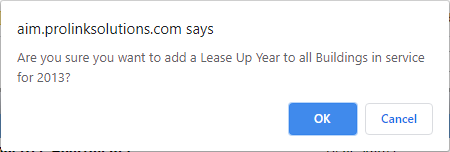
Click OK to confirm creation of records for the next consecutive year for all buildings.
The following values are defaulted for new records:
Status = Not Received
Due Date = last day of the Reporting Period plus the # of Days Due After Period (OPA tab). If no value is populated on the OPA tab, the new record uses the Occupancy Reports (Days After Period) from the Reports tab of Edit Config Settings.
Penalty Rate = Penalty Rate defined in the OPA tab. If no value is populated on the OPA tab, the field remains blank.
Edit Lease Up
When you click into a row in the Lease Up grid, the Edit Lease Up screen for the record opens.
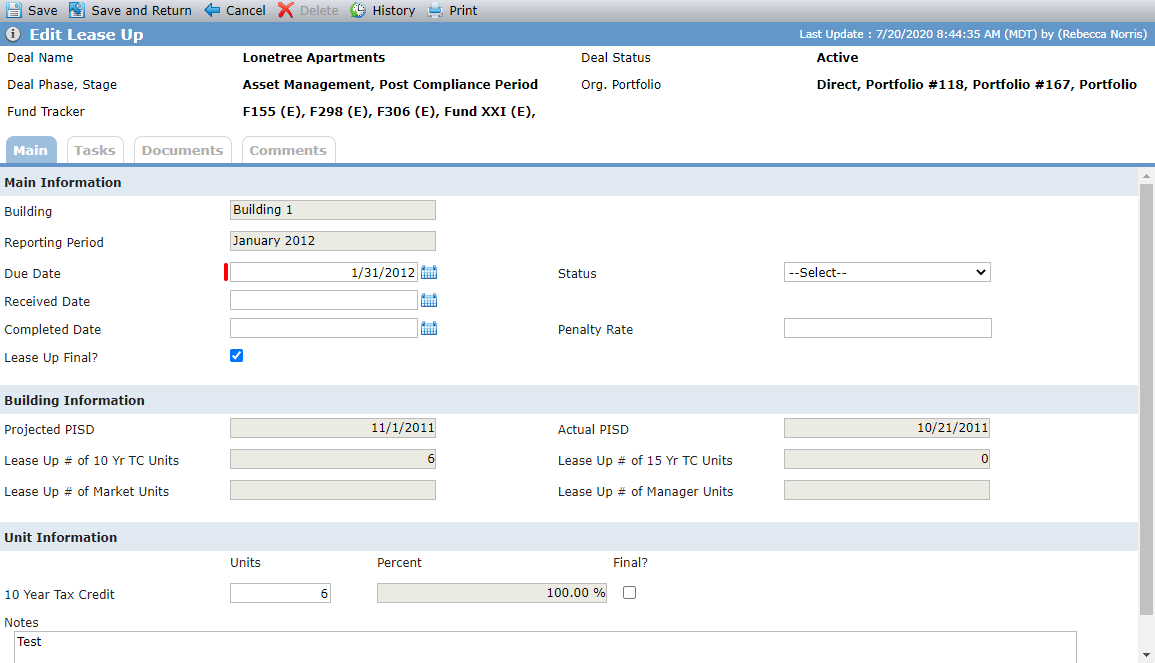
The screen is divided into the following sections:
Main Information—General information about the building lease up for the reporting period, such as dates and status.
Building Information—The values for the fields in this section are displayed from the corresponding building (Edit Building).
Unit Information—When you enter and save Unit Information for a reporting period, and the current status of the reporting period on Edit Lease Up is Not Received or Received, the system changes the status to In Process.
10 Year Tax Credit Percent = sum of the 10 Year Tax Credit Units divided by the # of 10 Yr TC Units for the building; 15 Year Tax Credit Percent = sum of the 15 Year Tax Credits divided by the # of 15 Yr TC Units for the building.