Quarter 1, 2026 ProLinkAIM Release Notes
ProLink Solutions is pleased to announce the Quarter 1, 2026 release. You've come to the right place to review what's new and tickets delivered.
UAT Build: February 12, 2025
UAT Rebuild: March 5, 2026
Production Build: March 12, 2025
What's New
The release introduces the following new functionality.
New Bulk Deal Creation Utility
ProLink introduces a new utility, which allows you create multiple deals at once. The utility provides a template so you can quickly import critical deal data points to begin managing and analyzing additions to your pipeline.
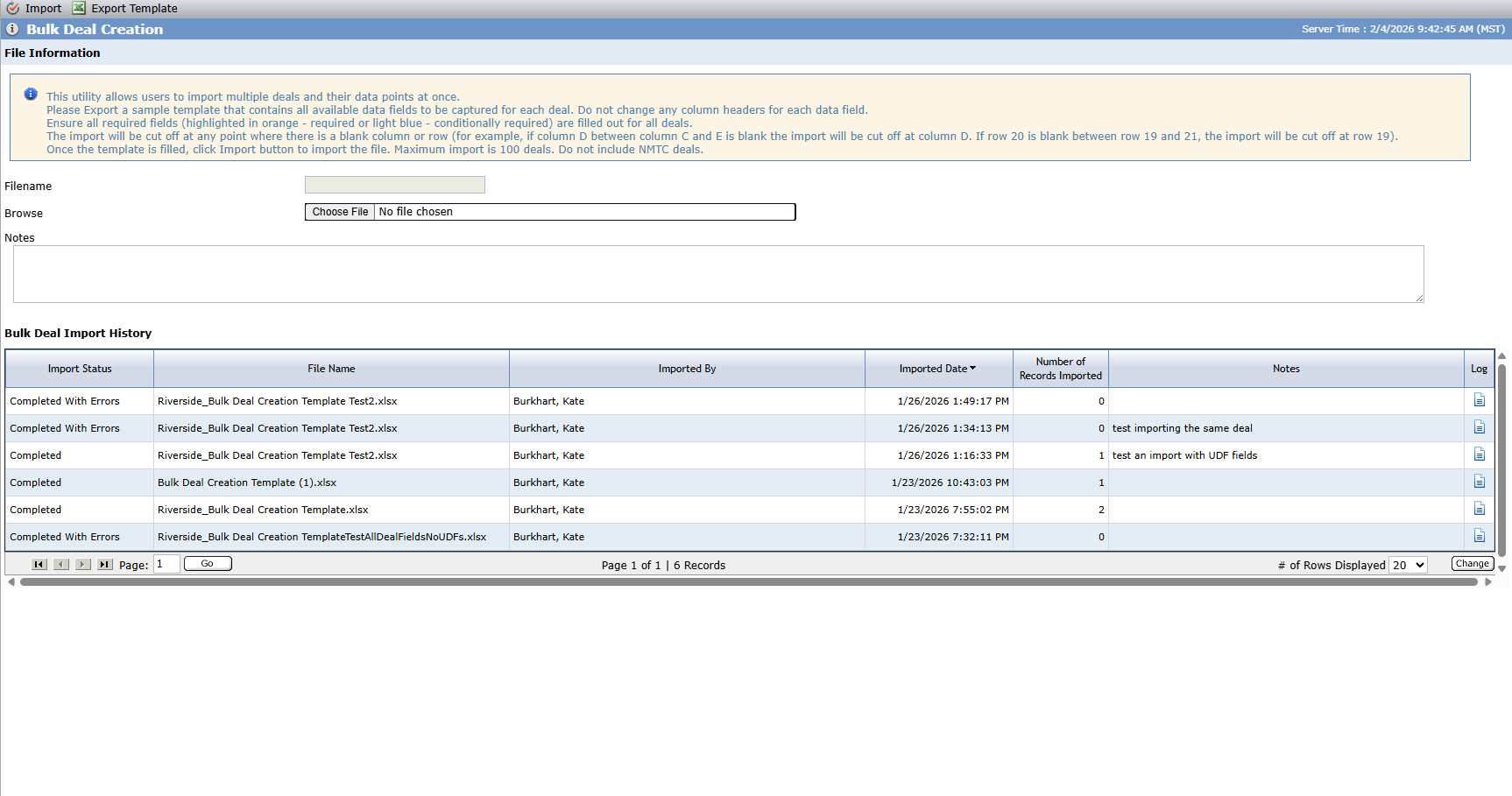
The availability of the utility is controlled by a ProLink only configuration setting. Please reach out to ProLink Support if you are interested in this functionality.
To create a large number of deals at one time:
Begin by exporting the template.
The first row is the header row. Do not change this row.
Any active user defined fields (UDFs) on the Deal object are included at the end of the template.
Complete all required fields (columns) for every deal (row). The header for required columns is highlighted orange, and the header for conditionally required columns is highlighted light blue. (For the program fields, you are required to mark only one program per record as true. You do not need to mark the other program fields false (can be blank).)
Enter data in the expected data type for the field, such as date, currency, and so on. For picklist fields, only select a valid value from the list.
The maximum number of deals you can import with one template is 100. You cannot import NMTC deals.
Upload the completed template, and click Import.
The import will stop where there is a blank column or row. For example, if column D between column C and E is blank, the import stops after column C. If row 20 is blank between row 19 and 21, the import stops after row 19.
Upon completion, the system shows a message indicating the number of deals successfully imported and the total number of deals in the file. You can view a summary of the process in the History grid and download the log file to review any errors.
New Field in File Audit Data View
ProLink added a new, default column to the File Audit data view for the Audit Type. When a record is populated from the Initial File Audit tab on the Compliance screen, then the value of the Audit Type field is Initial. When a record is populated from the Other File Audits tab, then the value of the field is Other. As a result, you can use this column to filter and view the results by audit type.
Tickets Delivered
The release includes the following items.
Ticket Number | Description |
|---|---|
N/A | ProLink fixed an issue that prevented the ability to export risk reviews. |
N/A | ProLink fixed an issue with the LT Financials report that affected search results in certain scenarios. |
30558 | ProLink updated SmartDox schemas to resolve an issue where the PPC field was mapped to the incorrect field in ProLinkAIM. The existing PPC field is renamed to NMTCPPC, and we added a new field called PPC. This aligns with the database columns that the fields are mapped to. Changes affect Total Benefits nodes on the Capital Contributions, Cash Flow Distributions, Deal, Financial Forecast, Inspection, and Pricing Model schemas. |
30864 | ProLink fixed an issue that prevented users from creating new fund records if they had the Add Fund security privilege but not the Entity - Modify privilege. With the change, the Add Fund security privilege now matches the behavior of the Add Deal privilege, so that users do not need to have the Entity - Modify privilege to create a new fund. |
31100 | ProLink fixed the Fund Owners Benefits Schedules - Annual data view so that the records include only annual value records. |
31357 | ProLink fixed the process for adding an entity so that the entity name is required, as indicated and expected. |
Rebuild Tickets (Version 26.1 Release 2) | |
31785 | ProLink made changes so that Checklist Template Items can be deleted from Checklists Templates and the updated template will be applied to new deals from that point forward. |