Edit the Occupancy for a Deal Year
The Edit Occupancy screen shows the details for an Occupancy record.
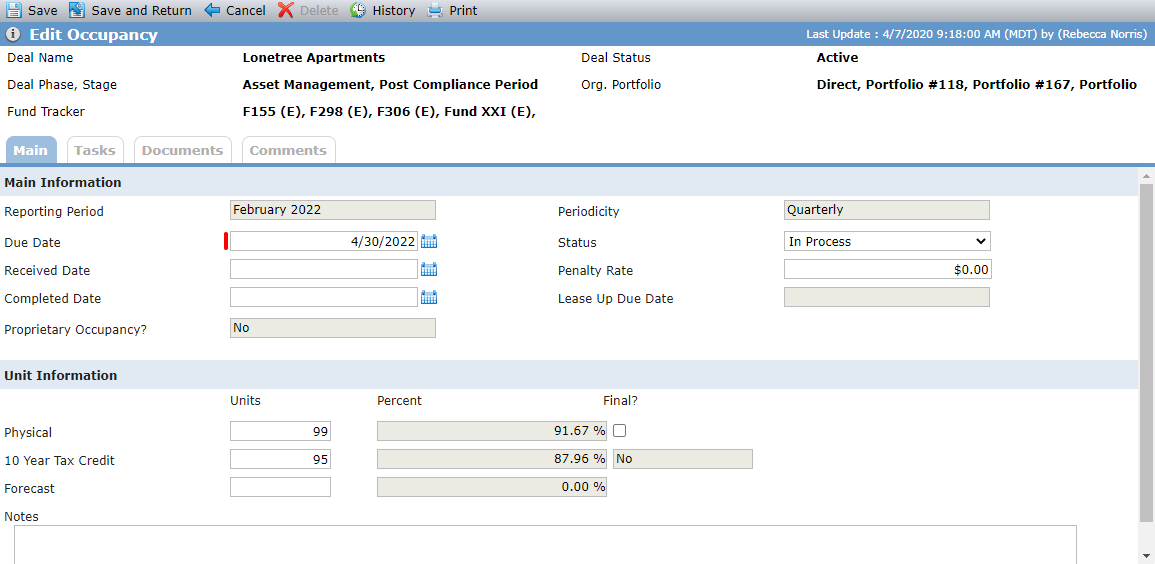
Main Tab - Main Information
Field | Description |
|---|---|
Reporting Period | Month and year of the reporting period |
Periodicity | Frequency selected for the Occupancy record |
Due Date | Populated based on the reporting period and the selected # Days Due After Period |
Status | The state of the Occupancy record |
Received Date | If populated, the system updates the Status to Received |
Penalty Rate | The amount that would be due if the reporting period's occupancy numbers are not received by the due date |
Completed Date | If populated, the system updates the Status to Completed |
Lease Up Due Date | When at least one property exists on a deal in Lease Up (Edit Property), then this field is calculated as follows: Add the # Days Due After Period for Lease Up (Lease Up section of the OPA tab on Deal Details) to the last day of the month for the month of the Reporting Period |
Proprietary Occupancy | Displays Yes if the Proprietary Occupancy checkbox is selected on the Occupancy screen |
Main Tab - Unit Information
Field | Description |
|---|---|
Physical Units | The number of total units (market and tax credit units). |
Physical Percent | Sum of the Physical Units for the Reporting Period divided by the Total Residential Units. |
Final | Indicates whether the physical units populated for the reporting period are final. |
10 Year Tax Credit Units | Sum of the 10 Yr TC Units for the Reporting Period divided by the Property # of 10 Yr TC Units when no Lease Up record exists for the Reporting Year. When Lease Up records exist for any building for a Reporting Period, the values for the 10 Yr and 15 Yr columns (10 Yr TC Units, 10 Yr TC %, Final, 15 Yr TC Units, 15 Yr TC %, Final) will be displayed from the corresponding Lease Up record as read-only and blue font. |
10 Year Tax Credit Percent | Sum of the 10 Yr TC Units for all Buildings for the Reporting Period (Lease Up Tab) divided by the sum of the Lease Up # of 10 year TC Credits from Edit Building when a Lease Up record exists for the Reporting Year. When Lease Up records exist for any building for a Reporting Period, the values for the 10 Yr and 15 Yr columns (10 Yr TC Units, 10 Yr TC %, Final, 15 Yr TC Units, 15 Yr TC %, Final) will be displayed from the corresponding Lease Up record as read-only and blue font. |
Final | Indicates whether the 10 year tax credit units populated for the reporting period are final. When Lease Up records exist for any building for a Reporting Period, the values for the 10 Yr and 15 Yr columns (10 Yr TC Units, 10 Yr TC %, Final, 15 Yr TC Units, 15 Yr TC %, Final) will be displayed from the corresponding Lease Up record as read-only and blue font. |
15 Year Tax Credit Units | Sum of the 15 Yr TC Units for the Reporting Period divided by the Property # of 15 Yr TC Units when no Lease Up record exists for the Reporting Year. The 15 Yr columns—15 Yr TC Units, 15 Yr TC %, and Final—will be displayed only if one of the following conditions is met:
When Lease Up records exist for any building for a Reporting Period, the values for the 10 Yr and 15 Yr columns (10 Yr TC Units, 10 Yr TC %, Final, 15 Yr TC Units, 15 Yr TC %, Final) will be displayed from the corresponding Lease Up record as read-only and blue font. |
15 Year Tax Credit Percent | Sum of the 15 Yr TC Units for all Buildings for the Reporting Period (Lease Up Tab) divided by the sum of the Lease Up # of 15 year TC Credits from Edit Building when a Lease Up record exists for the Reporting Year. The 15 Yr columns—15 Yr TC Units, 15 Yr TC %, and Final—will be displayed only if one of the following conditions is met:
When Lease Up records exist for any building for a Reporting Period, the values for the 10 Yr and 15 Yr columns (10 Yr TC Units, 10 Yr TC %, Final, 15 Yr TC Units, 15 Yr TC %, Final) will be displayed from the corresponding Lease Up record as read-only and blue font. |
Final | Indicates whether the 15 year tax credit units populated for the reporting period are final. The 15 Yr columns—15 Yr TC Units, 15 Yr TC %, and Final—will be displayed only if one of the following conditions is met:
When Lease Up records exist for any building for a Reporting Period, the values for the 10 Yr and 15 Yr columns (10 Yr TC Units, 10 Yr TC %, Final, 15 Yr TC Units, 15 Yr TC %, Final) will be displayed from the corresponding Lease Up record as read-only and blue font. |
Forecast Units | The number of units forecasted to be occupied for the corresponding period. |
Forecast Percent | Sum of the Forecast Units for the Reporting Period Month divided by the Property Forecast TC Units (Edit Property) |