Mass Mapper
This information is for system administrators or super users who are responsible for setting up the SmartDox templates.
One-to-many relationships may require data points be mapped multiple times. If many different data points for a Schema Group will be mapped multiple times, the process of creating a template could become lengthy. The Mass Mapper can reduce the amount of time spent mapping fields by providing the ability to map a single data point to multiple fields at once.
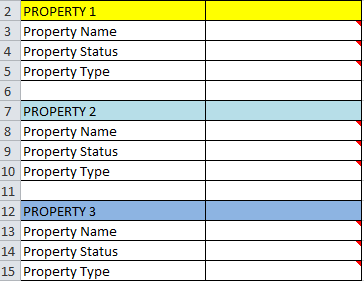 |
The example shows what multiple fields mapped multiple times might look like in a SmartDox template. Three identical sections are shown, one above the other, with a blank row in between repeated sections. The first mapped field in each section is Property Name, and there are two rows separating each instance of Property Name.
The process of using the Mass Mapper follows these general steps:
Determine the fields to be mapped.
Make copies of the Schema Groups that represent the data from the ProLink application to be repeated.
Map a data point from the repeated Schema Group to multiple locations at once, separated by a defined number of vertical spaces.
Repeat mass mapping of other data points until all data points are mapped.