Introduction to ProLinkAIM Debt/Financing
Debt/Financing tracking is instrumental in determining if a deal is properly financed. This information is used for managing construction budgets and reporting transactions to the Community Development Financial Institution (CDFI) for NMTC deals.
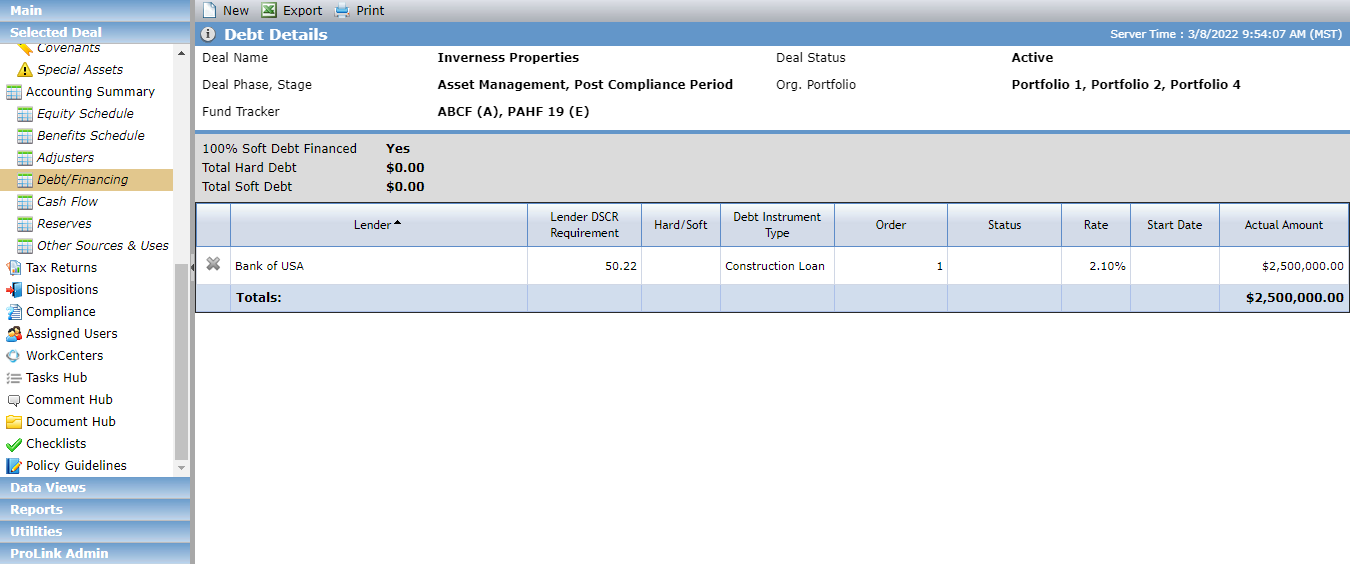
The Debt Details screen includes all Debt records for the deal.
Tip
For LIHTC deals, Debt records are generally created through the SmartDox Financial Forecast template.
Between the header and the grid, you can find the following information:
100% Soft Debt Financed—Displays "No" when Hard is selected from the Hard vs Soft field (Edit Debt Details - Terms tab) on ALL debt instruments associated to the deal; otherwise, "Yes" is displayed.
Total Hard Debt—Displays the sum of the Actual Amounts for all Debt Instruments on the deal where "Hard" is selected in the Hard vs Soft field (Edit Debt Details – Terms tab).
Total Soft Debt—Displays the sum of the Actual Amounts for all Debt Instruments on the deal where "Soft" is selected in the Hard vs Soft field (Edit Debt Details – Terms tab).
Click New in the top toolbar to create a new Debt record.
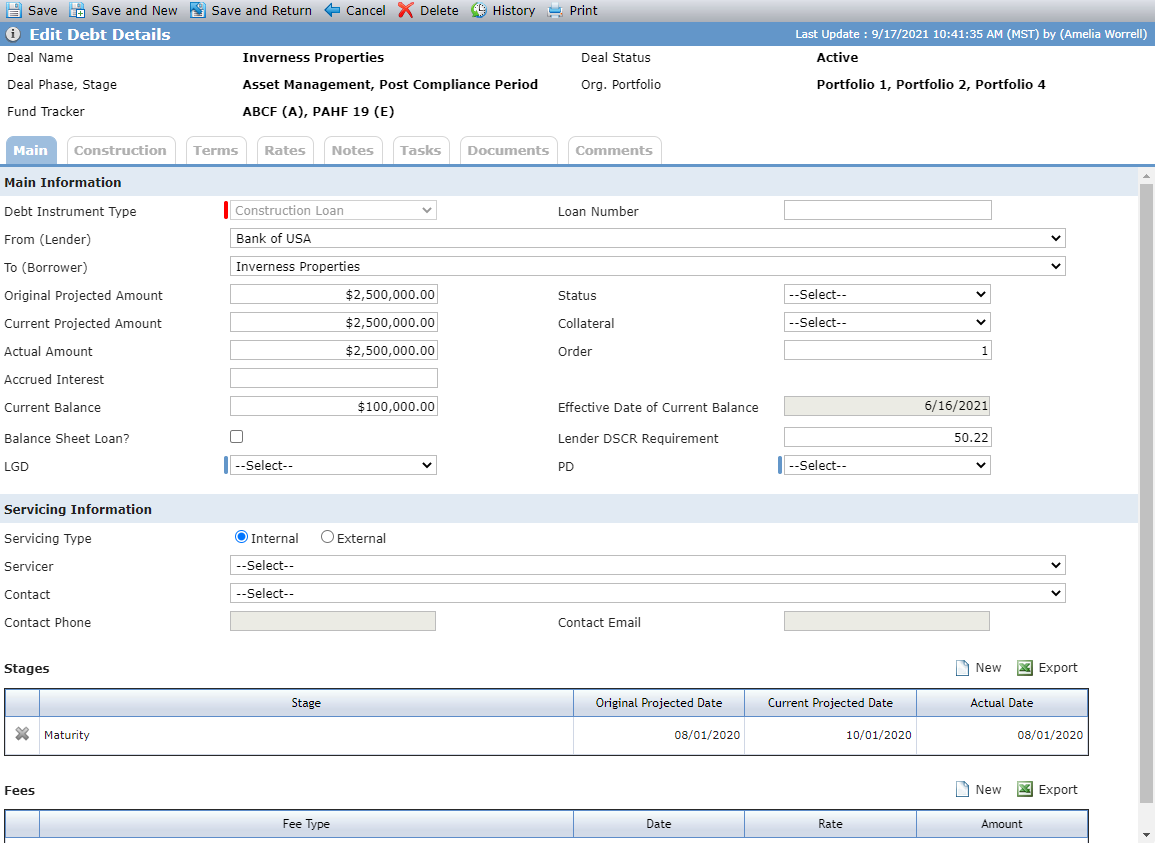
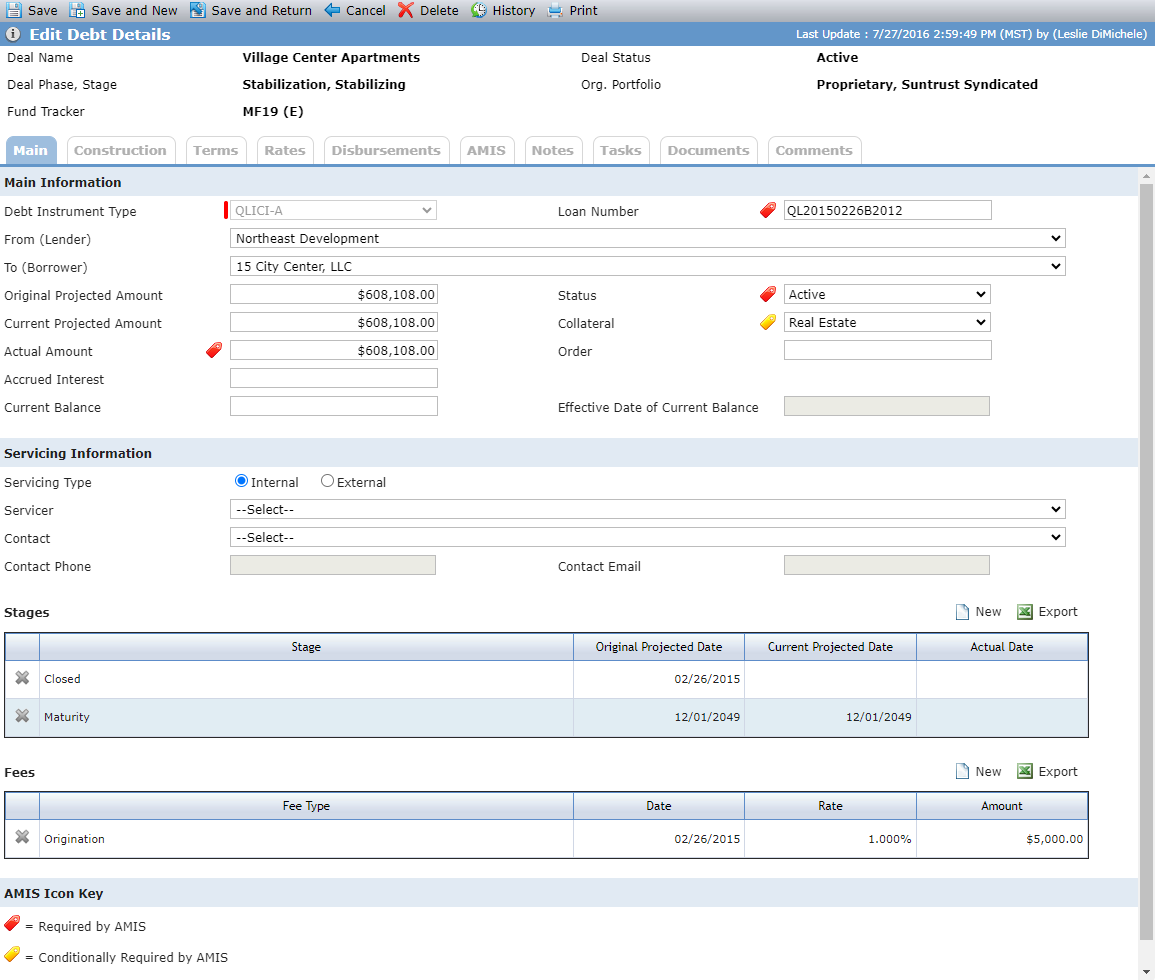
Debt Instrument Type not equal to QLICI; Debt Instrument Type of QLICI (including QLICI-A - QLICI-F)
The fields displayed depend on the Debt Instrument Type selected for the Debt record.
Tip
You can also access this screen through the QLICI Loan grid on the NMTC Summary screen.
Field | Description |
|---|---|
Main Information | |
Debt Instrument Type | After you add a Stage record to the Debt Instrument, the Debt Instrument Type becomes read only. The QLICI Debt Instrument Type is available only if the Deal Program Type is NMTC or STC Sub-Type. If the Debt Instrument Type is any QLICI value, a AMIS indicator displays next to those fields that are required or conditionally required for AMIS reporting. |
Loan Number | AMIS required Must be unique for the deal. |
From (Lender) | The From (Lender) cannot be the same as the To (Borrower). Select from the Deal Entities associated with the deal, with a Deal Role of Lender, Leveraged Lender, or Sub-CDE. |
To (Borrower) | Select from the Deal Entities associated with the deal. |
Status | AMIS required |
Collateral | AMIS conditionally required when the Transaction Type = Term Loan, Line of Credit, or Debt with Equity. Transaction Type is located on the AMIS tab. |
Actual Amount | AMIS required |
Effective Date of Current Balance | Displays the current date of when the Current Balance field is populated or modified. |
Balance Sheet Loan | Not displayed for Debt Instrument Types of QLICI. If selected, then LGD and PD are required. |
Servicing Information | |
Servicing Type | Select Internal for entities already on the deal or External for any entity to be added manually. |
Servicer | For Internal entities, select from the Deal Entities with a Deal Role of Servicer. |
Contact | If a Deal Entity is selected for the Servicer, you can select from that entity's contacts. If populated on the Entity record, the Contact's Phone Number and Email Address will be displayed. |
Debt Instrument Stage
You can track the stages of the Debt Instrument by creating a different record at each stage.
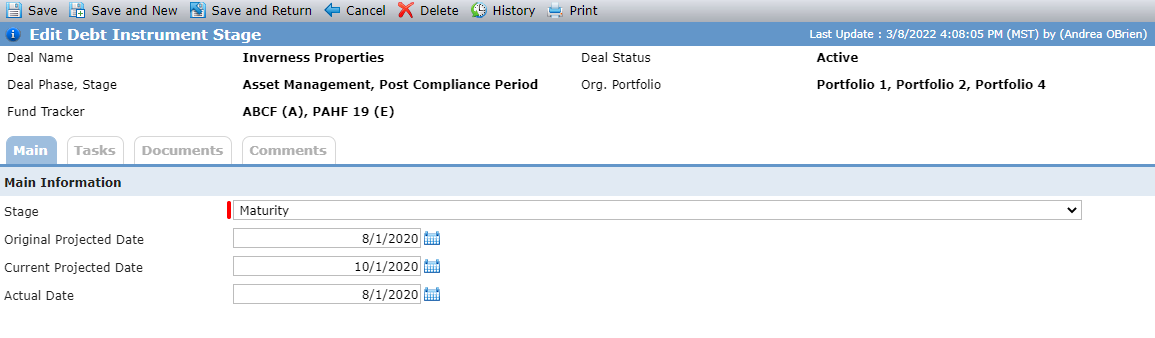
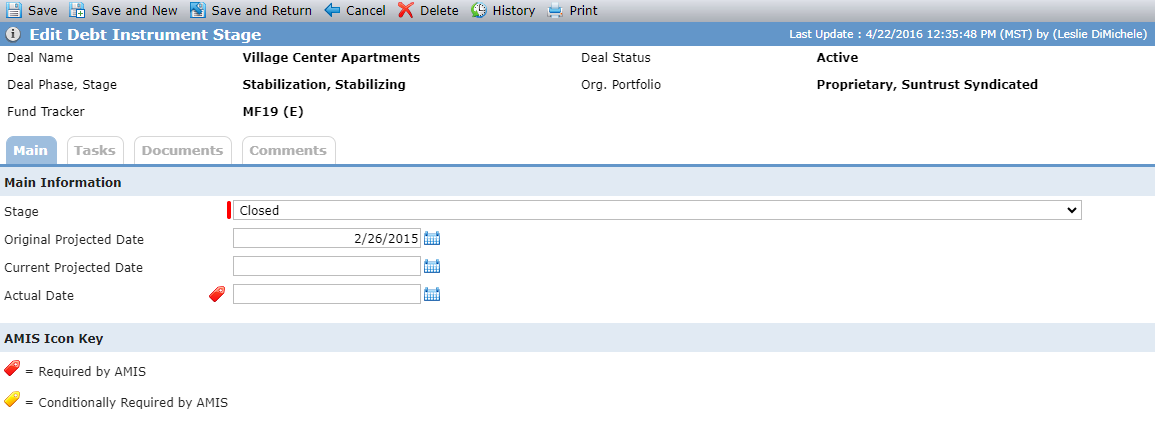
Debt Instrument Type not equal to QLICI; Debt Instrument Type of QLICI (including QLICI-A - QLICI-F)
When you add a Stage record, at least one date field must be populated. Actual Date is AMIS required when the Stage = Closed.
When a Financial Forecast is sent via SmartDox, if the Original Projected Date is populated for a Debt record (and that record does not have a Debt Instrument Stage created for "Closed"), the system will create a new Debt Instrument Stage record and populate the Original Projected Date.
Some notes about the stage options:
The only Stage options available for a Pre-Development Commitment Debt Instrument are Closed, Maturity, Maturity Extension, and Repay.
A Stage record of Maturity must exist if you are adding a Stage record of Maturity Extension.
The Commitment Expiration Extension Stage cannot exist unless a Commitment Expiration Stage also exists.
Debt Instrument Fee
You can track fees related to the Debt Instrument.
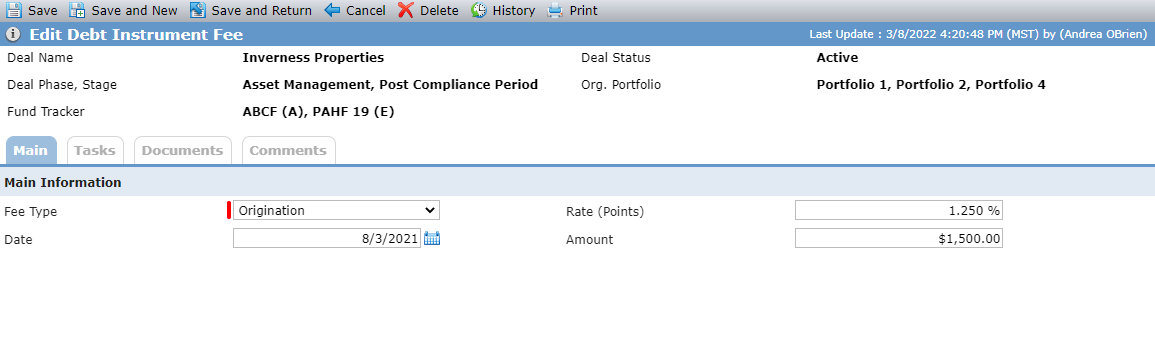
For QLICI Debt Instruments, Rate Points is conditionally required when the Transaction Type (located on the AMIS tab) is equal to Term Loan or Debt with Equity. And Amount is conditionally required if the Lower than Standard Origination Fees field (located on the AMIS tab) is equal to Yes.
When a Financial Forecast is sent via SmartDox, and the following conditions are met, the system will create a Debt Instrument Fee record with Fee Type of Origination:
The Debt Instrument Type is Bridge Loan, Construction Loan, Conversion Loan, Letter of Credit Loan, or Permanent Loan.
The Balance Sheet Loan field equals Yes.
When the Rate (Points) and Amount are populated in the Financial Forecast template, the fields will update the Debt Instrument Fee record.
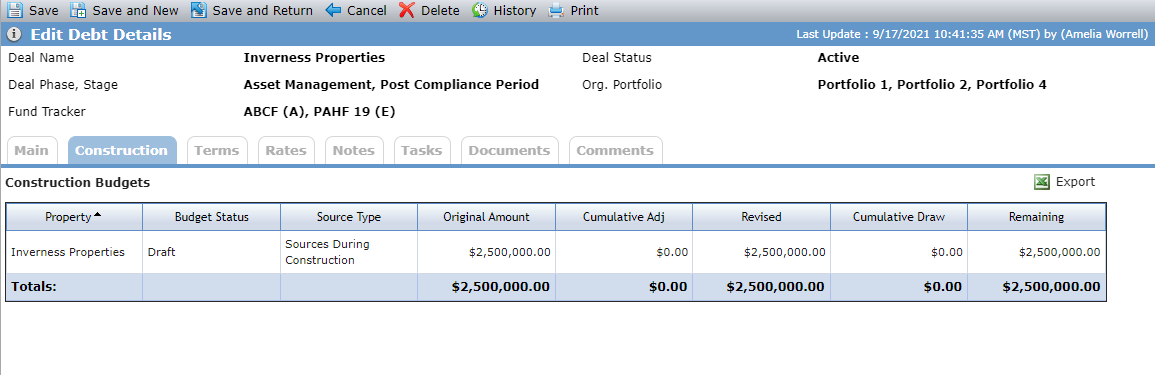
The Construction tab displays information about the Debt Instruments that have been used as a Source on the Construction Budget. Select a row in the grid to navigate to the Edit Construction Budget screen for the corresponding record.
The Terms tab allows you to view and edit various information about the terms of a Debt Instrument, including Loan Term, End Date, Amortization Term, and Amortization Method.
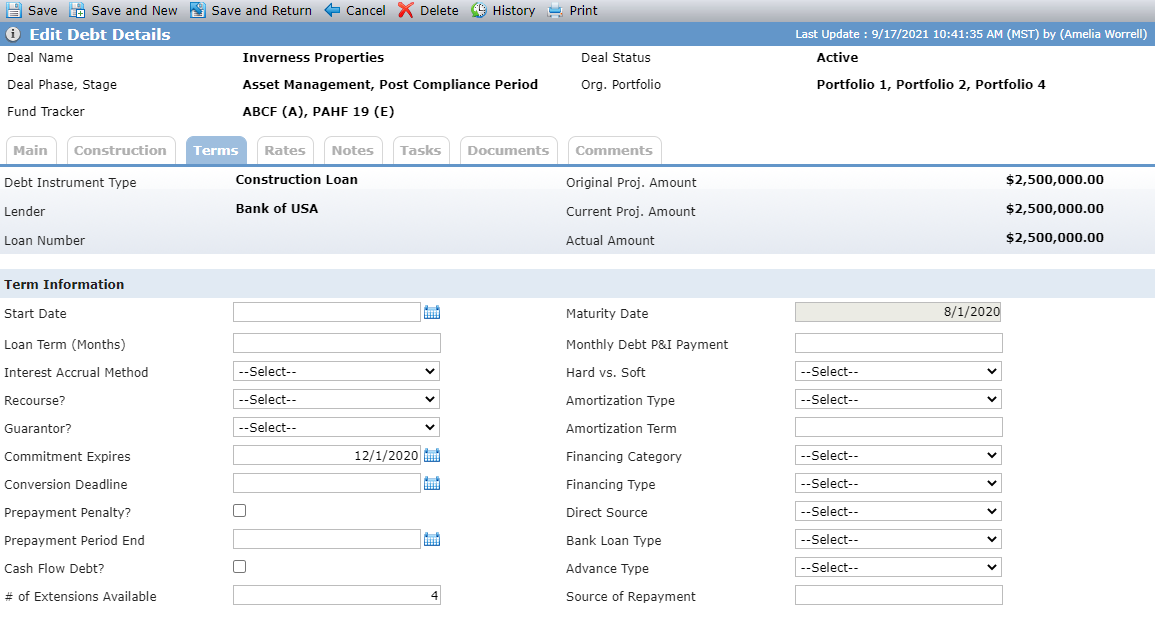
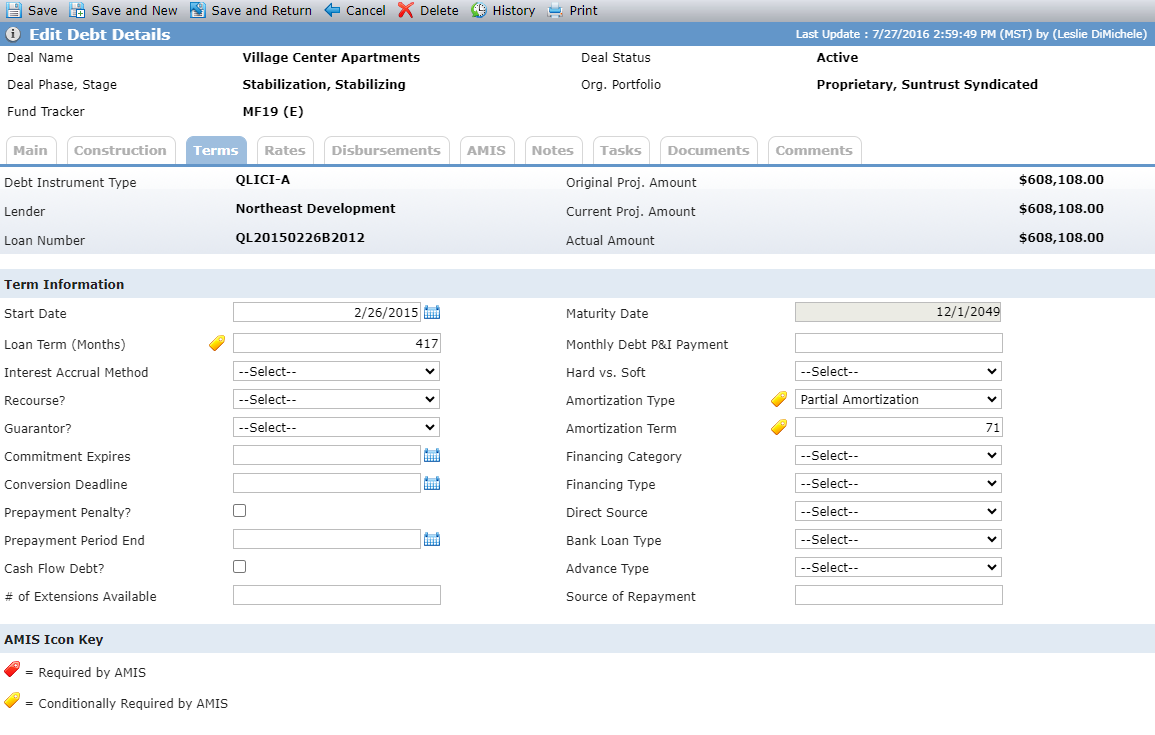
Debt Instrument Type not equal to QLICI; Debt Instrument Type of QLICI (including QLICI-A - QLICI-F)
The fields displayed depend on the Debt Instrument Type selected for the Debt record.
Tip
You can also access this screen through the QLICI Loan grid on the NMTC Summary screen.
Field | Description |
|---|---|
Maturity Date | Read-only field that is displayed when a Stage of Maturity exists. The date defaults to the Actual Date if populated, otherwise the Current Projected Date if populated, otherwise the Original Projected Date from the Debt Instrument Stage record with a Maturity Stage. |
Loan Term (Months) | AMIS conditionally required when the Transaction Type (located on the AMIS tab) equals Term Loan, Line of Credit, or Debt with Equity. |
Monthly Debt P&I Payment | The monthly debt P&I payment amount. If ProLink has configured your agency's environments to support it, the Monthly Debt P&I Payment may be captured on the Financials income statement. |
Amortization Type | AMIS conditionally required when the Transaction Type (located on the AMIS tab) equals Term Loan, Line of Credit, or Debt with Equity. |
Amortization Term | AMIS conditionally required when the Amortization Type is FULLAMORT or PARTAMORT. |
You can track rate information for the Debt Instrument.
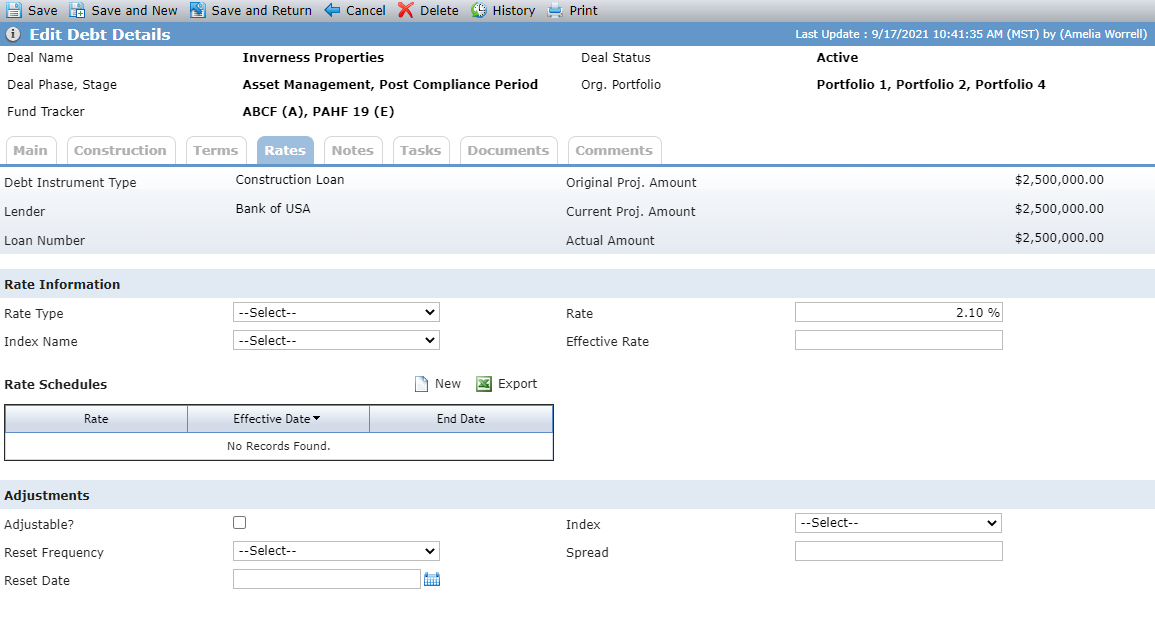
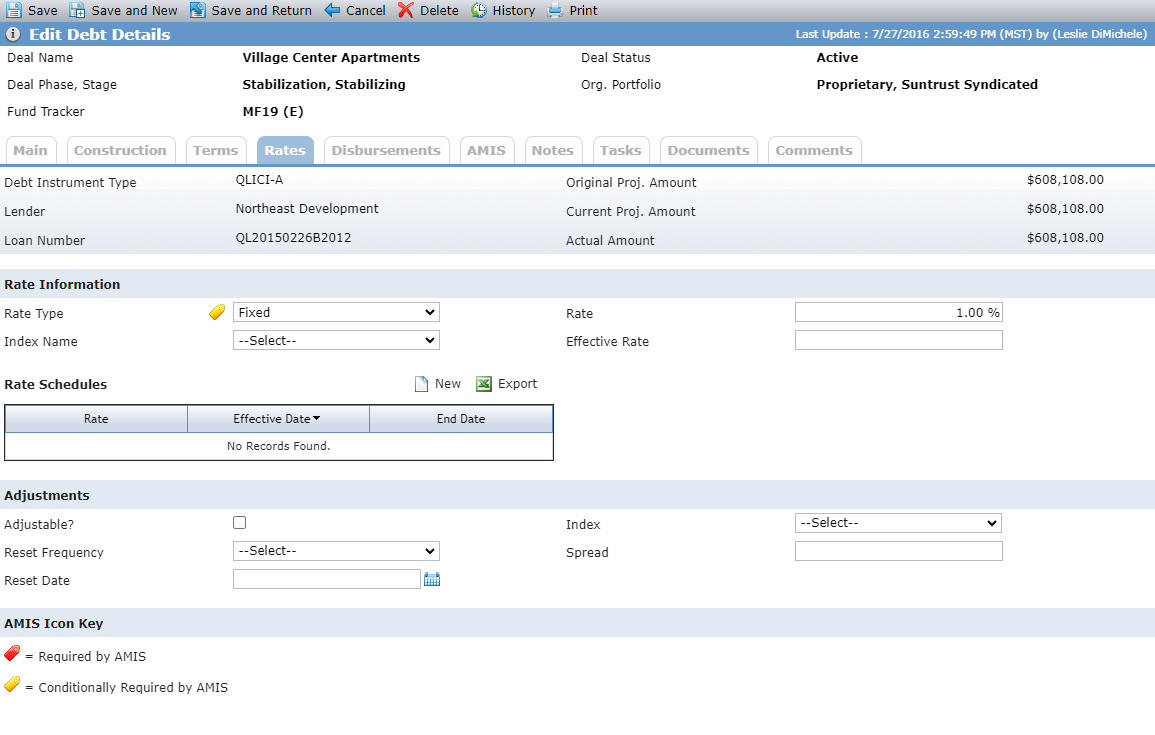
Debt Instrument Type not equal to QLICI; Debt Instrument Type of QLICI (including QLICI-A - QLICI-F)
The Rate Type is AMIS conditionally required when the Transaction Type (located on the AMIS tab) equals Term Loan, Line of Credit, or Debt with Equity.
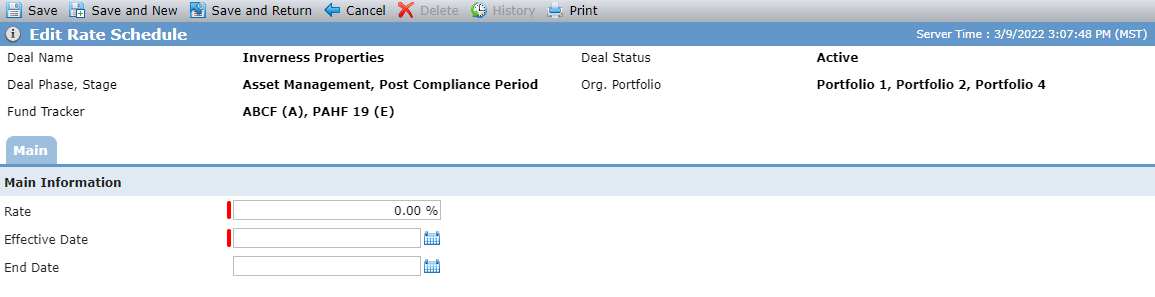
Click New above the Rate Schedules grid to open the Edit Rate Schedule screen and add a new one. The date range cannot overlap the range of an existing rate schedule.
The Disbursements tab is displayed only for Debt Instrument Types of QLICI.
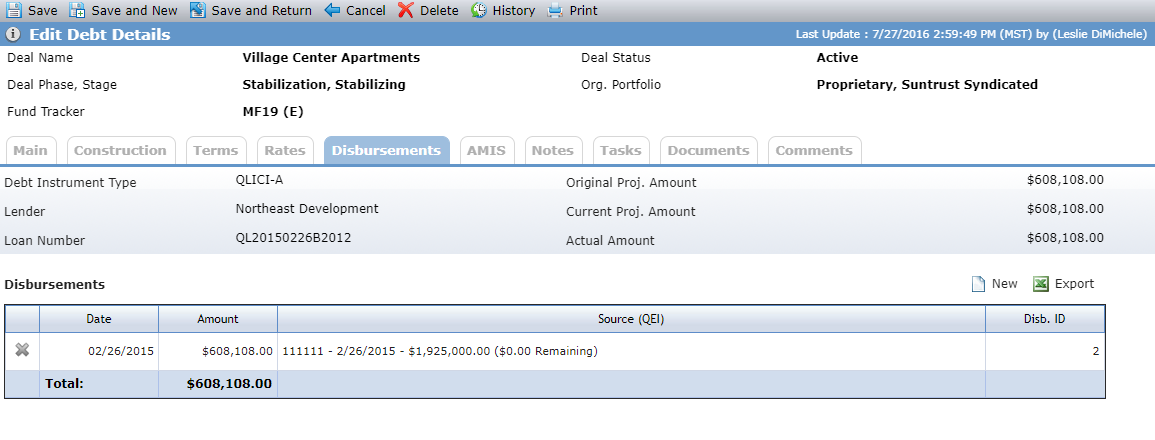
Click New above the Disbursements grid to open the Edit Disbursement screen and add a new one.
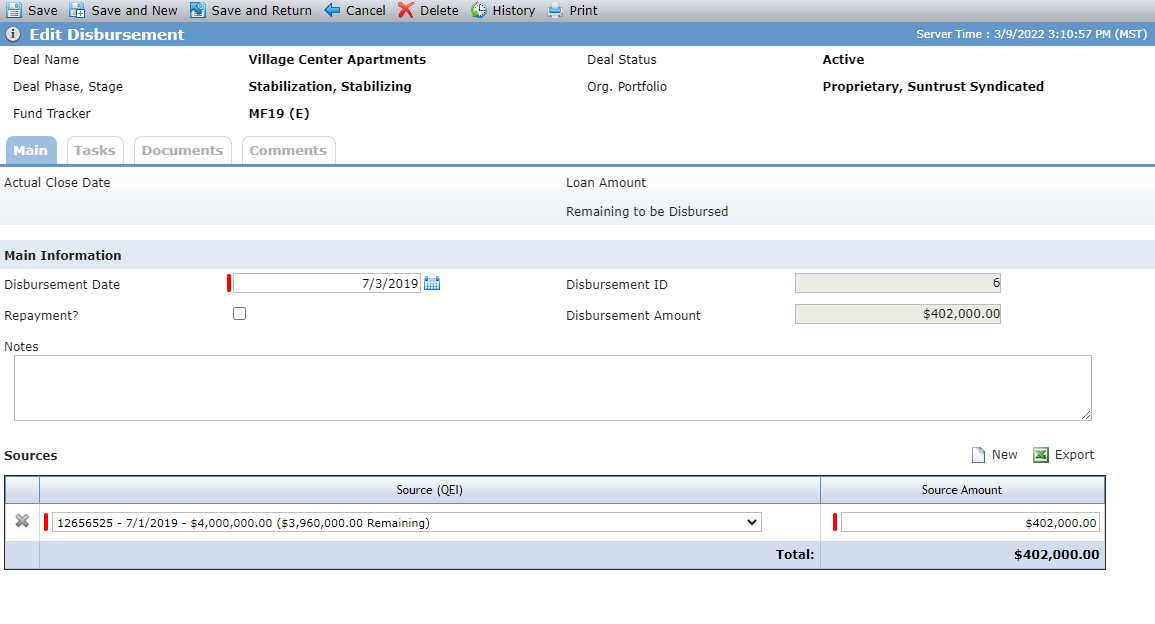
The sum of all disbursements for the QEI cannot be greater than the QEI Amount, nor can the sum of all disbursements be greater than the Loan amount.
Field | Description |
|---|---|
Disbursement Date | AMIS required |
Disbursement ID | AMIS required A systematically assigned unique number. |
Disbursement Amount | AMIS required Displays the Total Source amount from the Sources grid. |
Source (QEI) | AMIS required Select at least one Source (QEI) on a disbursement. The options include the QEIs on the NMTC Summary screen:
Each option displays the QEI Identifier, Actual Date (or Projected Date), Actual Amount (or Projected Amount), and the remaining amount. The Source (QEI) remaining amount is the sum of all Source Amounts for the QEI from the disbursements on the QLICI Loans and QLICI Equities for the QEI selected. |
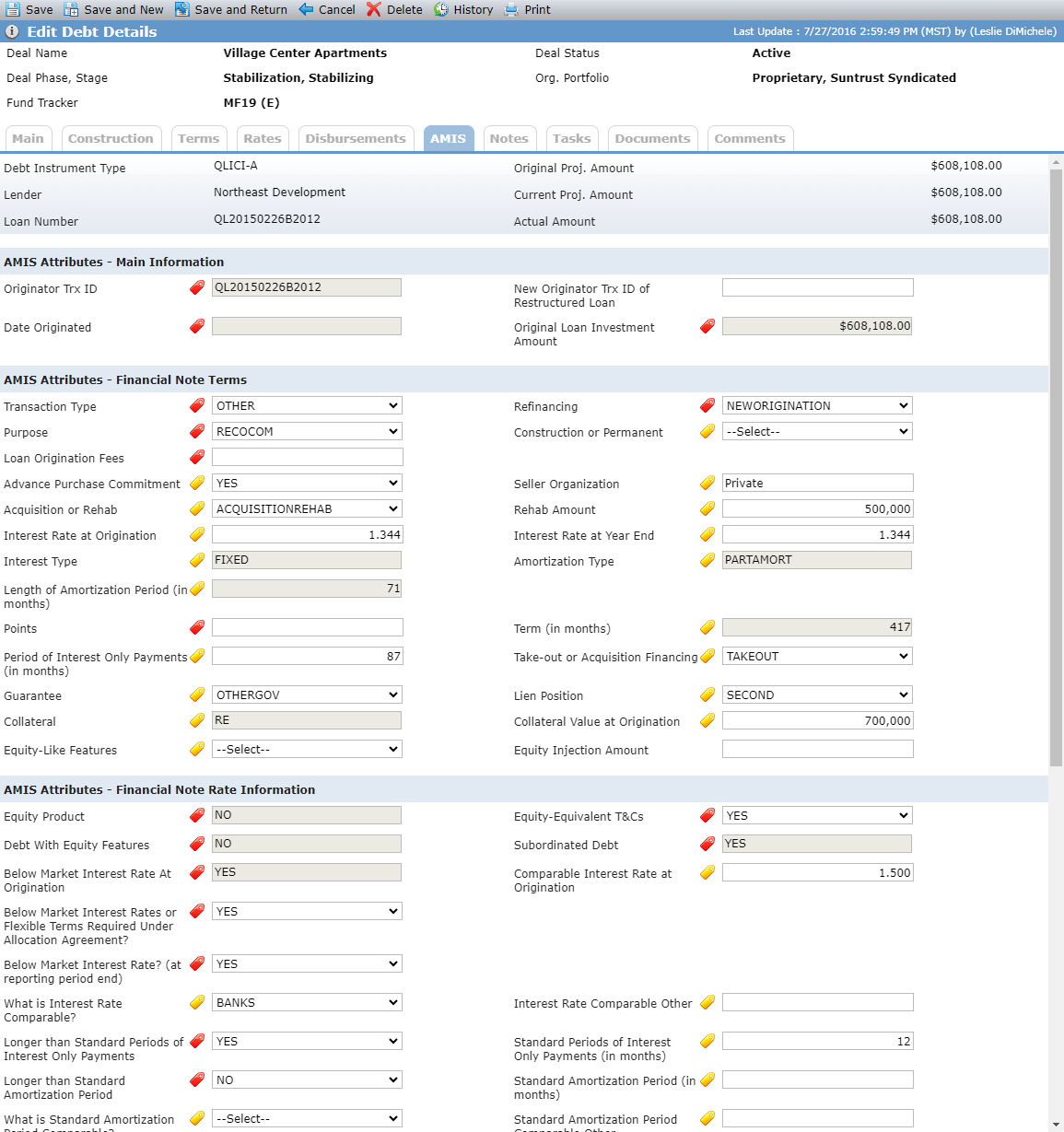
The AMIS tab is displayed only for Debt Instrument Types of QLICI.
Field | Description |
|---|---|
Originator Trx ID | AMIS required field Displays the Loan Number from the Main tab. |
Date Originated | AMIS required field Displays the Actual Date from the Closed Stage (Main tab). |
Original Loan Investment Amount | AMIS required field Displays from Actual Amount on the Main tab. |
Transaction Type | AMIS required field |
Refinancing | AMIS required field |
Purpose | AMIS required field |
Construction or Permanent | AMIS conditionally required field when the “Purpose” is equal to RECOCOM. |
Loan Origination Fees | AMIS required field Displays the sum of all Amounts for Fee records where the Fee Type is equal to Origination. |
Advance Purchase Commitment | AMIS conditionally required field when the QLICI Type is equal to QALICB (located on the AMIS tab of Edit Entity). |
Seller Organization | AMIS conditionally required field required when “Advance Purchase Commitment” is equal to Yes. |
Acquisition or Rehab | AMIS conditionally required field when the “Purpose” is equal to RERHCOM. |
Rehab Amount | AMIS conditionally required field when “Acquisition or Rehabilitation” is equal to AQUISITIONTREHB. Must be greater than zero. |
Interest Rate at Origination | AMIS conditionally required field when the “Transaction Type” is equal to Term Loan, Line of Credit, or Debt with Equity. |
Interest Rate at Year End | AMIS conditionally required field required when “Transaction Type” is equal to Term Loan, Line of Credit, or Debt with Equity. The value must be up to three decimal places. |
Interest Type | AMIS conditionally required field when the “Transaction Type” is equal to Term Loan, Line of Credit, or Debt with Equity. The value displayed is based on the Rate from the Rate tab. If the Rate is equal to Fixed then FIXED will be displayed; if the value is not equal to Fixed or Select, then ADJ will be displayed. |
Amortization Type | AMIS conditionally required field when “Transaction Type” is equal to Term Loan, Line of Credit, or Debt with Equity. It is displayed from the Amortization Type field on the Term tab using the following logic:
|
Length of Amortization Period (in months) | AMIS conditionally required field when the “Amortization Type” is equal to FULLAMORT or PARTAMORT. It displays from Amortization Term on the Terms tab. |
Points | AMIS conditionally required field when the “Transaction Type” is equal to Term Loan or Debt with Equity. Displays the sum of Rate(s) for all Fee records where the Fee Type is equal to Origination (Main tab). |
Terms (in months) | AMIS conditionally required field when “Transaction Type” is equal to Term Loan, Line of Credit, or Debt with Equity. It is displayed from the Loan Term field on the Terms tab. |
Period of Interest Only Payments (in months) | AMIS conditionally required field when the “Transaction Type” is Term Loan. |
Take-out or Acquisition Financing | AMIS conditionally required field when “Construction or Permanent Financing” is equal to Permanent or Both. |
Guarantee | AMIS conditionally required field when the “Transaction Type” is equal to Term Loan, Line of Credit, or Debt with Equity. |
Lien Position | AMIS conditionally required field when “Transaction Type” is equal to Term Loan, Line of Credit, or Debt with Equity. |
Collateral | AMIS conditionally required field when the “Transaction Type” is equal to Term Loan, Line of Credit, or Debt with Equity. It is displayed from the Collateral field on the Main tab with the following logic:
|
Collateral Value at Origination | AMIS conditionally required field when “Transaction Type” is equal to Term Loan, Line of Credit, or Debt with Equity. |
Equity-Like Features | AMIS conditionally required field when the “Transaction Type” is equal or Debt with Equity. |
Equity Product | AMIS required field The value will display “Yes” when the Transaction Type is equal to “EQTYINV”, otherwise it will display “NO”. |
Equity-Equivalent T&Cs | AMIS required field |
Debt With Equity Features | AMIS required field The value will display “Yes” when the Transaction Type is equal to “DEBTEQTY”, otherwise it will display “NO”. |
Subordinated Debt | AMIS required field The value displays “NO” if Lien Position is equal to “FIRST”, otherwise “YES” is displayed. |
Below Market Interest Rate At Origination | AMIS required field The value will display “NA” if the value for Equity Product equals “YES”. If the Interest Rate at Origination value is less than the Comparable Interest Rate at Origination value, then “YES” will be displayed. If the Interest Rate at Origination value is greater or equal to the Comparable Interest Rate at Origination value, then “NO” will be displayed. If either Interest Rate at Origination or Comparable Interest Rate at Origination are not populated, then “NO” will be displayed. |
Comparable Interest Rate at Origination | AMIS conditionally required field when “Below Market Interest Rate at Origination” is equal to Yes. The value must be greater than the Interest at Origination value. |
Below Market Interest Rates or Flexible Terms Required Under Allocation Agreement | AMIS required field |
Below Market Interest Rate (at reporting period end) | |
What is Interest Rate Comparable | AMIS conditionally required field when “Below Market Interest Rate” is equal to “Yes”. |
Interest Rate Comparable Other | AMIS conditionally required field when “What is Interest Rate Comparable” is equal to Other. |
Longer than Standard Periods of Interest Only Payments | AMIS required field |
Standard Periods of Interest Only Payments (in months) | AMIS conditionally required field when “Longer than Standards Periods of Interest Only Payments” is equal to Yes. |
Longer than Standard Amortization Period | |
Standard Amortization Period (in months) | AMIS conditionally required field when “Longer than Standard Amortization Period” is equal to Yes. |
What is Standard Amortization Period Comparable | AMIS conditionally required field when “Longer than Standard Amortization Period” is equal to Yes. |
Standard Amortization Period Comparable Other | |
Lower than Standard Origination Fees | AMIS required field |
Standard Origination Fees | AMIS conditionally required field when “Lower than Standard Origination Fees is equal to Yes. |
Nontraditional Forms of Collateral | AMIS required field |
What is Traditional Form of Collateral Comparable | AMIS conditionally required field when “Nontraditional Forms of Collateral” is equal to Yes. |
Traditional Form of Collateral Comparable Other | AMIS conditionally required field when “What is Traditional Forms of Collateral Comparable? is equal to Other. |
Dollar Amount Used to Finance Non-Real Estate Activities | AMIS required field |
QLICI Level | AMIS required field |
Loan Status | AMIS required field |
Principal Balance Outstanding | AMIS required field. This is a calculated field. The Sum of the Disbursement amounts from all the disbursements associated to the QLICI with a Disbursement Date less than or equal to the TLR Reporting Period End date minus the Amount Charged Off. |
Number of Times Loan Restructured | AMIS conditionally required field when the “Transaction Type” is equal to Term Loan, Line of Credit, Debt with Equity, or Other. The Number of Time the Loan was Restructured must be equal to or greater than the value reported the previous year. |
Days Delinquent | AMIS conditionally required field when “Transaction Type” is equal to Term Loan, Line of Credit, Debt with Equity, or Other. |
Number of Times 60+ Days Delinquent | AMIS conditionally required field when “Transaction Type” is equal to Term Loan, Line of Credit, Debt with Equity, or Other. The number must be equal to or greater than the value reported the previous year. |
Amount Charged Off | AMIS conditionally required field when the “Transaction Type is equal to Term Loan, Line of Credit, Debt with Equity, or Other. The Amount Charged Off plus the Amount Recovered must be less than or equal to Original Loan/Investment Amount. |
Projected Residual Value of QLICI that may be obtained by the QALICB | AMIS conditionally required field when the “QLICI Type” is equal to QALICB and the “Date Originated” is greater than 12/31/2010. (Located on AMIS tab of Edit Entity) |
Amount Recovered | AMIS conditionally required field when the “Transaction Type” is equal to Term Loan, Line of Credit, Debt with Equity, or Other. It must be equal to or greater that the value reported the previous year. |
Projected Residual Value of QLICI that may be obtained by the QALICB (Opt) | |
Actual Rate of Return at Reporting Pd End | AMIS conditionally required field when the “Transaction Type” is equal to Equity Investment. |
The Notes tab allows you to view and edit notes related to the debt instrument, the lender, wire instructions, and pre-development penalty, if applicable.