Introduction to ProLinkAIM Adjusters
Adjusters are calculations that compare actual delivered Tax Credits to the Tax Credit amounts that were promised under the Operating Partnership Agreement (OPA).
If the cost basis of the building differs, up or down, from the projected cost basis of the building, then the Tax Credits delivered by the building will be higher or lower than promised. This would result in a Basis adjuster. Similarly, if a building leases up faster or slower than expected, the Tax Credits delivered will be higher or lower than promised, resulting in a Timing Adjuster.
Once the adjusters are calculated, you can then determine whether to apply all or part of the indicated amount to one or more Capital Contribution records on the Equity Schedule. If applied, it would result in a change in the amount of contribution the Investor is required to make, up or down, depending on whether the adjuster is upward or downward.
Adjuster calculations are organized into separate grids by Benefit Type. The various Tax Credit grids appear on the screen only if one or more rows exist for the benefit type on the Total Benefits tab.
Note
Adjusters are not calculated for NMTC deals.
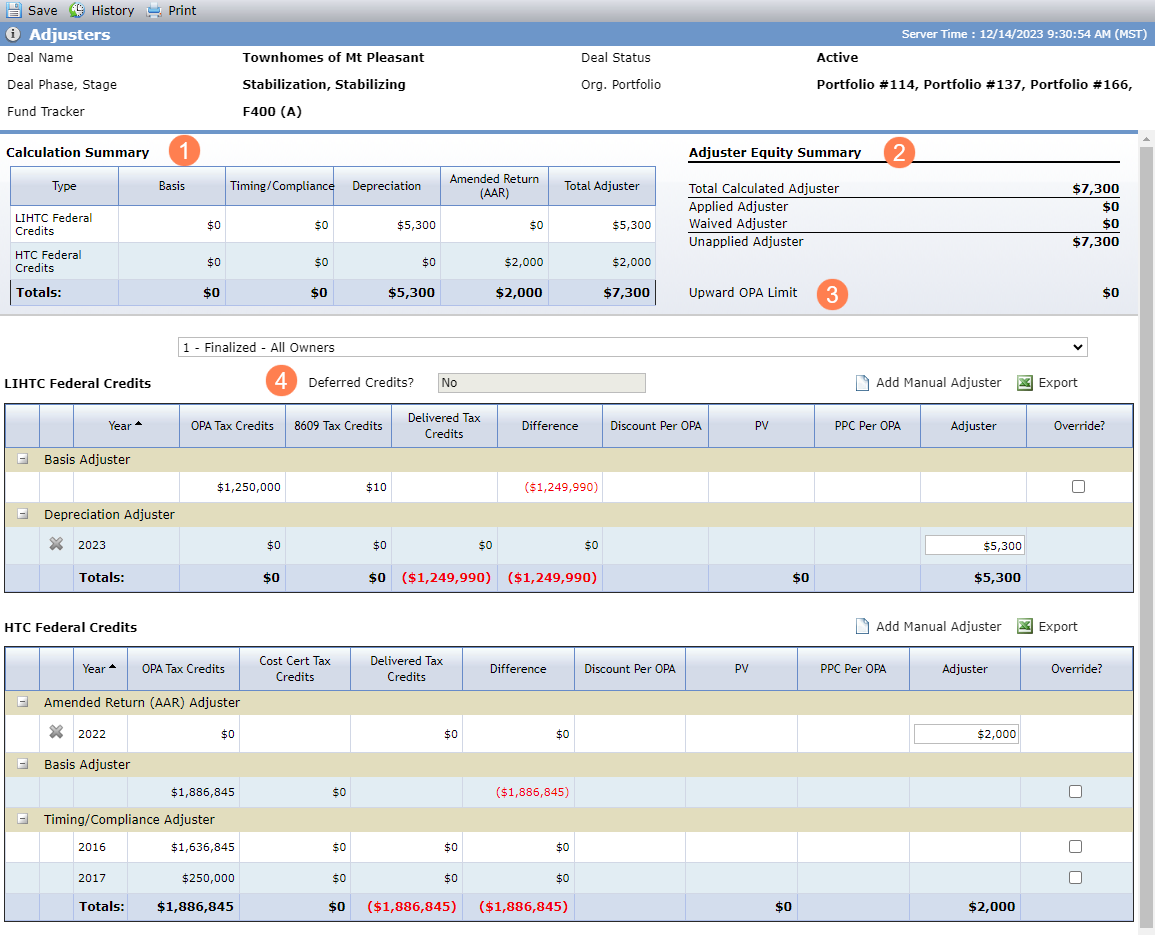
A single basis adjuster calculation is performed for each tax credit type.
LIHTC—Timing and compliance adjusters will calculate for every year up to the year of the last placed in service date (from all the buildings) plus 10. This will ensure the system will not calculate adjusters for 15 year credits. (Actual PISD must exist on at least one building.)
The Depreciation column for the LIHTC row shows the total of all Depreciation adjusters entered for any year. The Amended Return (AAR) column for the LIHTC row shows the total of all Amended Return adjusters entered for any year.
The Depreciation column for the HTC row shows the total of all Depreciation adjusters entered for any year. The Amended Return (AAR) column for the HTC row shows the total of all Amended Return adjusters entered for any year.
All other tax credit types—The screen shows rows for only those years where the OPA, Calculated Current, or LT Actual values exist on the corresponding Benefit years.
The Adjuster Equity Summary shows:
Total Calculated Adjuster—Sum of Total Adjuster column across all Tax Credit Types
Applied Adjuster—Sum of Adjuster Applied from Capital Contribution on the Equity Schedule where Paid equals Yes and Exclude from Total Capital equals No
Waived Adjuster—Sum of Adjuster Waived from Capital Contributions on the Equity Schedule where Exclude from Total Capital equals No
Unapplied Adjuster—Sum of Total Calculated Adjuster – (Applied Adjusted + Waived Adjuster)
Upward OPA Limit—Sum of Upward OPA Limit (Deal Details – OPA tab) X Total Capital (Equity Schedule)
Deferred Credits—Read-only field that appears when LIHTC is a selected program. The value is Yes if the Building(s) Deferral toggle (Benefits Schedule) is turned on, or an 8609 has been received for any Building and Line 10a is Yes.
Tip
You can use the Adjusters data view to report on adjusters across deals in the system. Records only appear in the Adjusters data view for owner entities in finalized ownership structures.
Override Adjusters
You can override the adjusters by selecting the checkbox in the Override column for a given row. This allows you to edit the amounts in the Adjuster column.
Overridden adjusters are monitored and reported through the Approvals functionality. This functionality is enabled through a configuration setting and not visible to all customers.
Adjusters are calculated using values from Benefits and the OPA tab of Deal Details. The calculation is dependent upon the tax credit type (whether LIHTC or not) and whether the Discount or PPC values are populated on the OPA tab.
Basis Adjusters are not calculated on an annual basis. Only one adjuster is calculated per tax credit type. The following values are included in the Basis Adjuster calculation.
OPA Tax Credits | Sum of the OPA Credits for the tax credit type |
8609 Tax Credits (LIHTC Programs) |
|
Cost Cert Tax Credits (non-LIHTC Programs) | Sum the Current Credits from the Benefit Schedule for the Program |
Delivered Tax Credits | Blank for Basis adjusters |
Difference |
|
Discount Per OPA |
|
PV |
|
PPC Per OPA |
|
Adjuster |
|
Compliance Adjusters are calculated on an annual basis. Only one adjuster is calculated per year, per tax credit type. The following values are included in the Timing/Compliance Adjuster calculation.
OPA Tax Credits | The OPA Credits for the tax credit type for the year |
8609 Tax Credits (LIHTC Programs) | (OPA Tax Credits for the year) / (OPA Tax Credits from Basis Adjuster) X 8609 Tax Credits from Basis Adjuster |
Cost Cert Tax Credits (non-LIHTC Programs) | (OPA Tax Credits for the year) / (OPA Tax Credits from Basis Adjuster) X Cost Cert Tax Credits from Basis Adjuster |
Delivered Tax Credits |
|
Difference |
|
Discount Per OPA |
|
PV |
|
PPC Per OPA |
|
Adjuster |
|
You can add each of the following manual adjusters once to a deal:
Federal LIHTC Depreciation
Federal LIHTC Amended Return (AAR)
Federal HTC Depreciation
Federal HTC Amended Return (AAR)
If a LIHTC or HTC manual adjuster type is defined for the deal (Deal Details - OPA tab), then the Add Manual Adjuster button is available for the corresponding grid.
Important
You must have the Deal Adjusters - Manual Adjusters - Modify security privilege to add, edit, or delete manual adjusters.
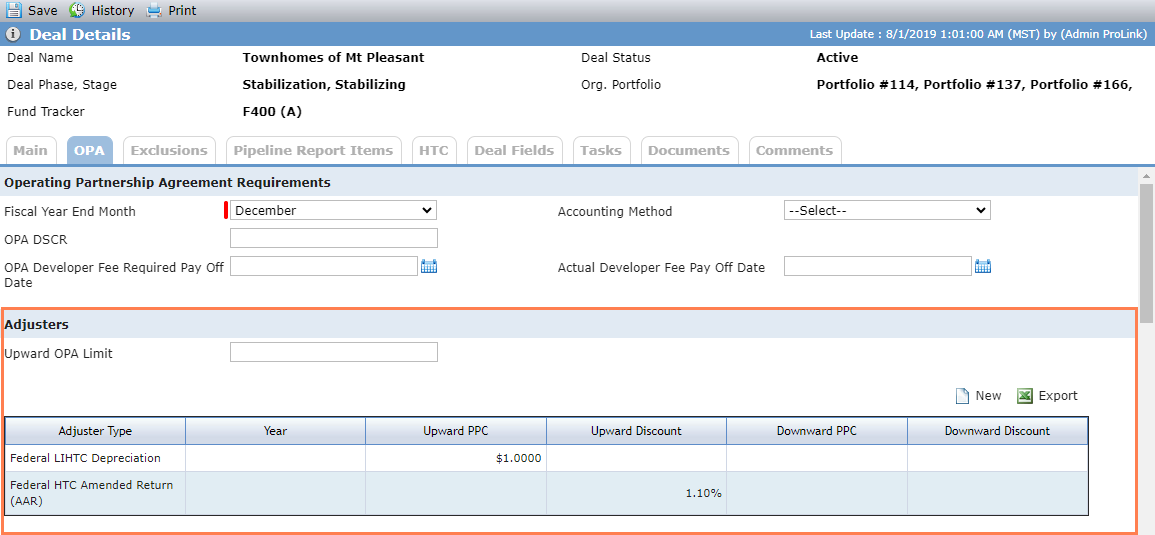
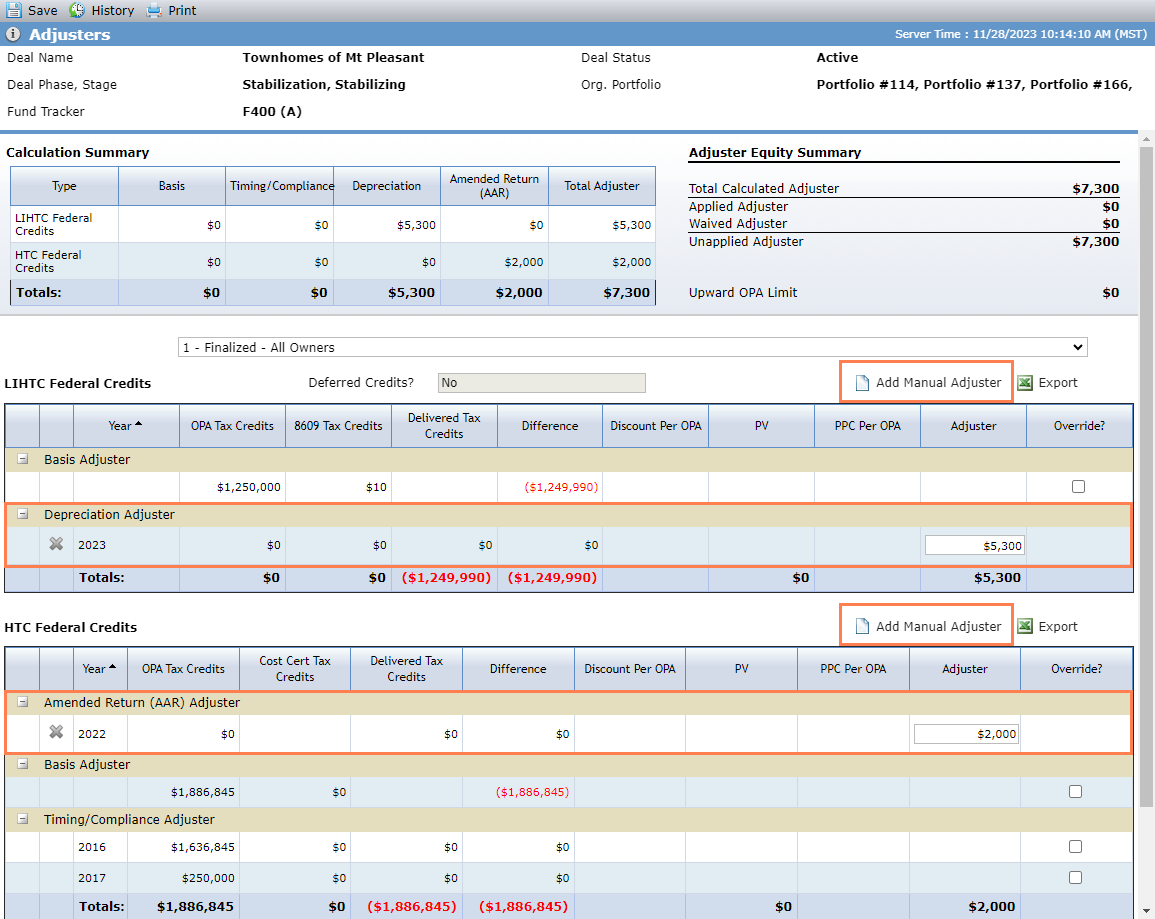
Deal Details - OPA Adjusters; Deal Adjusters
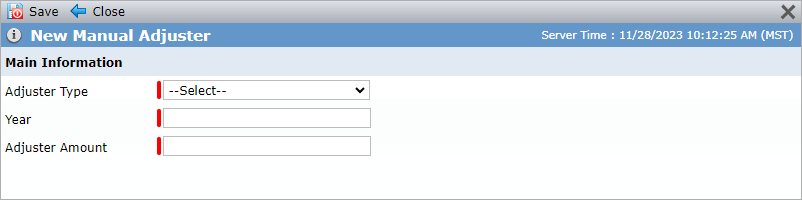
Click Add Manual Adjuster to open the New Manual Adjuster popup where you specify the adjuster type, year, and amount. The Adjuster Type list displays only the types that are defined for the deal. The Tax Credit Type, Adjuster Type, and Year must be unique for manual adjusters.
The system shows Depreciation Adjuster row or Amended Return (AAR) row in the applicable Federal Credits grid. Click  in the first column of a row to delete the manual adjuster. The system recalculates the total adjusters and owner adjusters.
The Adjuster column for the manual adjuster rows include an editable Adjuster Amount text box. Be sure to save the record if you change the amount. When you select an individual owner from the Ownership Schedule list, the Adjuster column is not editable.
When you add a new manual adjuster, the system validates that the year is valid. If all owners are exited, the system requires that the year is less than or equal to the max exit year. If all owners are not exited, then the system requires that the year is in the future and greater than or equal to the earliest admission year in the finalized schedule.
The following values are included in the manual adjuster calculation.
OPA Tax Credits | The OPA Tax Credits for the corresponding Benefit Year of the LIHTC or HTC tax credit type. If no value exists or no corresponding year exists, $0 is displayed. |
8609 Tax Credits (if LIHTC) | The 8609 Tax Credits for the corresponding Benefit Year of the LIHTC tax credit type. If no value exists or no corresponding year exists, $0 is displayed. |
Cost Cert Tax Credits (if HTC) | The Cost Cert Tax Credits for the corresponding Benefit Year of the HTC Tax Credit type. If no value exists or no corresponding year exists, $0 is displayed. |
Delivered Tax Credits | The Delivered Tax Credits for the corresponding Benefit Year of the LIHTC or HTC Tax Credit type. If no value exists or no corresponding year exists, $0 is displayed. |
Difference |
|
Discount Per OPA | This field is blank. |
PV | This field is blank. |
PPC Per PA | This field is blank. |
Adjuster | The value entered in the popup. |
Override | This field is blank. |
The Owner list displays a nested listing of all Ownership Schedules and their statuses, as follows:
Finalized Schedule
Proposed Schedules
Prior Schedules
To view a specific owner's adjuster values, select the owner in the drop-down list. When a specific owner is selected in the Ownership Schedule list, the system shows the information applicable to the owner as follows:
LIHTC, STC - LIHTC, and Other Credits—The system uses the selected Owner’s ownership of the Partnership Owned Entity on the Deal.
HTC and STC - HTC—The system will first use the selected Owner’s ownership of the Master Tenant Owned Entity on the Deal, if it exists; otherwise, the system uses the selected Owner’s ownership of the Partnership Owned Entity on the Deal.
The system will adjust the OPA, 8609 Tax Credits, Delivered Tax Credits, and Cost Cert Tax Credits columns by applying the selected Owner’s benefit percentage (FTC %, HTC %, STC - LIHTC %, STC - HTC %, or Other % from ownership schedule) to total amounts defined for the given deal, and the Adjuster calculations will be updated, accordingly.
For timing/compliance adjusters and manual adjusters (depreciation and amended return), admission and Exit dates are used to determine what years and adjuster values are calculated for an owner. Basis adjusters use the current ownership to determine years and values shown.
If there is no overlap (the end of the Year is before the Owner’s Admission Date or the beginning of the Year is after the Owner’s Exit Date), the system will display $0 for columns (OPA Tax Credits, 8609 Tax Credits, Delivered Tax Credits, Difference, and Adjuster amount) for that Year for that owner.
If the entire Year is within the ownership period, the full amount for the Year will be used in the calculation.
If part of the Year overlaps the ownership period, the system will pro-rate the amount by multiplying it by the quotient of (# of days of overlap / number of days in the Benefit Year). For example, if the Benefit Year runs from 4/1/2014–12/31/2014, the system uses 275 instead of 365.
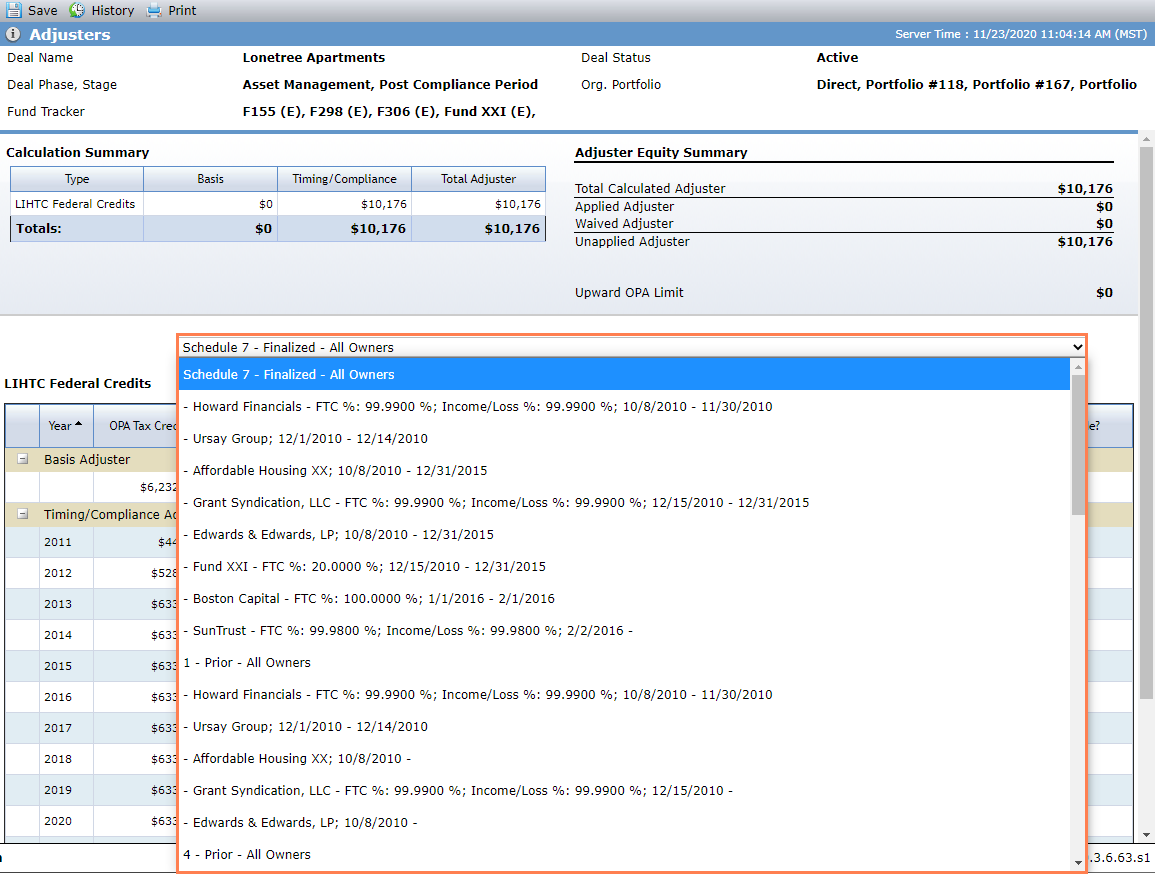
When a specific owner is selected, the values in the Calculation Summary, Adjuster Equity Summary, and Adjuster grid are based on the percentage of tax credits they own. These percentages are identified in the corresponding Ownership Schedules.