Introduction to ProLinkAIM Covenants
At times, when equity is committed or loans are made on a deal, specific agreements might be made between the investor and the deal, or between the creditor and the deal, that certain thresholds will be met.
You can use ProLinkAIM Covenants to measure those thresholds.
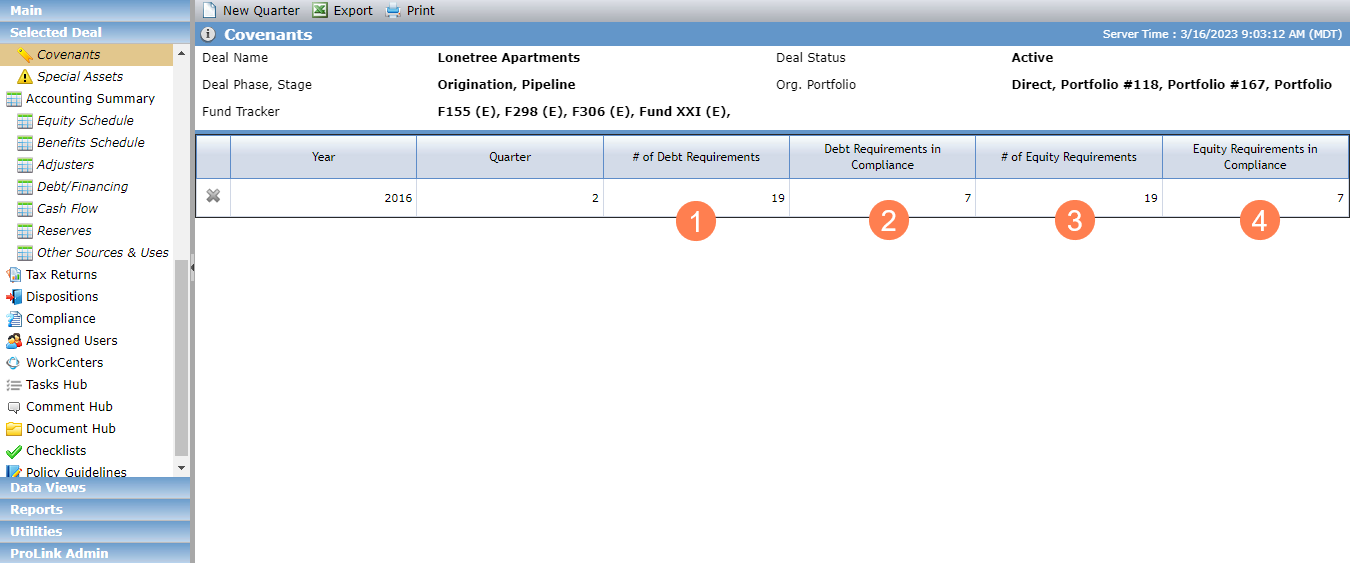
The Covenants screen lists all quarterly covenant records, and shows the following information:
# of Debt Requirements—The number of all debt requirements that equal Yes.
Debt Requirements in Compliance—The number of all debt requirements in compliance that equal Yes.
# of Equity Requirements—The number of all equity requirements that equal Yes.
Equity Requirements in Compliance—The number of all equity requirements in compliance that equal Yes.
Covenants can be set up and evaluated on a quarterly basis.
For each quarter, you can specify the items to evaluate. You can use the default items (displayed for all deals) or create your own, manually evaluated items on a deal-by-deal basis. And you can identify whether the item applies to the equity agreement, debt agreement, or both.
Some default items are systematically evaluated, while others are manually evaluated.
Tip
Visit the Covenants data view to view and report on covenants across deals.
Begin by identifying the year and quarter to evaluate.
Navigate to the deal, and then click Covenants in the left navigation panel.
The Covenants screen opens.
Click New Quarter in the top toolbar.
The Add New Quarterly Covenant Status screen opens.

Enter the year to evaluate.
Enter the quarter to evaluate.
Optionally, select the Copy Prior Qtr Requirements checkbox to copy the values from the prior quarter's debt and equity requirements to the new record.
Click Save and Close.
You can set requirements for debt and equity per agreement for the deal.
To set the requirements across all covenants, select "Yes" (or "No") in the Debt list and Equity list on the Edit Quarterly Covenant Status screen.
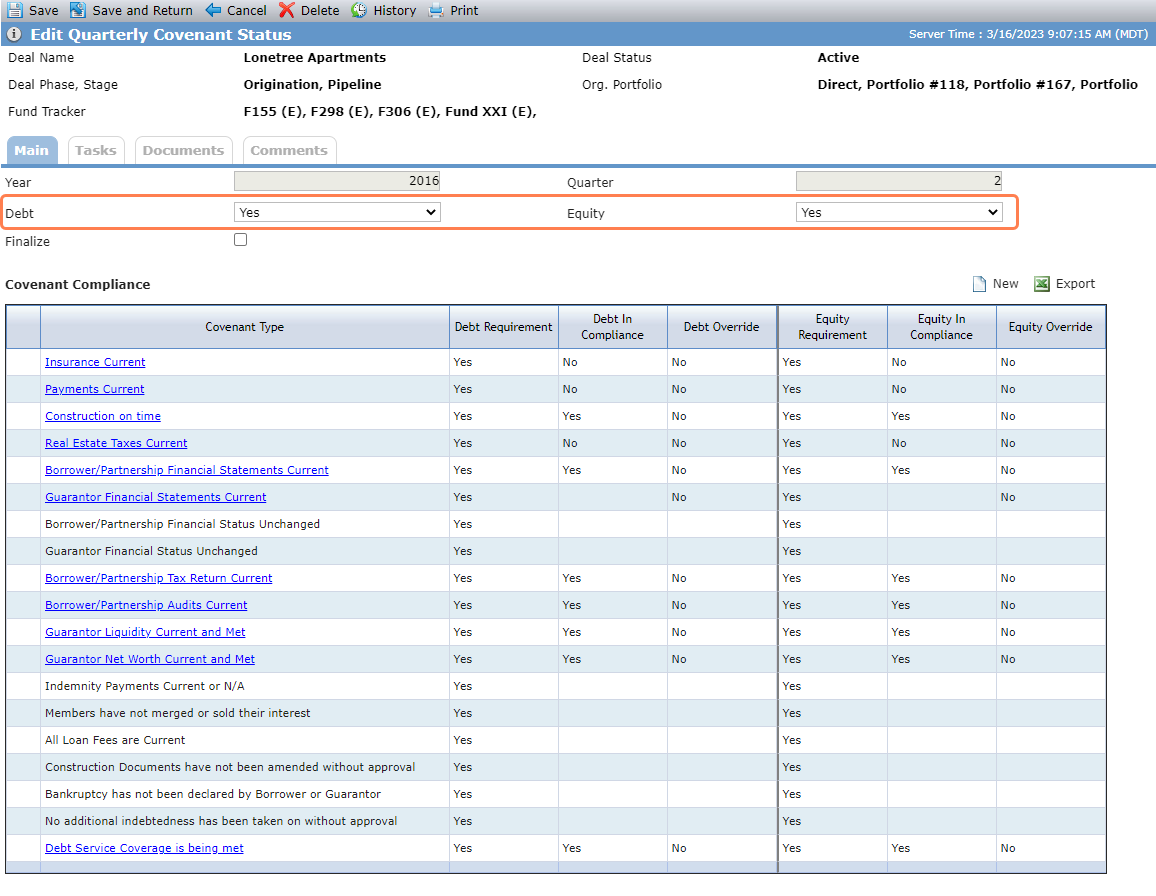
Alternatively, you can set the requirements for each covenant individually. (Or if you set requirements in bulk, you change change the requirements for individual covenants as needed.) Select "Yes" (or "No") in the Debt Requirement list and Equity Requirement list on the Edit Quarterly Covenant Compliance screen for the corresponding covenant.
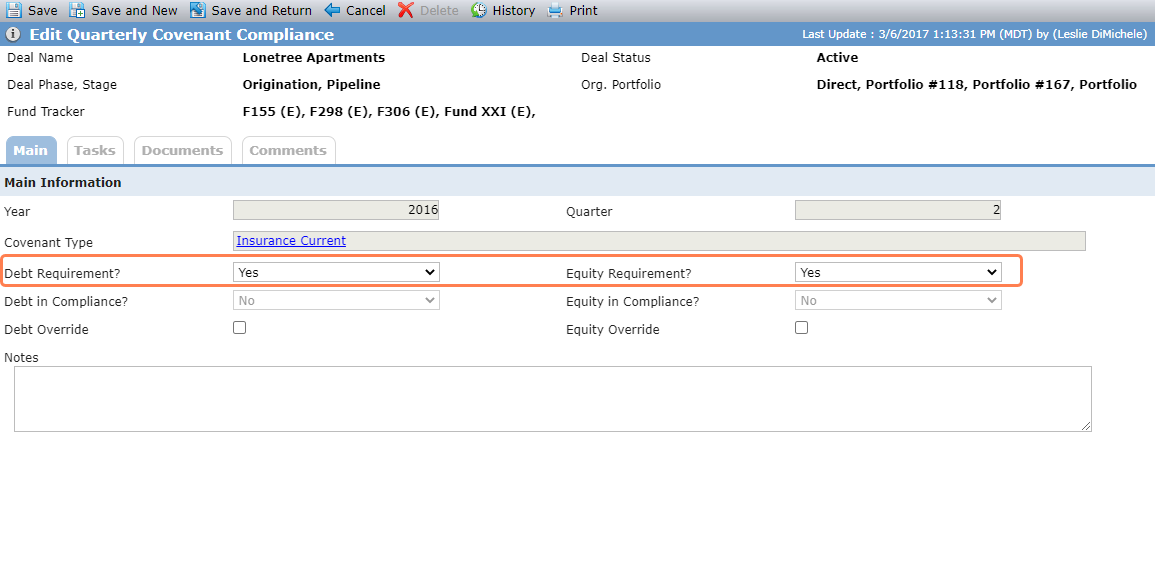
Some of the items are systematically evaluated (those with hyperlinks). The systematic items are only evaluated when the item is required. The hyperlink navigates to the screen where the data that is being evaluated is stored.
Note
For compliance testing for covenants, the last periodic/annual financials is defined as:
Q1 Covenant = March Periodic Financial
Q2 Covenant = June Periodic Financial
Q3 Covenant = September Periodic Financial
Q4 Covenant = Annual Financial for year, if exists; otherwise, December Periodic Financial
If data does not exist for the last periodic/annual financial for the covenant period, the corresponding covenant will be out of compliance.
The system evaluates the following covenants to determine if the requirement is met when the Debt and/or Equity Requirement equals Yes.
The requirement is in compliance (=Yes) when all insurance records on the deal when OPA is required have an expiration date after the current date.
The requirement is not in compliance (=No) when any insurance record on the deal when OPA is required has an expiration date on, or prior to, the current date.
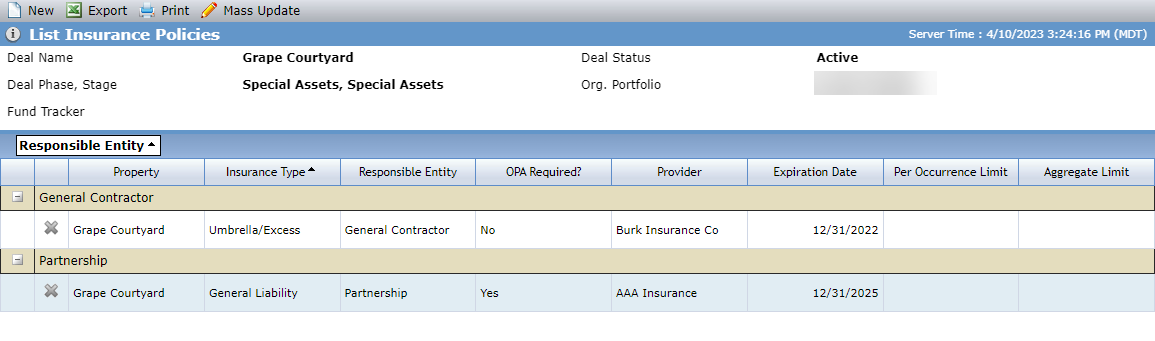
The Covenant Type links to the List Insurance Policies screen.
Insurance Requirements are located on the OPA tab of Deal Details. In the following example, General Liability insurance is required during construction, and Umbrella/Excess insurance is required post-construction.
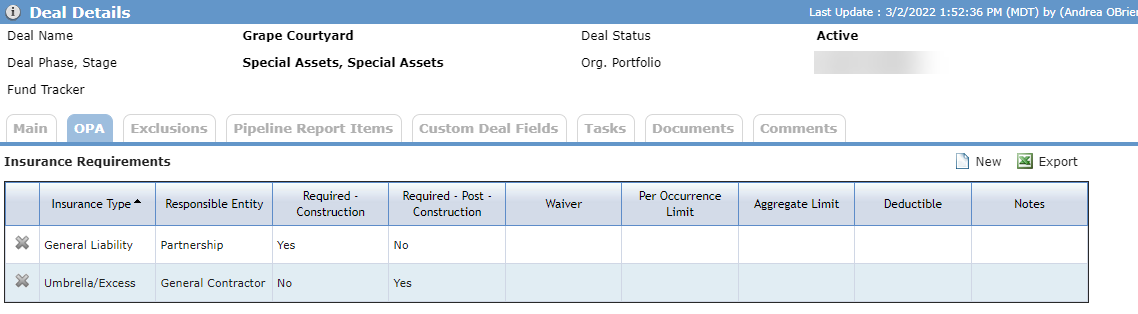
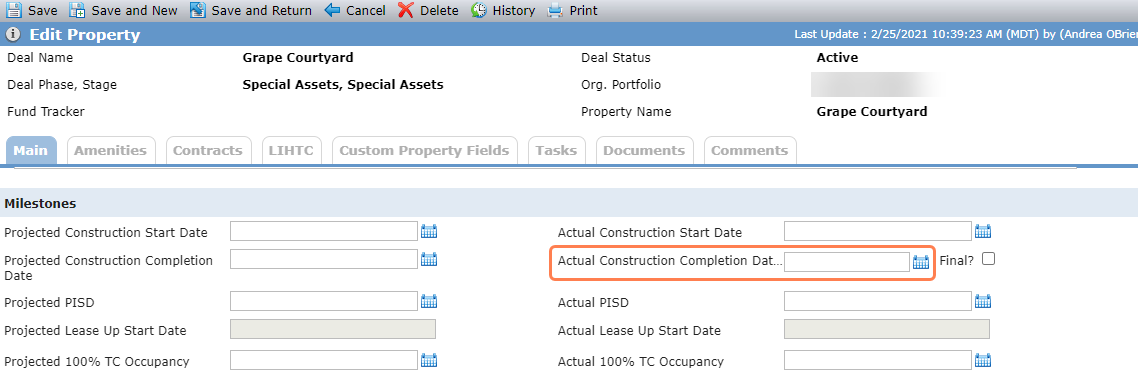
The OPA requirement period is determined by the Actual Construction Completion Date on Edit Property:
If the current date is prior to the Actual Construction Completion Date or the property construction date is blank, then Construction is the OPA Requirement Period.
If the current date is after the Actual Construction Completion Date, then Permanent is the OPA Requirement Period.
In the example, the Actual Construction Completion Date is blank so the requirement period is Construction.
The General Liability insurance policy, which is required during construction, has an expiration date after the current date (4/10/23).
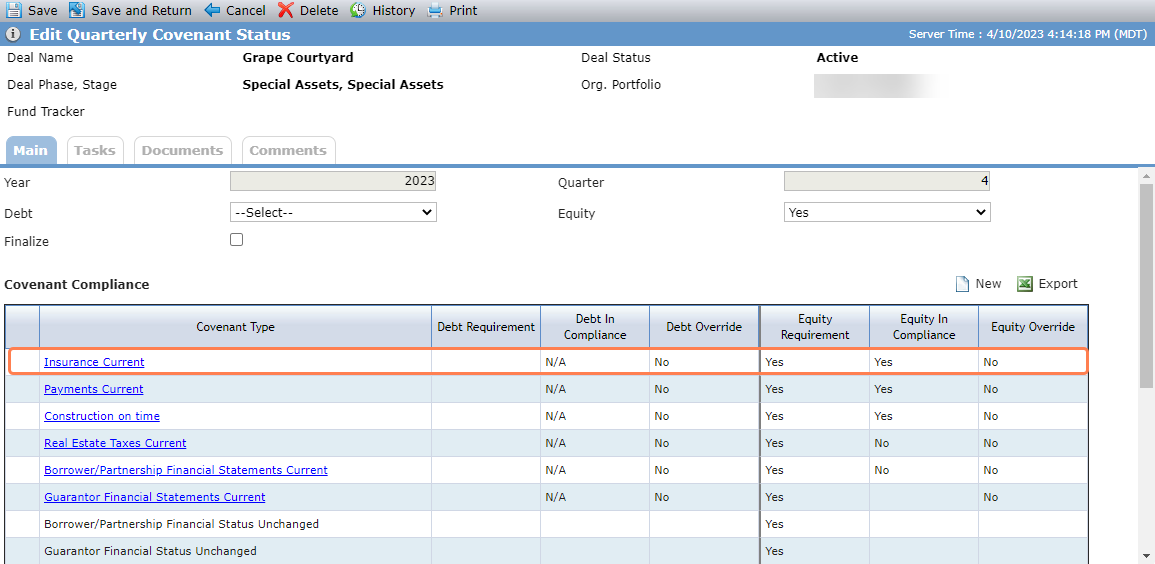
As a result, the Insurance Current covenant is in compliance.
The requirement is in compliance (=Yes) when the Mortgage Current checkbox is selected for the Periodic/Annual Financial for the covenant quarter.
The requirement is not in compliance (=No) when the Mortgage Current checkbox is not selected for the Periodic/Annual Financial for the covenant quarter, or if the last Periodic/Annual Financial record for the period does not exist.
The Covenant Type links to the Edit Periodic for last Periodic (or Annual) of the covenant period.
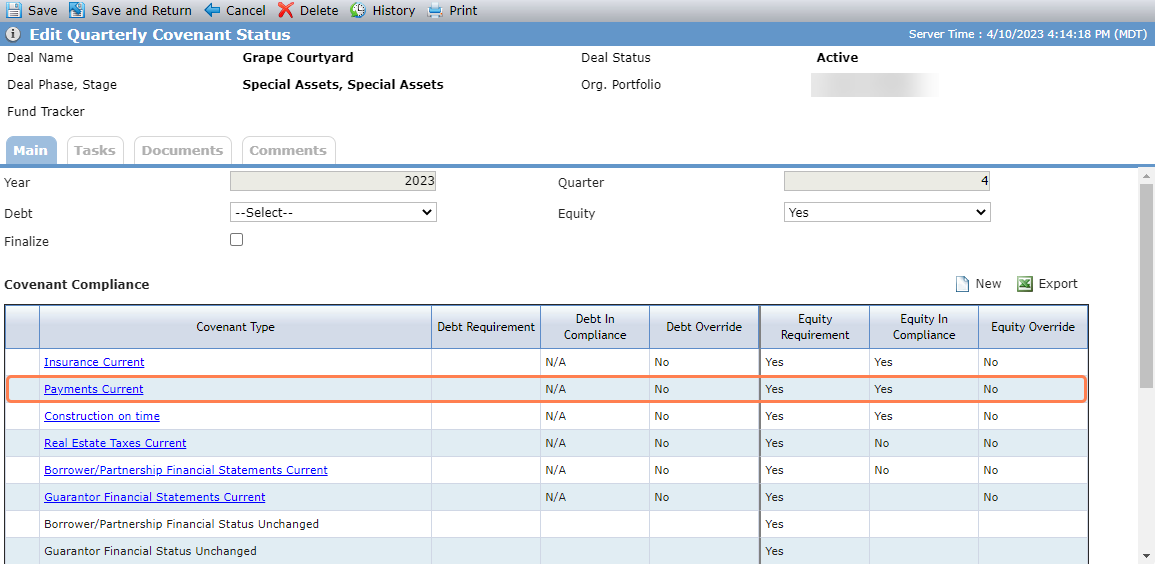
In this example, the covenant year is 2023 and the covenant quarter is 4.
The Mortgage Current checkbox is selected for the December (quarter 4) periodic financial record.
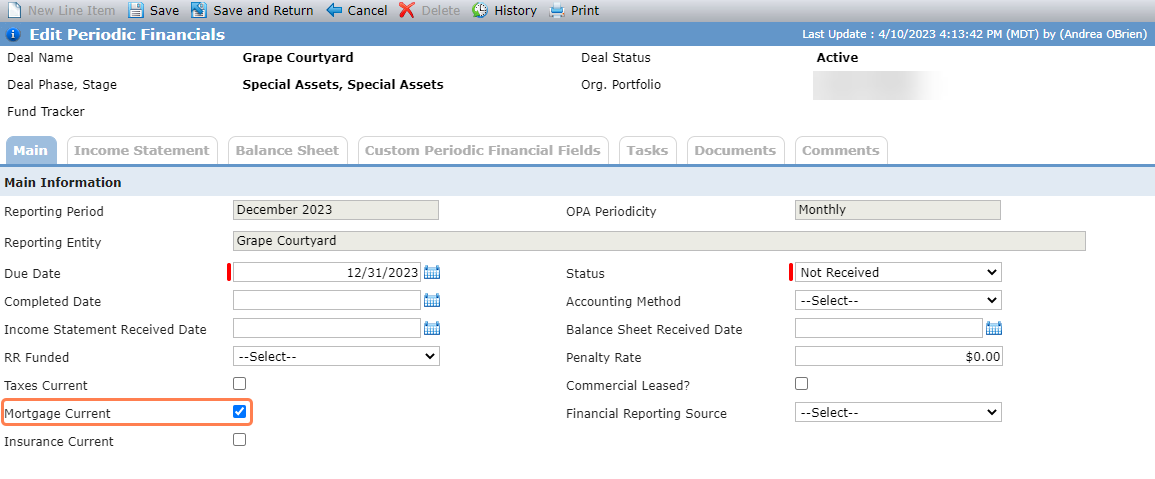
As a result, the Payments Current covenant is in compliance.
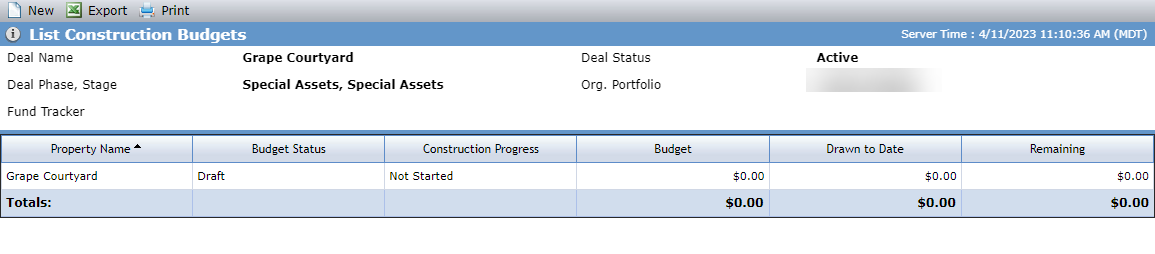
The requirement is in compliance (=Yes) when the Construction Status is equal to Not Started, On Time, Ahead, or Complete. If multiple budgets exist, at least one must be in one of these statuses to be in compliance.
The requirement is not in compliance (=No) when the Construction Status is equal to Behind.
The Covenant Type links to the List Construction Budgets screen.
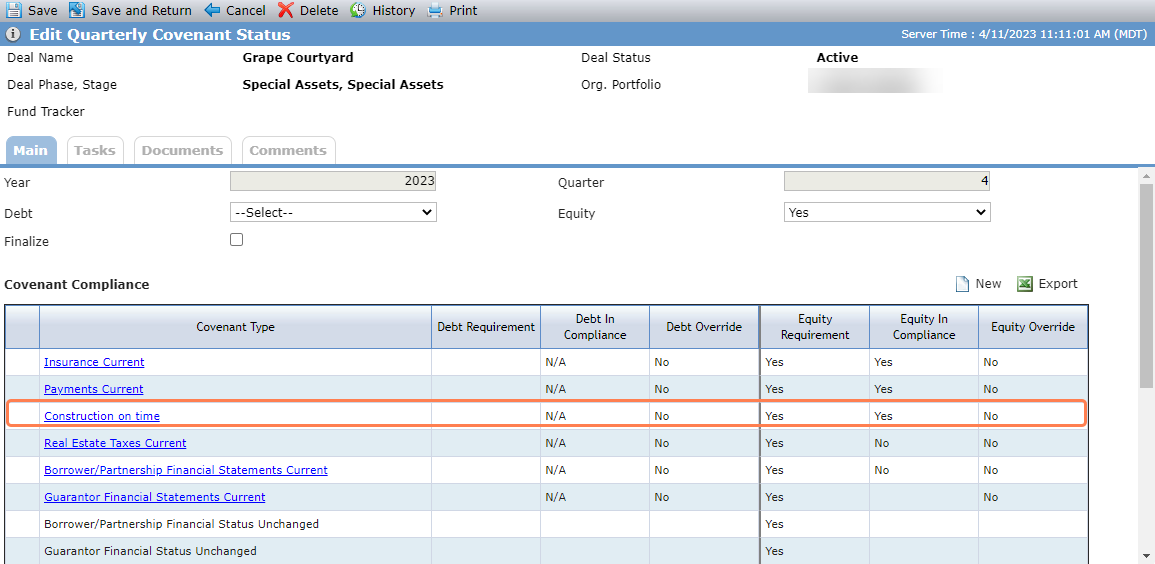
In this example, the construction budget is Not Started.
As a result, the Construction on Time covenant is in compliance.
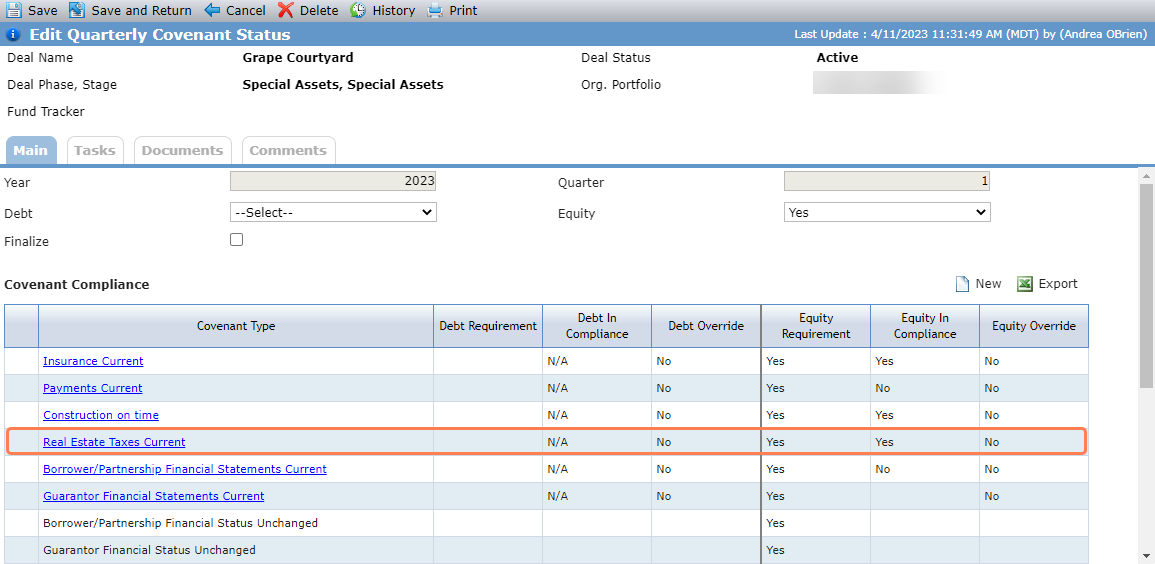
The requirement is in compliance (=Yes) when the Taxes Current checkbox is selected for the Periodic/Annual Financial for the covenant quarter.
The requirement is not in compliance (=No) when the Taxes Current checkbox is not selected for the Periodic/Annual Financial for the covenant quarter, or if the last Periodic/Annual Financial record for the period does not exist.
The Covenant Type links to the Edit Annual Financials if Q4; otherwise, the Edit Periodic Financial for the last month of the covenant quarter.
In this example, the Taxes Current checkbox is selected for the last 2023 Q1 period.
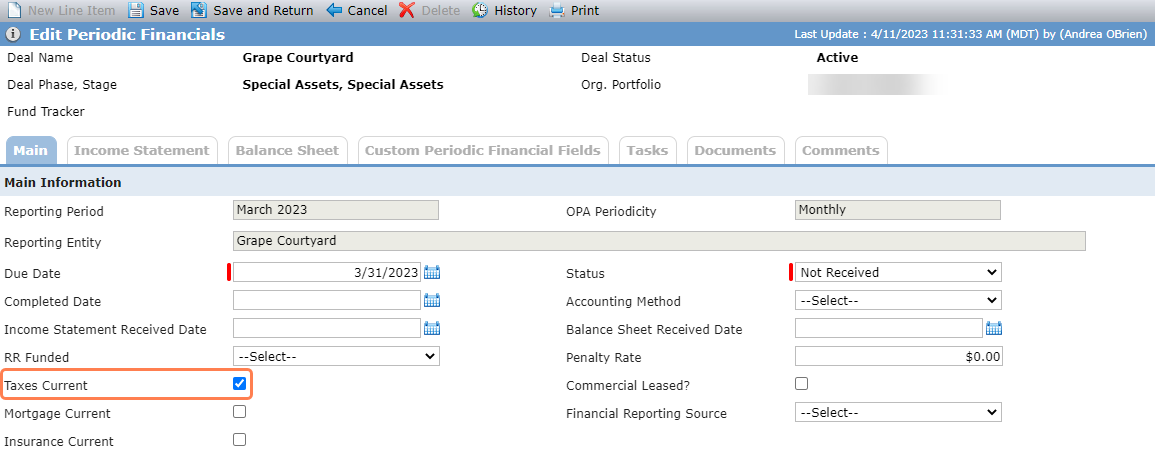
As a result, the Real Estate Taxes Current covenant is in compliance.
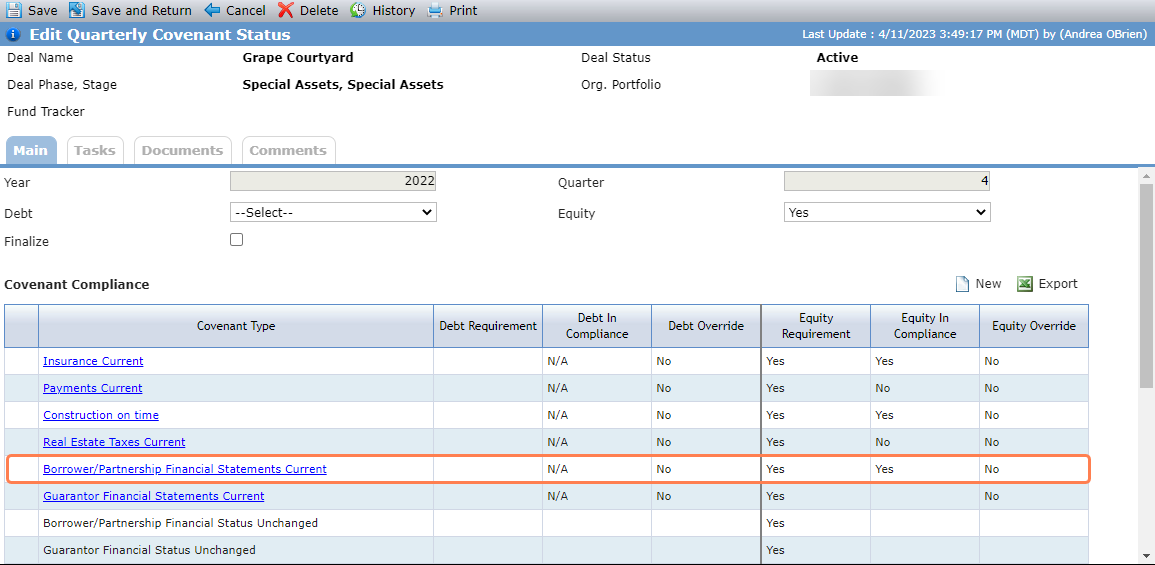
The requirement is in compliance (=Yes) for Q1, Q2, and Q3 when Income Statement and Balance Sheet Received Dates are populated for the last period of the covenant quarter.
The requirement is in compliance (=Yes) for Q4 when, for the Annual Financial record for the covenant year, the Due Date is not in the future and at least one of the Version records has a populated Received Date.
OR
The Annual Financial record for the covenant does not exist but a Periodic Financial for December of the covenant year does exist, has a Due Date that is not in the future, and the Income Statement Received Date and Balance Sheet Received Date are populated.
The requirement is not in compliance (=No) for Q1, Q2, and Q3 when the Periodic Financial for the last period of the covenant quarter does not exist OR the Periodic Financial does exist and either the Income Statement or Balance Sheet Received Date is not populated.
The requirement is not in compliance (=No) for Q4 when the Annual Financial exists for the covenant year, the Due Date is not a future date, and there are no Version records with a populated Received Date.
OR
The Annual Financial record for the covenant does not exist but a Periodic Financial for December of the covenant year does exist, has a Due Date that is not in the future, and EITHER of the following apply:
Income Statement Received Date is not populated
Balance Sheet Received Date is not populated
The Covenant Type links to the Edit Periodic Financial for the last month of the covenant quarter.
The following examples show the covenant in compliance.
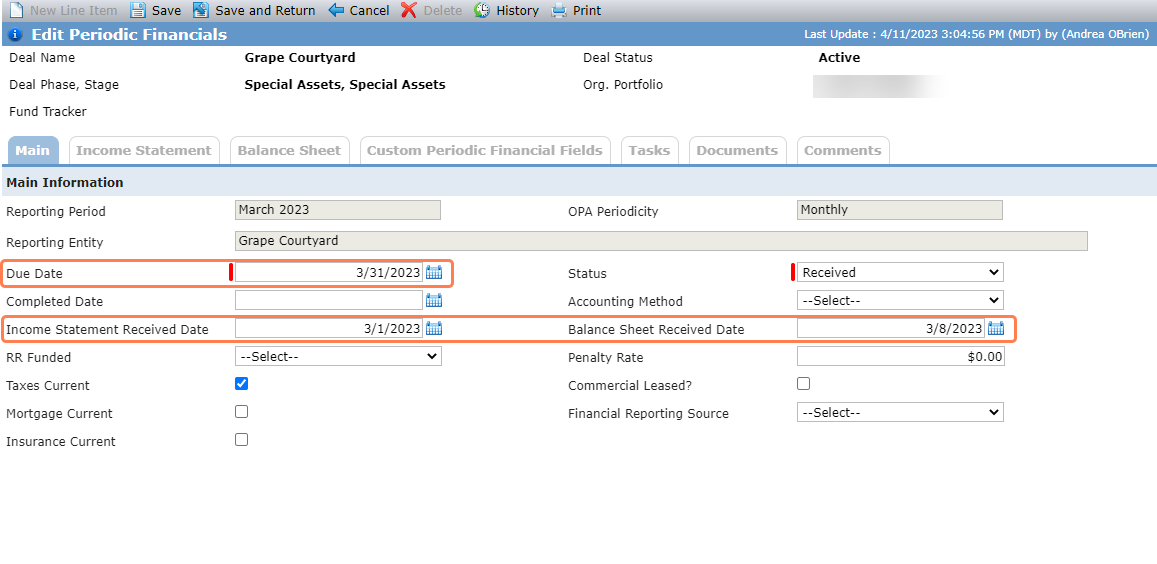
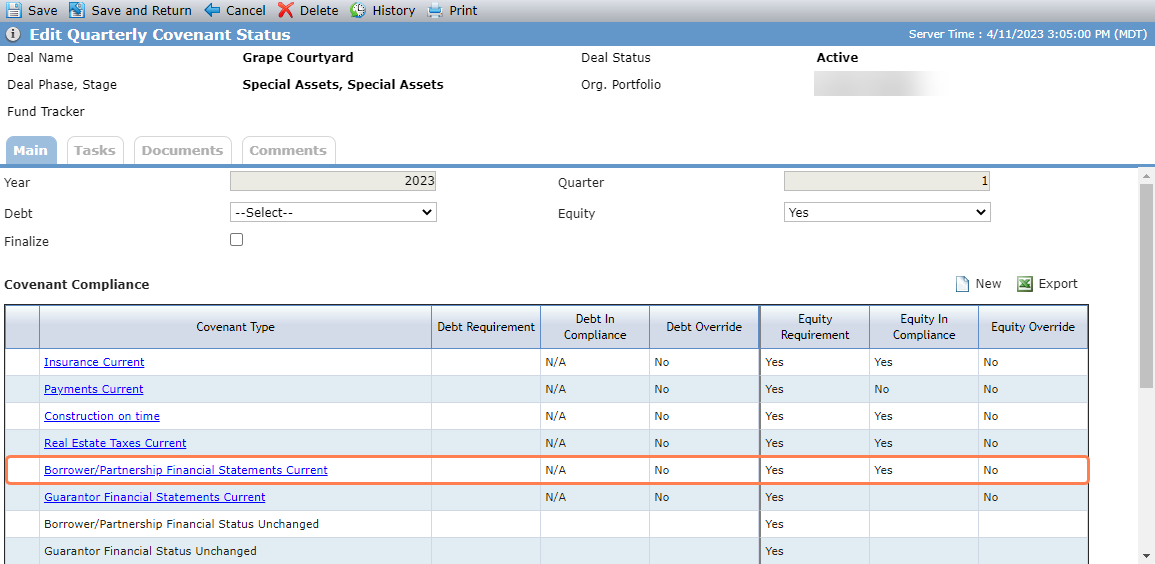
Q1, Q2, Q3
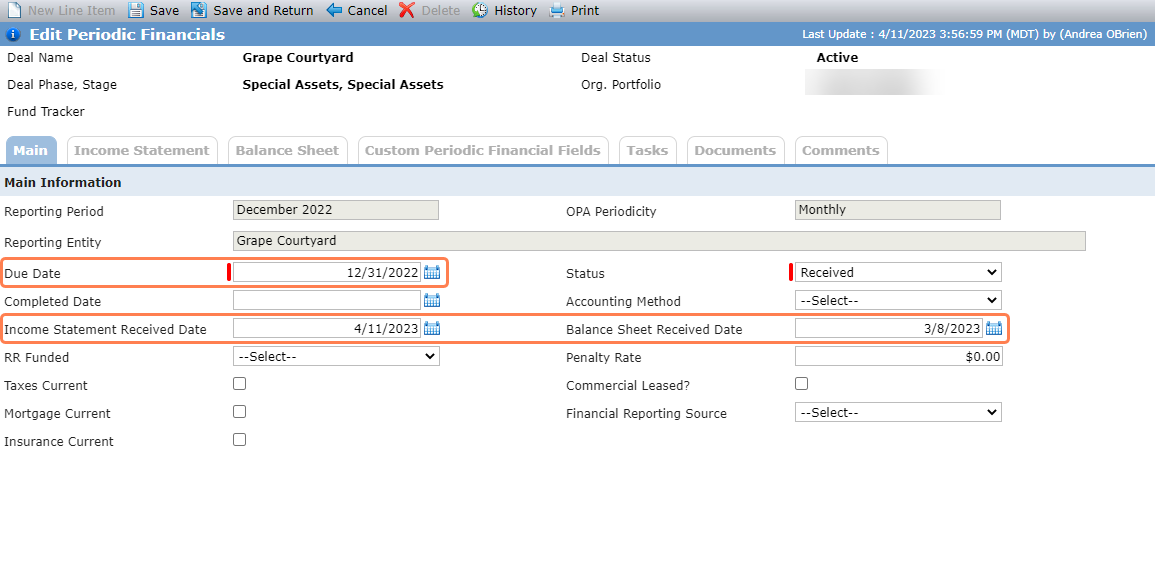
Q4
The requirement is in compliance (=Yes) when an Annual Financial Statement for the year prior to the covenant year exists for the guarantor associated to at least one Guarantee on the deal with a Due Date prior to the current date and the Status is a value other than Not Received.
The requirement is not in compliance (=No) when an Annual Financial Statement for the year prior to the covenant year exists for the guarantor associated to at least one Guarantee on the deal with a Due Date prior to the current date and the Status is equal to Not Received.
The Covenant Type links to the Reports Received screen.
The requirement is in compliance (=Yes) for Q1, Q2, and Q3 when a Tax Return for two years prior to the covenant year exists that is either a Final or Amended Final, the Periodicity is Annual, and the Due Date is in the future OR the Due Date is in the past and there is a populated Received Date.
OR
When the above does not exist and a Tax Return for one year prior to the covenant year exists that is either a Final or Amended Final, the Periodicity is Annual, and the Due Date is in the future OR the Due Date is the current date, or in the past, and there is a populated Received Date.
The requirement is in compliance (=Yes) for Q4 when a Tax Return for one year prior to the covenant year exists that is either a Final or Amended Final, the Periodicity is Annual, and the Due Date is in the future OR the Due Date is in the past and there is a populated Received Date.
OR
When the above does not exist and a Tax Return for the same year as the covenant year exists that is either a Final or Amended Final, the Periodicity is Annual, and the Due Date is in the future OR the Due Date is in the past and there is a populated Received Date.
The requirement is not in compliance (=No) for Q1, Q2, and Q3 when none of the Q1, Q2, or Q3 "Yes" conditions exist.
The requirement is not in compliance (=No) for Q4 when neither of the Q4 "Yes" conditions exist.
The Covenant Type links to the Reports Received screen.
In this example, the covenant year is 2023 and the covenant quarter is 1.
The deal has a 2021 tax return with a received date.
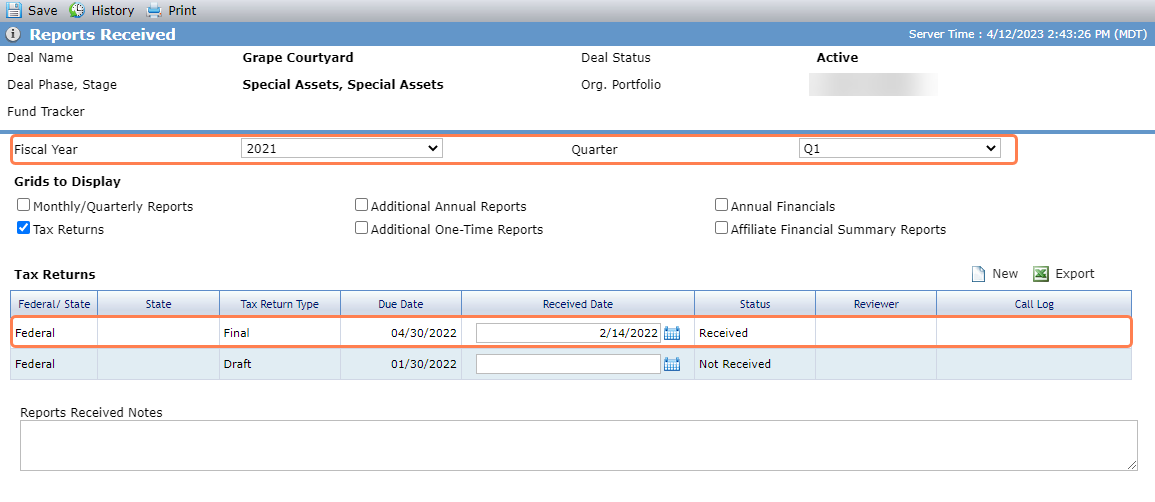
As a result, the covenant is in compliance.
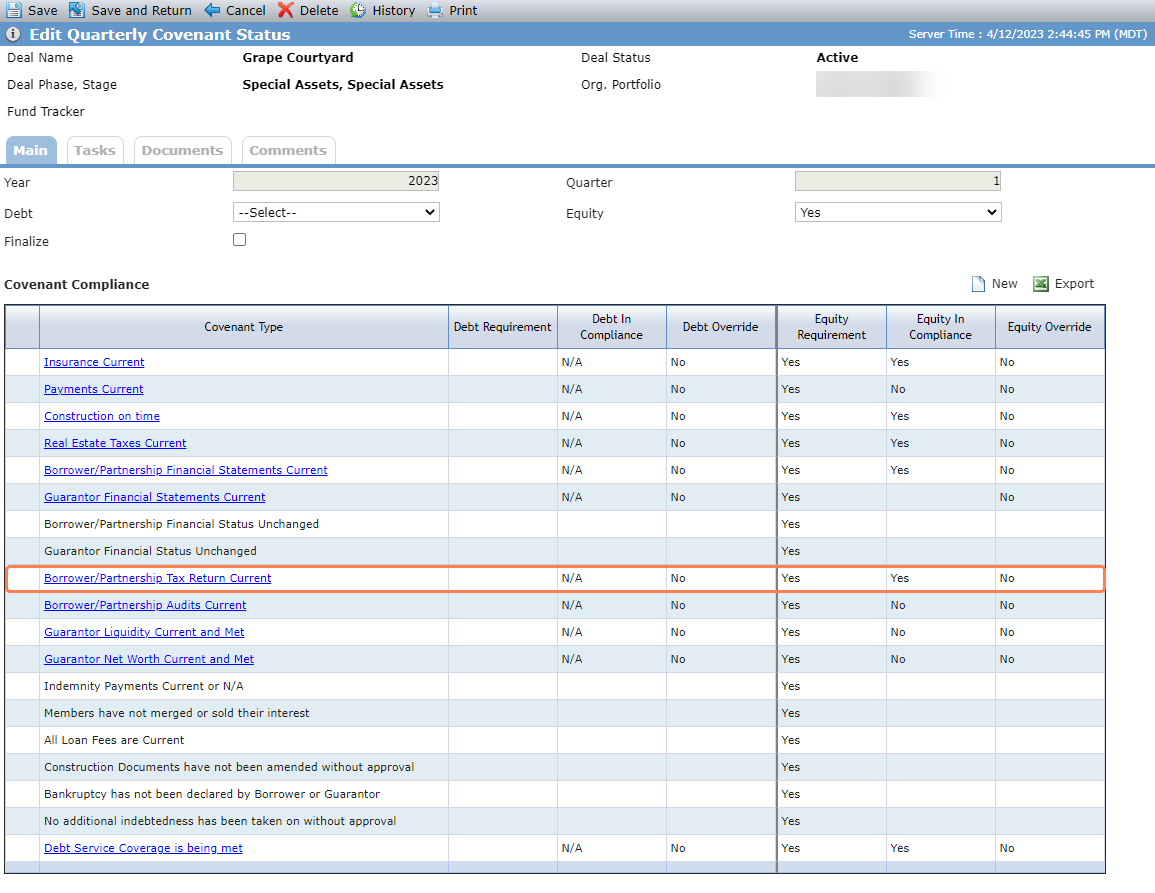
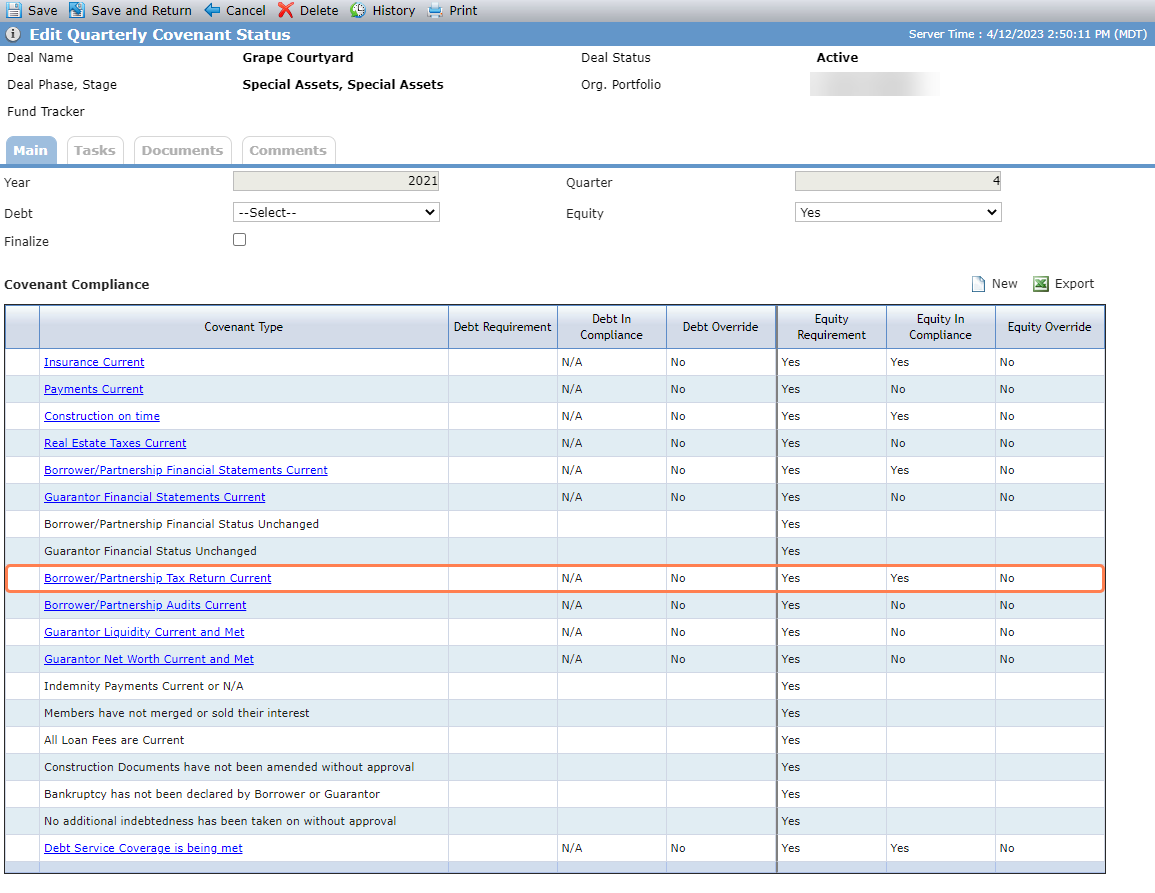
In the next example, the covenant year is 2021 and the covenant quarter is 4.
The deal has a 2020 tax return with a received date.
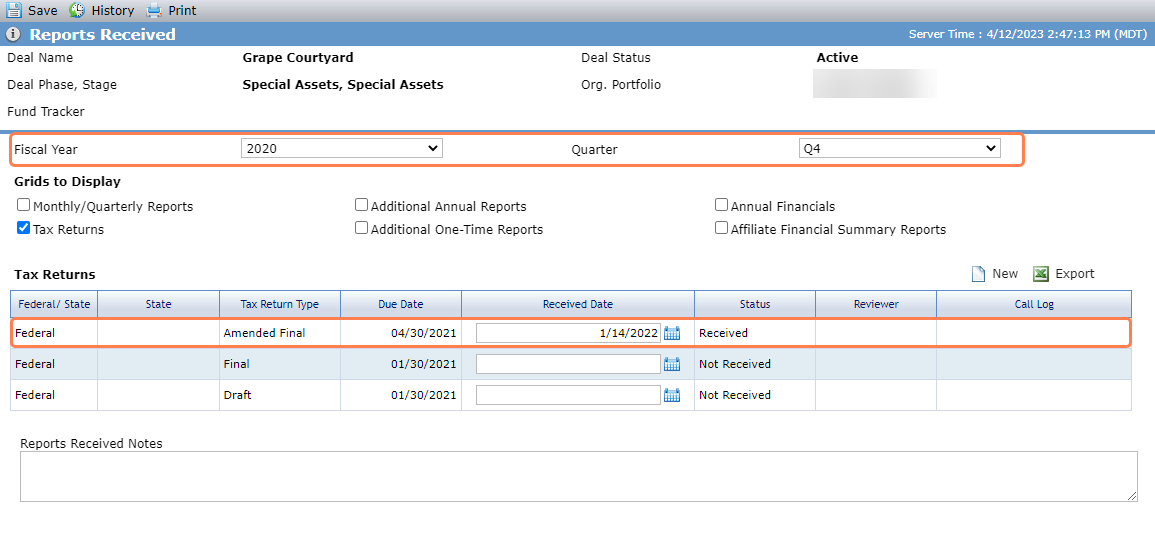
As a result, the covenant is in compliance.
The requirement is in compliance (=Yes) for Q1, Q2, and Q3 when a required Annual Financial Version record exists for two years prior to the covenant year with a Status not equal to Not Received.
OR
A required Annual Financial Version record exists for two years prior to the covenant year with the Due Date after the current date.
OR
A required Annual Financial Version record exists for one year prior to the covenant year with the Status not equal to Not Received.
OR
A required Annual Financial Version record exists for one year prior to the covenant year with the Due Date after the current date.
The requirement is in compliance (=Yes) for Q4 when a required Annual Financial Version record exists for one year prior to the Covenant year with the Status not equal to Not Received.
OR
A required Annual Financial Version record exists for one year prior to the covenant year with the Due Date after the current date.
OR
A required Annual Financial Version record exists for the year of the covenant year with the Status not equal to Not Received.
OR
A required Annual Financial Version record exists for the year of the covenant year with the Due Date after the current date.
The requirement is not in compliance (=No) for Q1, Q2, and Q3 when none of the Q1, Q2, or Q3 "yes" conditions exist.
The requirement is not in compliance (=No) for Q4 when none of the Q4 "yes" conditions exist.
The Covenant Type links to the Edit Periodic Financial for the last month of the covenant quarter.
The requirement is in compliance (=Yes) when the Date Received on the Financial Summary for all guarantors associated to Guarantees on the deal is within the 12 months prior to the covenant quarter AND the sum of their Liquidity is equal to, or greater than, Guarantor Liquidity (OPA tab).
The requirement is not in compliance (=No) when the Date Received on the Financial Summary for all guarantors associated to Guarantees on the deal is not within the 12 months prior to the covenant quarter, OR the sum of their Liquidity is less than Guarantor Liquidity (OPA tab).
If only one guarantor, the Covenant Type links to the Edit Financial Summary for the entity. If multiple guarantors, the Covenant Type links to the List Entities on the deal.
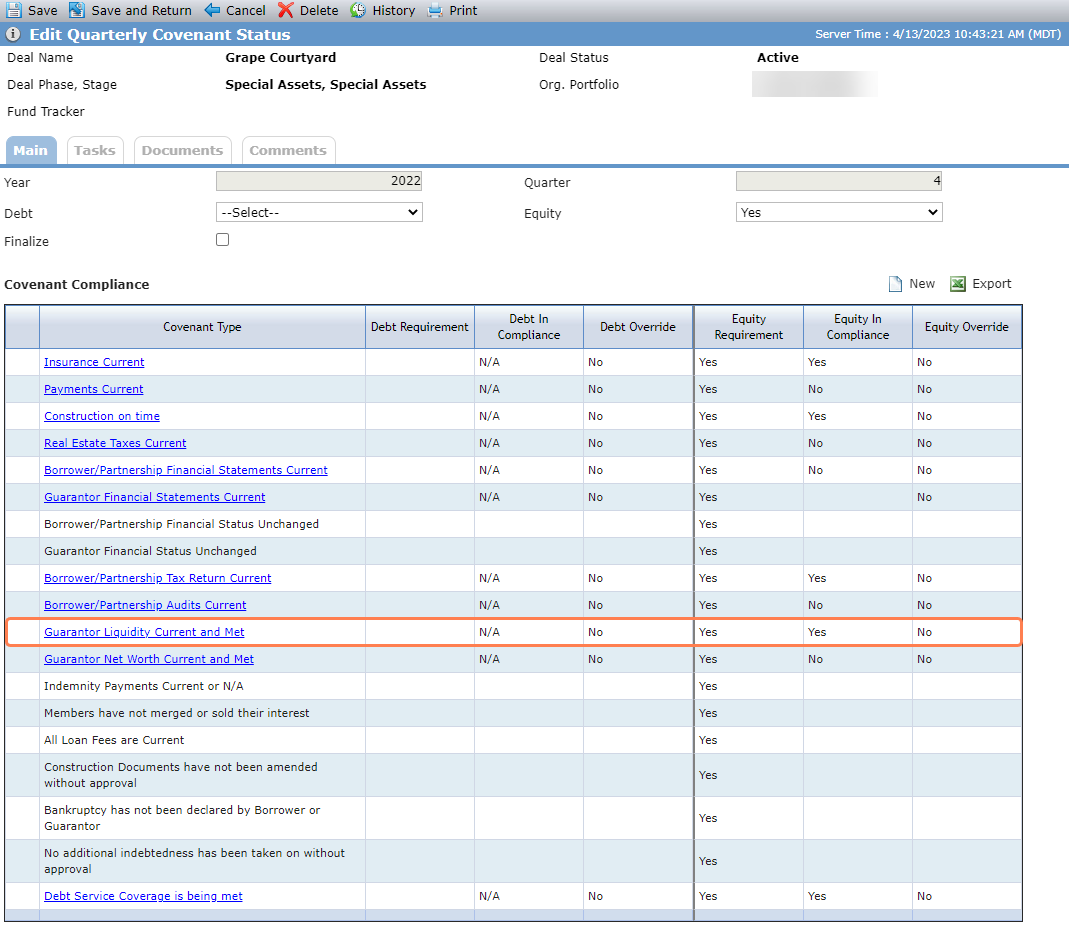
In this example, the covenant year is 2023 and the covenant quarter is 4.
The deal OPA's Guarantor Liquidity requirement is $2M.
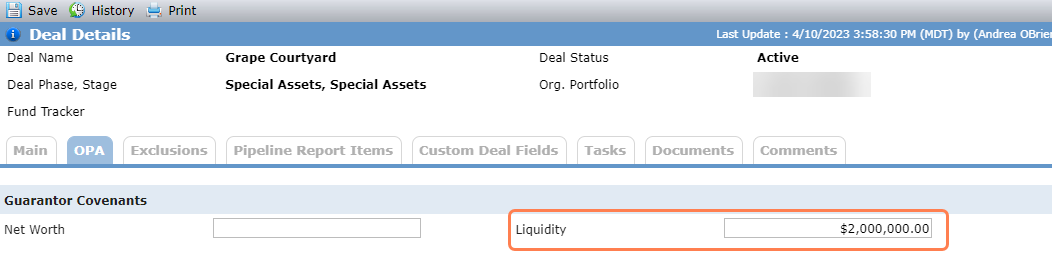
The guarantor associated to guarantees on the deal has a financial summary within the 12 months prior to the covenant quarter and its liquidity is equal to the deal liquidity.
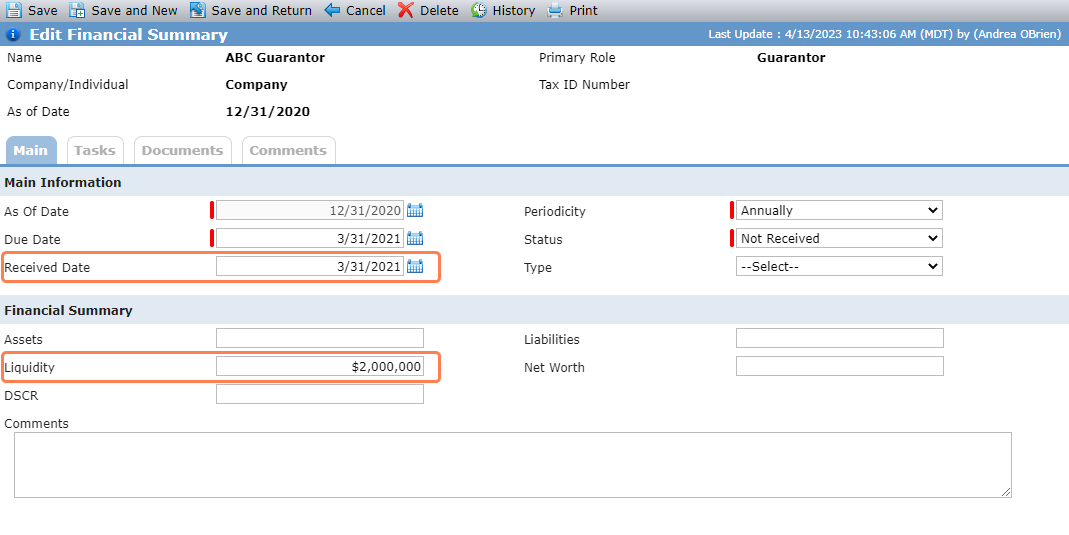
As a result, the covenant is in compliance.
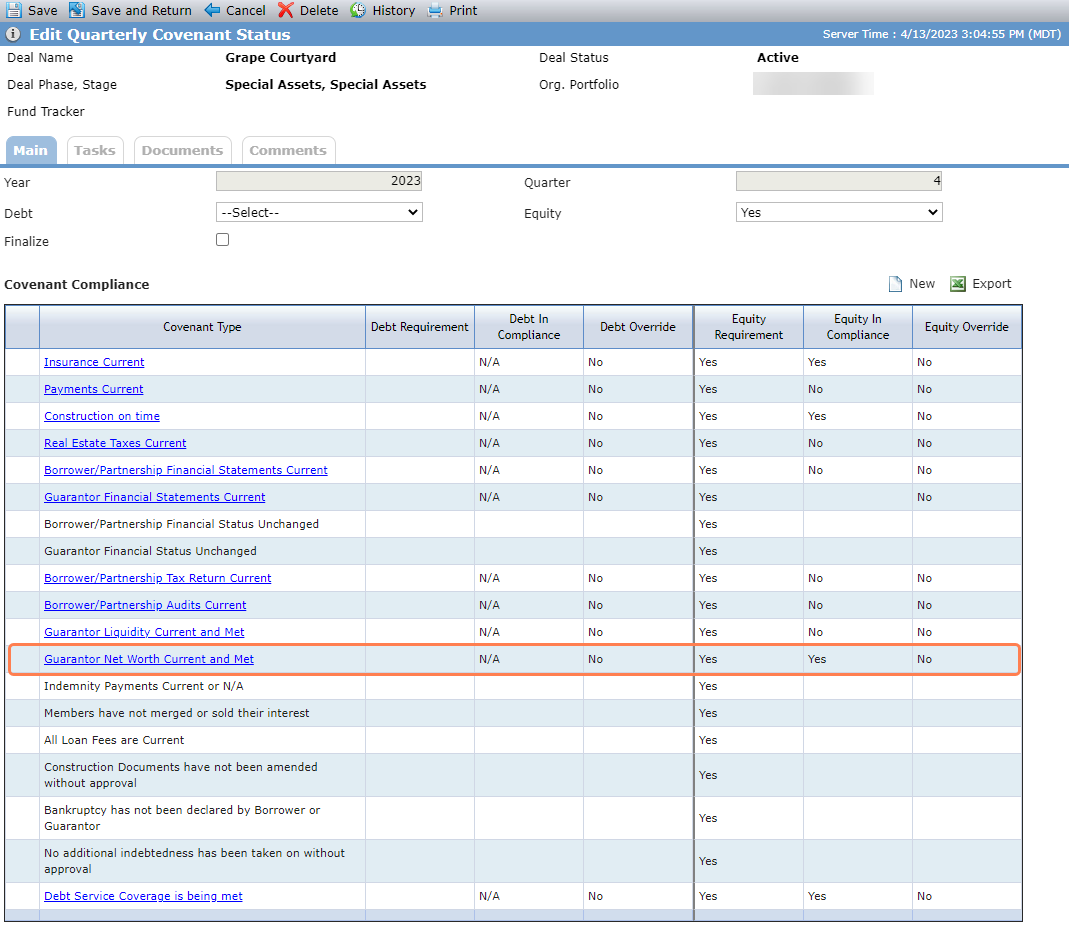
The requirement is in compliance (=Yes) when the Date Received on the Financial Summary for all guarantors associated to Guarantees on the deal is within the 12 months prior to the covenant quarter AND the sum of their Net Worth is equal to, or greater than, Guarantor Net Worth (OPA tab).
The requirement is not in compliance (=No) when the Date Received on the Financial Summary for all guarantors associated to Guarantees on the deal is not within the 12 months prior to the covenant quarter, OR the sum of their Net Worth is less than Guarantor Net Worth (OPA tab).
If only one guarantor, the Covenant Type links to the Edit Financial Summary for the entity. If multiple guarantors, the Covenant Type links to the List Entities on the deal.
In this example, the covenant year is 2023 and the covenant quarter is 4.
The deal OPA's Guarantor Net Worth requirement is $3.18M.
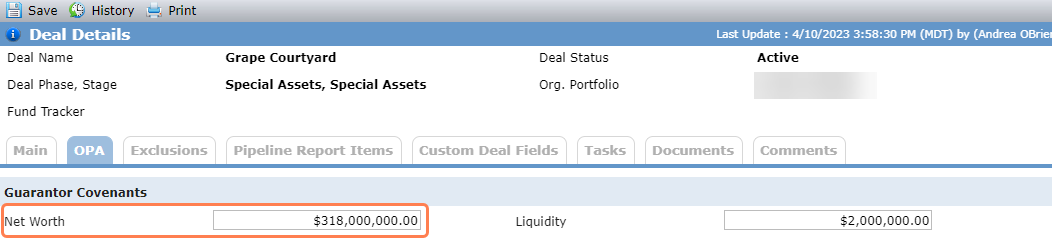
The guarantors associated to guarantees on the deal have financial summaries within the 12 months prior to the covenant quarter, with combined net worth greater than the deal net worth.
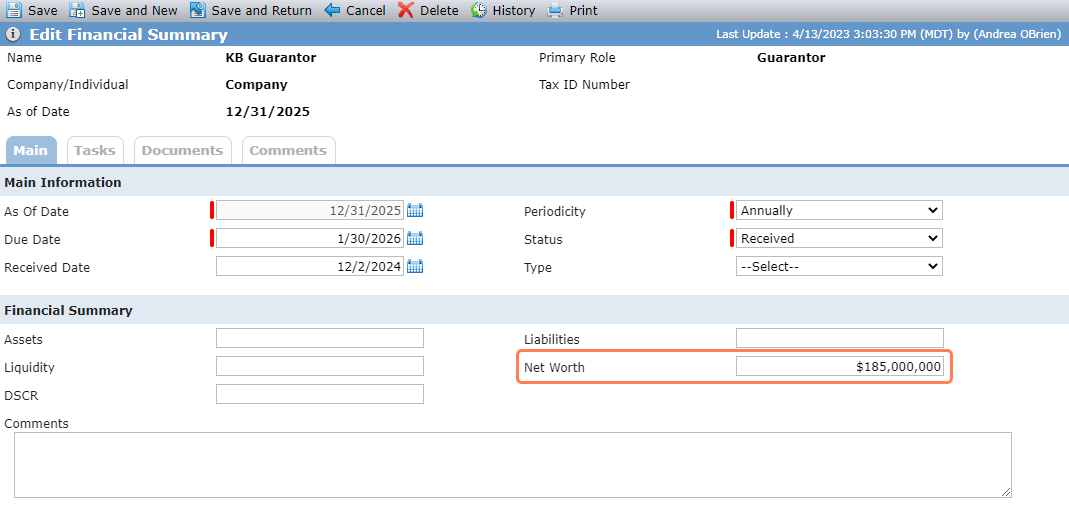
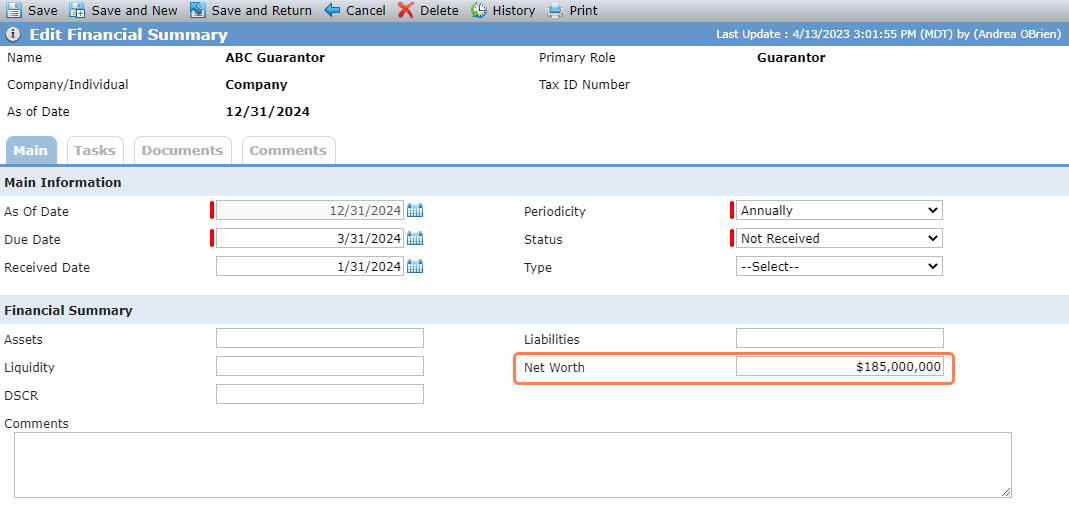
As a result, the covenant is in compliance.
The requirement is in compliance (=Yes) when Hard DSCR – Net RR from last Periodic Financial for the covenant period is greater than, or equal to, the OPA DSCR Requirement.
The requirement is not in compliance (=No) when Hard DSCR – Net RR from last Periodic/Annual Financial for the covenant period is less than the OPA DSCR Requirement, OR no last Periodic Financial for the covenant period exists.
The Covenant Type links to the Edit Periodic Financial for the last month of the covenant quarter.
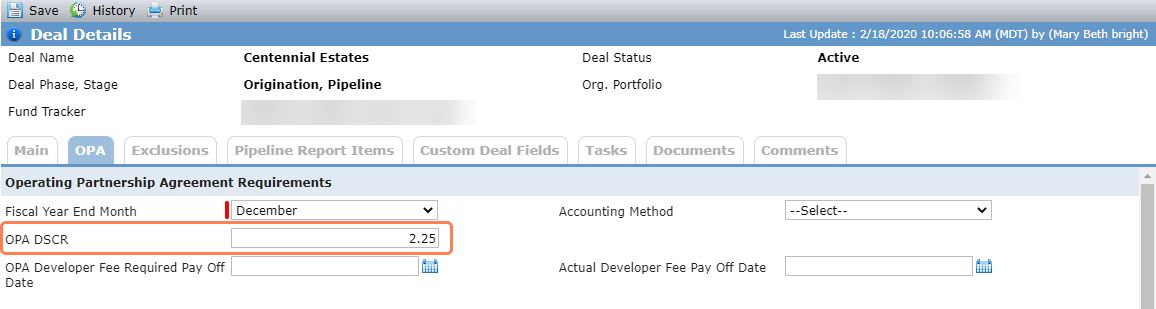
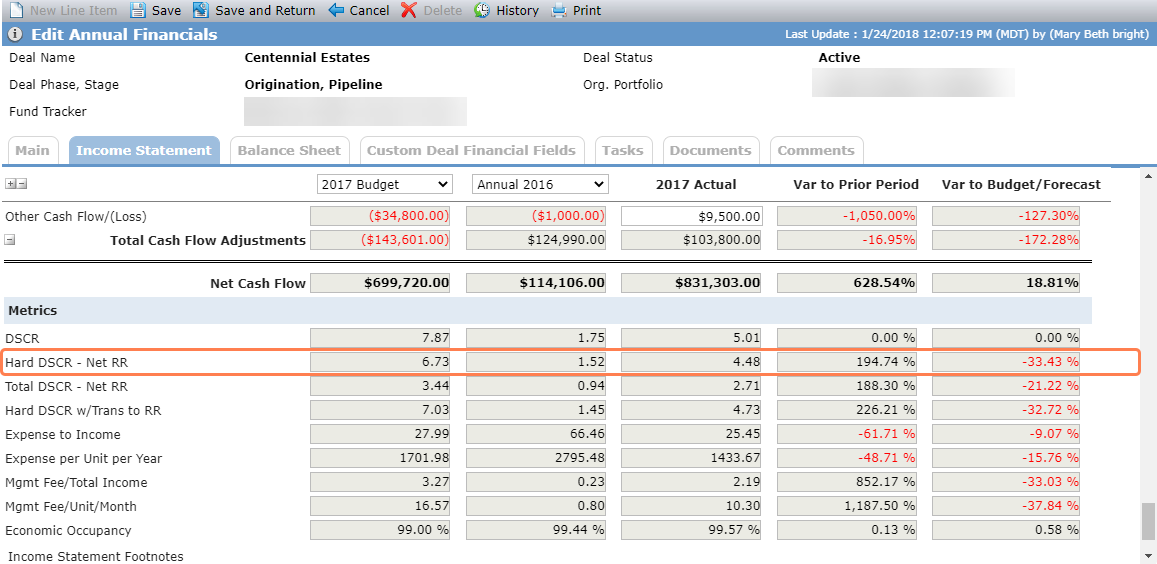
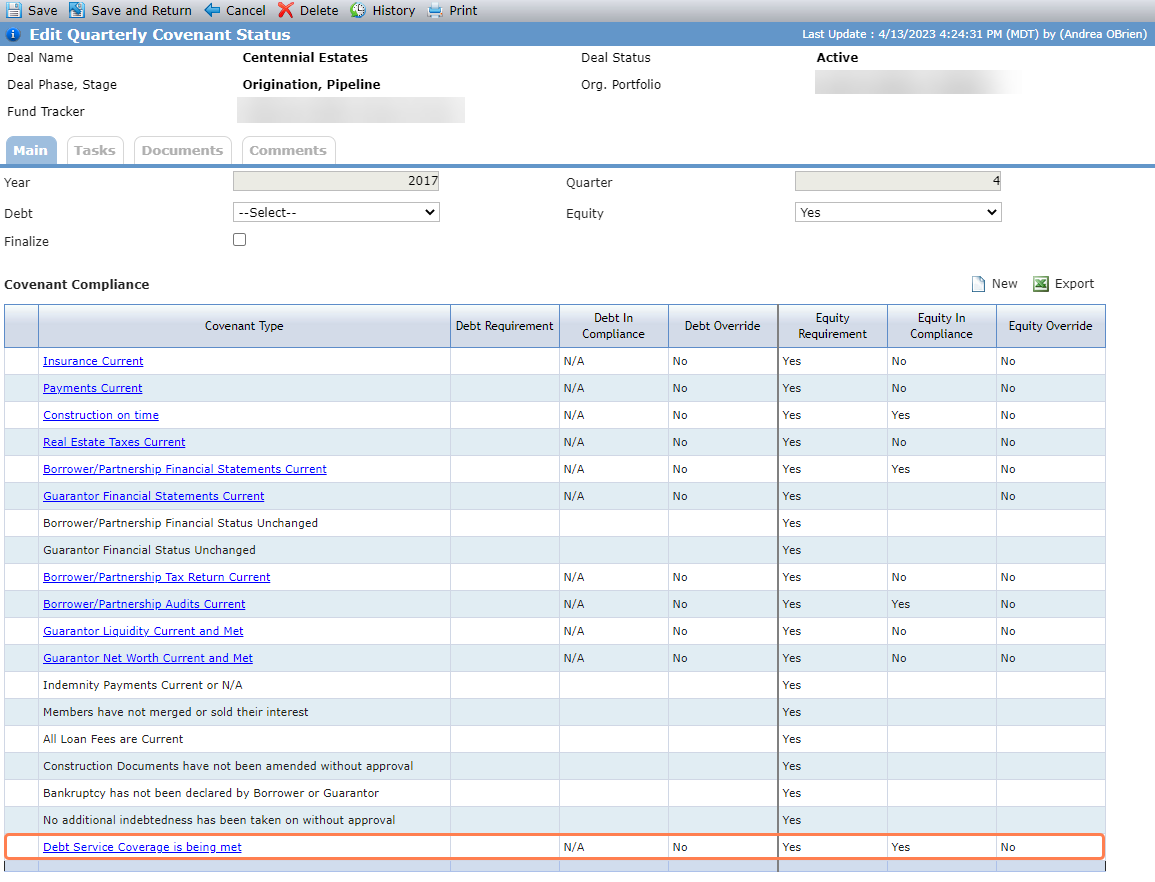
In this example, the covenant year is 2017 and the covenant quarter is 4. The deal OPA shows 2.25 for the DSCR requirement.
The Hard DSCR - Net RR for the covenant period is 5.01, which is greater than the deal DSCR requirement.
As a result, the covenant is in compliance.
The following default covenants are displayed for all deals, but unlike the system-evaluated items, you need to manually set whether the requirement is met:
Borrower/Partnership Financial Status Unchanged
Guarantor Financial Status Unchanged
Indemnity Payments Current or N/A
Members have not merged or sold their interest
All Loan Fees are Current
Construction Documents have not been amended without approval
Bankruptcy has not been declared by Borrower or Guarantor
No additional indebtedness has been taken on without approval
You can also create your own manually evaluated covenants on a deal-by-deal basis. Click New above the Covenant Compliance grid on the Edit Quarterly Covenant Status screen to get started.
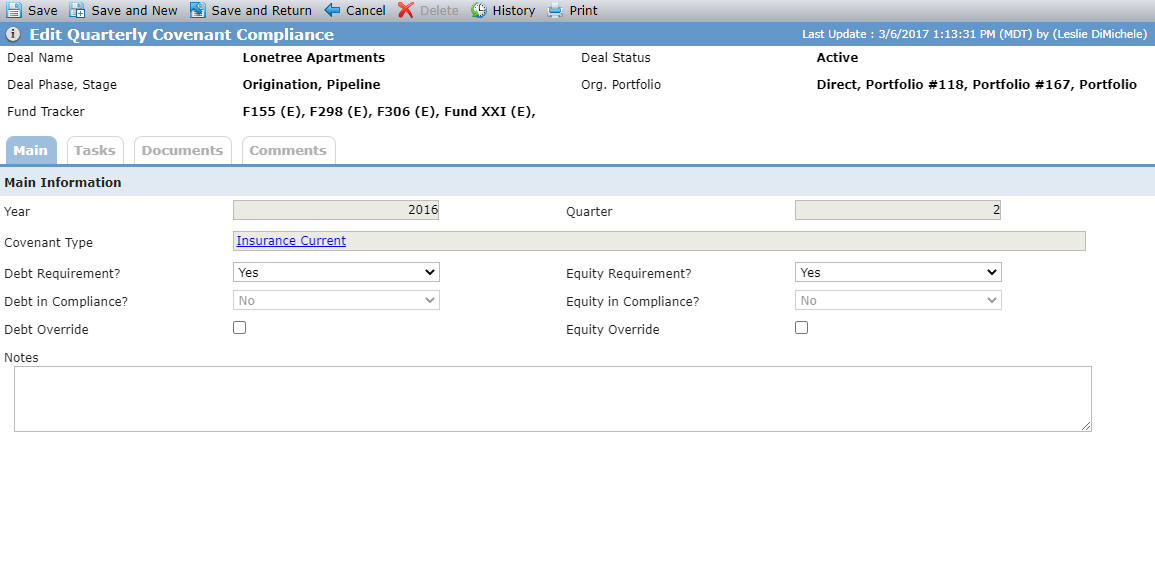
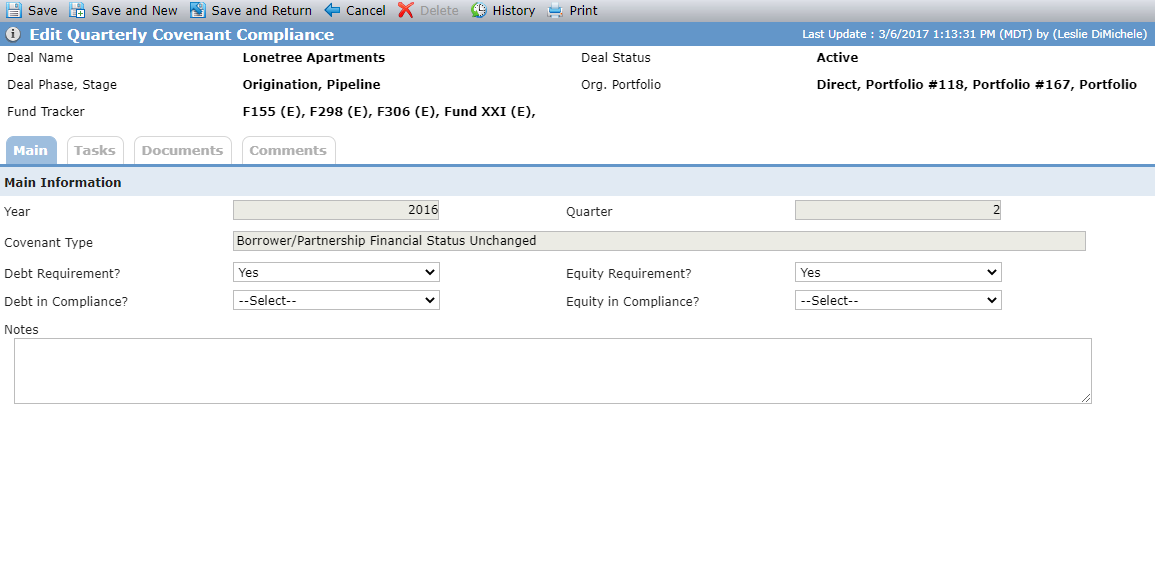
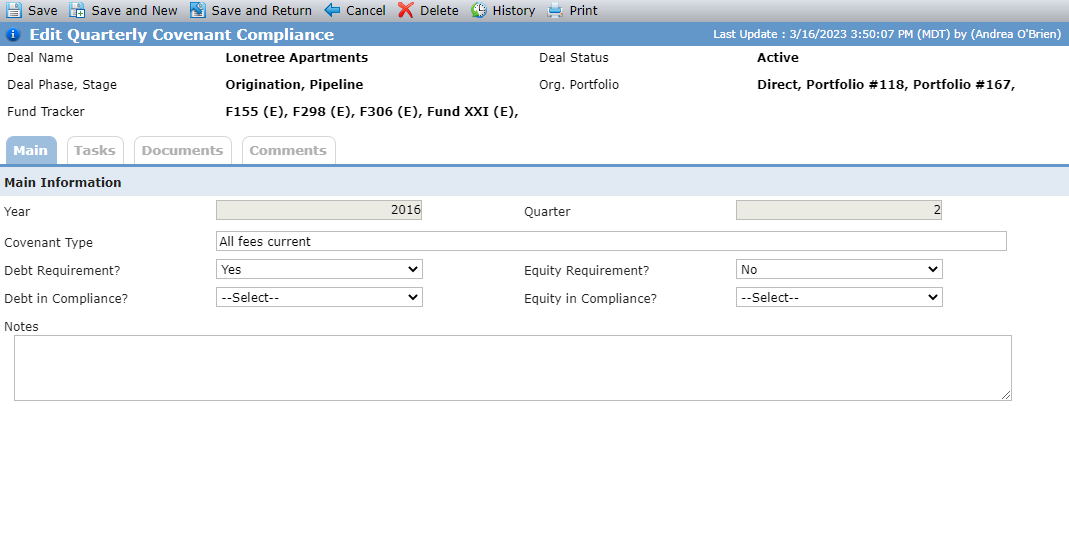
Edit Quarterly Covenant Compliance (default - system-evaluated, default - manually evaluated, and manually created/evaluated items)
Default Covenants | Manually Created Covenants |
|---|---|
Covenant Type is read-only. | Covenant Type is editable. |
When the Finalized checkbox is not selected, the Debt Requirement and Equity Requirement fields are editable, but their values default from the Edit Quarterly Covenant Status. | When the Finalized checkbox is not selected, the Debt Requirement and Equity Requirement fields are editable, but their values default from the Edit Quarterly Covenant Status. |
For default covenants that are system evaluated, when the Finalized checkbox is not selected, the Debt Override and Equity Override checkboxes are editable. For default covenants that are manually evaluated, the Debt Override and Equity Override checkboxes are hidden. | The Debt Override and Equity Override checkboxes are hidden. |
When the Finalized checkbox is selected, the Debt Requirement and Equity Requirement fields are read only, and their values default from the Edit Quarterly Covenant Status. | When the Finalized checkbox is selected, the Debt Requirement and Equity Requirement fields are read-only. |
For default covenants that are system evaluated, when the Finalized checkbox is selected, the Debt Override and Equity Override checkboxes are read only. For default covenants that are manually evaluated, the Debt Override and Equity Override checkboxes are hidden. | The Debt Override and Equity Override checkboxes are hidden. |
For default covenants that are system evaluated, the Debt in Compliance field is read only unless the Debt Override checkbox is selected. For default covenants that are manually evaluated, the Debt in Compliance field is hidden. | The Debt in Compliance field is read only. |
For default covenants that are system evaluated, the Equity in Compliance field is read only unless the Equity Override checkbox is selected. For default covenants that are manually evaluated, the Equity in Compliance field is hidden. | The Equity in Compliance field is read only. |
Override a Covenant's Compliance Standing
You can override the compliance status for a system-evaluated covenant, when the covenant period has not yet been finalized. To override a covenant's compliance status:
Navigate to the deal, and then click Covenants in the left navigation panel.
The Covenants screen opens.
Click the row of the covenant period.
The Edit Quarterly Covenant Status screen opens.
Click the row of the system-evaluated covenant.
The Edit Quarterly Covenant Compliance screen opens.
Select the Debt Override checkbox to override the Debt in Compliance status for the covenant.
Change the status in the Debt in Compliance list.
Select the Equity Override checkbox to override the Equity in Compliance status for the covenant.
Change the status in the Equity in Compliance list.
Click Save.
You can only delete manually added covenants. Navigate to the Edit Quarterly Covenant Compliance screen for the item, click Delete in the top toolbar, and then confirm the deletion.
When the Finalize checkbox is selected, regardless of changes made in the system, the covenants results will remain static.
If you later unfinalize the quarterly covenants, the system presents a message that covenant information could change if you clear the checkbox and save.