About Fund Details - Fund Load Tab
The Fund Load tab is a read-only screen. No data entry is allowed; however, you can create new Fund Load Components (expenses) related to the administration of the fund, as well view the impact of the Fund Load on all deals in which the fund is invested.
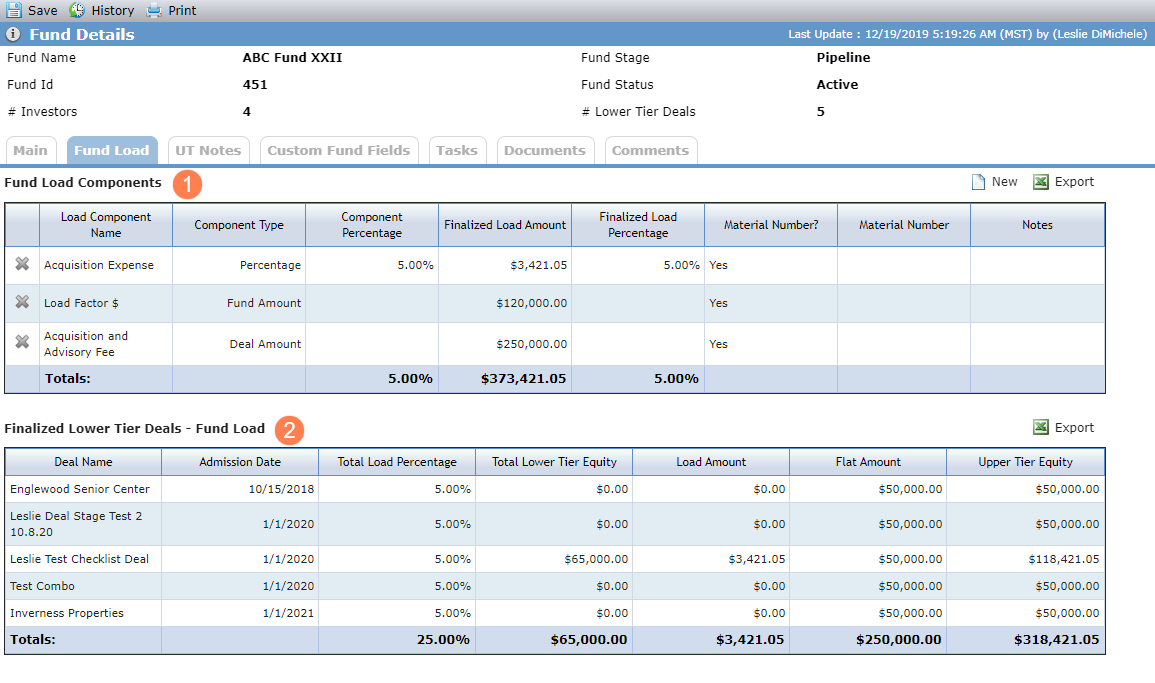
The Fund Load Components grid shows all Fund Load Component records that exist on the fund.
The Lower Tier Deals - Fund Load grid shows shows all deals where the fund is in a Finalized Ownership Schedule on the deal. If the fund exists in a Finalized Ownership Schedule more than once, the grid shows a row for each Owner record in the schedule.
Field | Description |
|---|---|
Fund Load Components (only fields requiring explanation are listed here) | |
Component Type | Displays whether the load is a percentage, deal amount, or fund amount. The percentage allows to you base the load on a percentage of the lower tier equity. The deal level amount allows you to allocate a specific amount to each owned lower tier deal as part of the upper tier equity. The fund level amount allows a flat amount to be added directly to the upper tier equity regardless of the owned lower tier deals. |
Component Percentage | Displays the percentage value if the Component Type is Percentage. Blank if the Component Type is Fund Amount or Deal Amount. |
Finalized Load Amount | If the Component Type is Percentage, then the field shows the sum of the Load Amounts for the Load Component on all Deals displayed in the Finalized Lower Tier Deals - Fund Load grid. If the Component Type is Deal Amount, then the field shows the sum of the Flat Amounts for the Load Component on all Deals displayed in the Finalized Lower Tier Deals - Fund Load grid. If the Component Type is Fund Amount, then the fields shows the Fund Amount from the Edit Fund Load Component. |
Finalized Load Percentage | Calculated (for Percentage Component Type only): Finalized Load Amount / Total Upper Tier Equity. |
Finalized Lower Tier Deals | |
Deal Name | Displays the Deal Name of the Deal on which the Fund exists as an Owner Entity. |
Admission Date | Displays the Admission Date of the Owner record on the Deal. |
Total Load Percentage | Displays the Total Load Percentage from the Edit Fund Load Details record on the Deal that is associated to the Ownership Schedule. Percentage Component Type only. |
Total Lower Tier Equity | Displays the Total Lower Tier Equity from the Edit Fund Load Details record on the Deal that is associated to the Ownership Schedule. |
Load Amount | Displays the Total Load Amount from the Fund Load Components grid on the Edit Fund Load Details record on the Deal that is associated to the Ownership Schedule. Does not include any Deal Amount. |
Flat Amount | Displays the Total Flat Amount from the Fund Load Components grid on the Edit Fund Load Details record on the Deal that is associated to the Ownership Schedule. |
Upper Tier Equity | Displays the Upper Tier Equity from the Edit Fund Load Details record on the Deal that is associated to the Ownership Schedule. |
Total of Total Load Percentages | Calculated: Total Load Amount / Total Upper Tier Equity. |
Total of Lower Tier Equity | Displays the sum of the Total Lower Tier Equity Amounts for all records displayed. |
Total Load Amount | Displays the sum of the Load Amounts for all records displayed. |
Total Flat Amount | Displays the sum of the Flat Amounts for all records displayed. |
Total Upper Tier Equity | Displays the sum of the total Lower Tier Equity Amounts for all records displayed. |
Add a Fund Load Component
Navigate to the fund, and then select Details in the left navigation menu.
Click the Fund Load tab.
Click New above the Fund Load Components grid.
The Edit Fund Load Component screen opens.
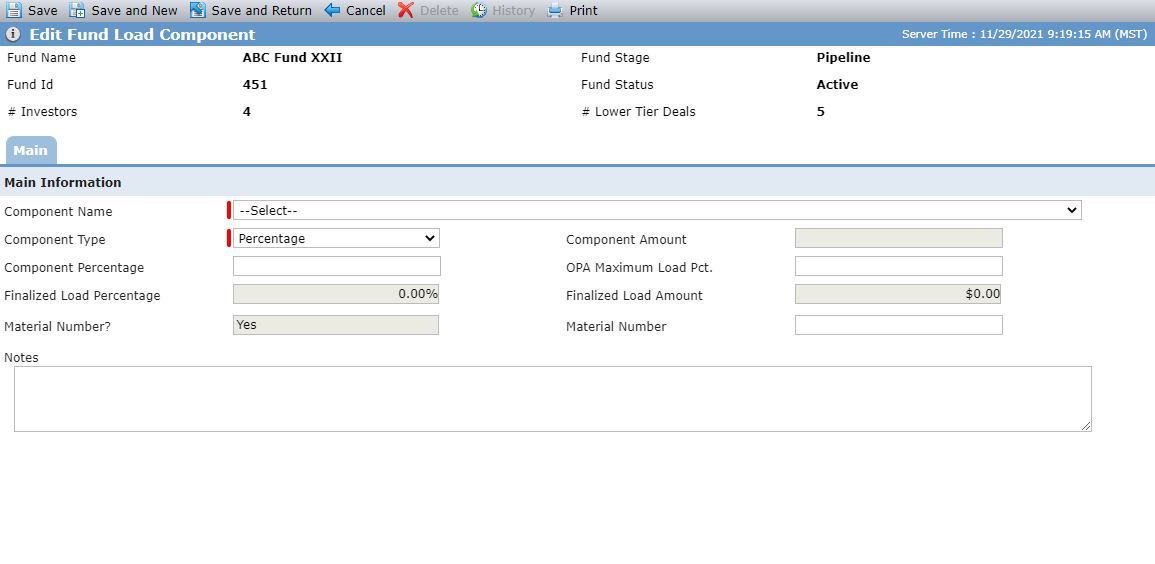
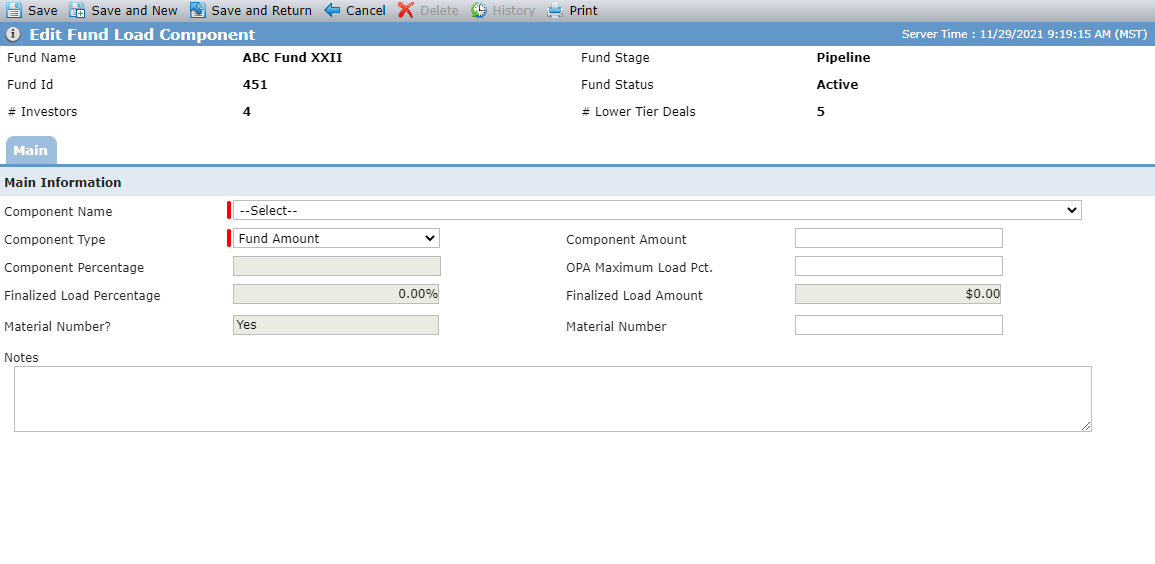
Fund Load Component - Percentage Type; Fund Load Component - Amount Type
Select the Component Name. You can add a Component Name to a fund only once.
Select the Component Type.
If the Component Type is Percentage, enter the Component Percentage.
OR
If the Component Type is Deal Amount or Fund Amount, enter the Component Amount.
Optionally, enter the OPA Maximum Load Pct.
Optionally, enter the Material Number (for components configured as Material Number = Yes).
Click Save.
To edit an existing fund load component, select a record in the grid to open the Edit Fund Component screen. Make your changes and then save the record.
You can delete a Fund Load Component record in one of two ways. Click  in the first column of the given Fund Load Component record of the Fund Load Components grid. Or, click Delete in the top toolbar on the Edit Fund Load Component screen. Then confirm the deletion when prompted.