About Total Benefits - HTC
The Total Benefit tab captures key information by Benefit Type in order to calculate the total amount of the Benefits generated on the deal. You can add or remove the programs that will be included in the deal. A grid is displayed for each selected program type.
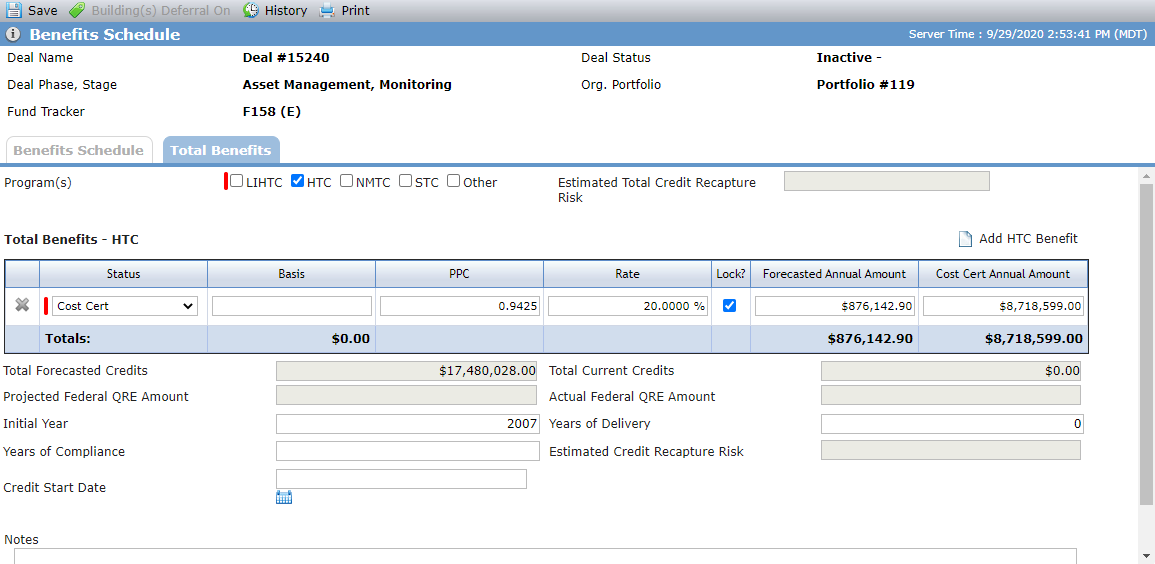
Add the HTC Program
The Total Benefits tab is populated based on the Program Type(s) selected at deal creation. You can add additional programs to the Total Benefits if needed.
Navigate to the deal, and then select Benefits Schedule in the left navigation menu.
The Benefits Schedule screen opens.
Click the Total Benefits tab.
Select the HTC checkbox.
An empty grid is added.
Click Add HTC Benefit above the grid.
A row is added to the grid.
Populate the benefits details.
Status
(required)
The status of the tax credits.
Basis
The amount that the housing tax credit are generated based upon.
PPC
The price per credit is the price the tax credits are worth.
Rate
The Interest rate that applies to the tax credits.
Lock
Select to indicate the rate is locked.
Forecasted Annual Amount
The annual amount of tax credits that the deal is forecasted to generate.
Cost Cert Annual Amount
The annual amount of tax credits that the deal will generate based upon the cost certificate.
Repeat steps 4–5 to add additional benefits.
The Total Forecasted Credits value is displayed from the Total row for the OPA Credits on the Benefits Schedule screen.
The Total Current Credits value is displayed from the Total row for the Current Credits on the Benefits Schedule screen.
The Projected Federal QRE Amount value is displayed from the Projected Federal QRE Amount on the HTC tab of Deal Details.
The Actual Federal QRE Amount value is displayed from the Actual Federal QRE Amount on the HTC tab of Deal Details.
Enter the first year tax credits are generated for the program in the Initial Year field.
Enter the number of years tax credits will be generated for the program in the Years of Delivery field.
Enter the number of years compliance will be required for the program in the Years of Compliance field.
The Estimated Credit Recapture Risk value is a system-calculated field.
Enter or select the date the tax credits will begin being generated in the Credit Start Date field.
Click Save.
Remove the HTC Program
When you clear the HTC checkbox, the system deletes all data on the Edit Property - HTC tab and the Deal Details - HTC tab for all properties and buildings on the deal.