About Total Benefits - NMTC
The Total Benefit tab captures key information by Benefit Type in order to calculate the total amount of the Benefits generated on the deal. You can add or remove the programs that will be included in the deal. A grid is displayed for each selected program type.
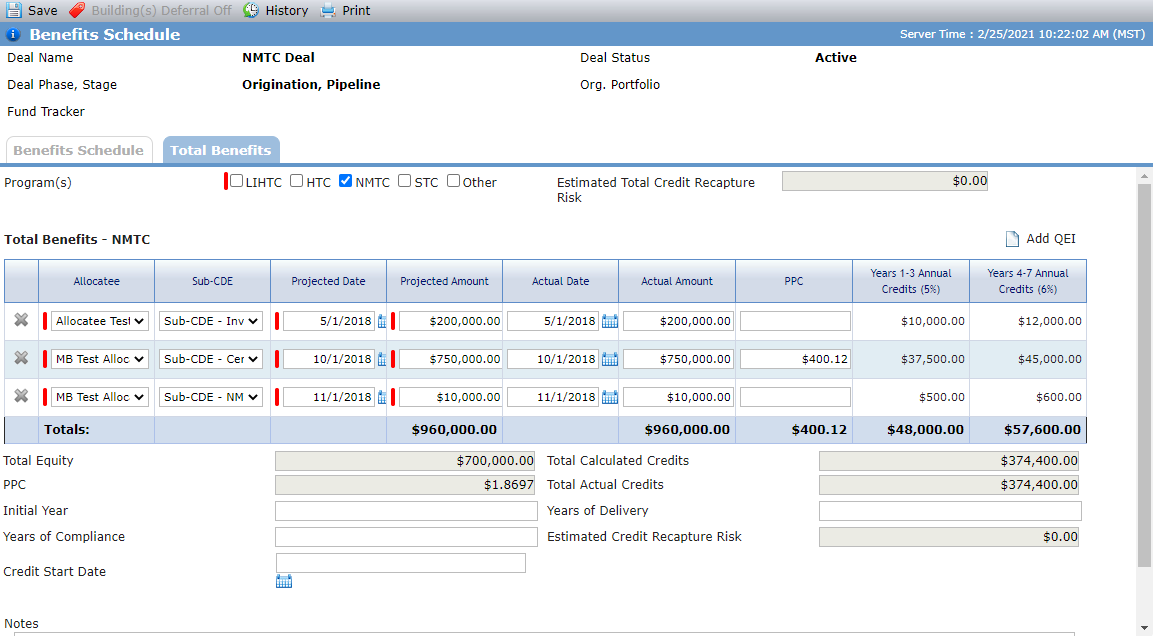
Add the NMTC Program
The Total Benefits tab is populated based on the Program Type(s) selected at deal creation. You can add additional programs to the Total Benefits if needed.
If you add, change, or delete Qualified Equity Investments (QEIs) in the grid, the changes are reflected on the NMTC Summary screen and Edit QEI screen.
Navigate to the deal, and then select Benefits Schedule in the left navigation menu.
The Benefits Schedule screen opens.
Click the Total Benefits tab.
Select the NMTC checkbox.
An empty grid is added.
Click Add QEI above the grid.
A row is added to the grid.
Populate the benefits details.
Allocatee (required)
The Associated Company entities on the deal with a Deal Role of Allocatee.
Sub-CDE
The entities on the deal with a Deal Role of Sub-CDE.
Projected Date (required)
The projected date the QEI was funded.
Projected Amount (required)
The projected investment amount of the allocation award given to the CDE. The Federal tax credits available are based on this amount.
Actual Date
The actual date the QEI was funded.
Actual Amount
The actual investment amount of the allocation award given to the CDE. The Federal tax credits available are based on this amount.
PPC
The Price Per Credit at the QEI level.
Repeat steps 4–5 to add additional benefits.
The Total Equity value is displayed from the Total row for the Forecast Amount in the OPA Commitments grid on the Equity Schedule.
The Total Calculated Credits value is the sum of (Years 1 - 3 Annual Credits {5%} times 3) plus (Years 4 - 7 Annual Credits (6%) times 4).
The PPC value is the calculated value of (Total Equity - State Equity)/Total Credits.
The Total Actual Credits value displays the Total row for the Current Credits on the Benefits Schedule tab.
Enter the first year tax credits are generated for the program in the Initial Year field.
Enter the number of years tax credits will be generated for the program in the Years of Delivery field.
Enter the number of years compliance will be required for the program in the Years of Compliance field.
The Estimated Credit Recapture Risk value is a system-calculated field.
Enter or select the date the tax credits will begin being generated in the Credit Start Date field.
Click Save.
Remove the NMTC Program
When you clear the NMTC checkbox, the system deletes all QEIs, QLICI Equities, QLICI Loans, Disbursements, NMTC Compliance Tests, Commercial Leases and Put/Call Options from the deal. All fields on the Edit QLICI Equity - AMIS tab, Edit Debt Details - AMIS tab, and Edit Property Details - NMTC tab are cleared. Any OPA Commitments on the deal with Program set to NMTC will have the Program reset to its default value.