Quarter 3, 2025 ProLinkAIM Release Notes
ProLink Solutions is pleased to announce the Quarter 3, 2025 release. You've come to the right place to review what's new and tickets delivered.
UAT Build: August 14, 2025
Production Build: September 11, 2025
What's New
The release introduces the following new functionality.
Fund CRA Enhancements
ProLink introduces new functionality to provide more comprehensive CRA tracking for fund-level investments. The Quarter 3 release includes two new features as part of this initiative:
The Fund CRA enhancement provides the ability to track granular CRA investment amounts for investments made to tax credit funds.
The Investment Allocation Report 5.0 builds on the existing Investment Allocation Report 4.0. See Investment Allocation Report 5.0 for more information.
ProLink added a calculated field called Deal Allocation Split Ratio to the Edit CRA Allocation screen, which contains the percentage value calculated per owner/investor. The calculation equals (Investor Allocation Amount / Investor Total Fund Commitment) * 100.
Both the Allocation Amount and the Total Fund Commitment are located on the Edit CRA Allocation screen for the selected fund. The Total Fund Commitment is the sum of capital commitments made by the investor to the fund.
The new field will be used in the calculation of CRA Credit Amount for Prior Period Deals in order to allocate fund investments to a Fund's various deals. See Investment Allocation Report 5.0.
ProLink also added a field called Exclude from the CRA Report to the Edit CRA Allocation screen.
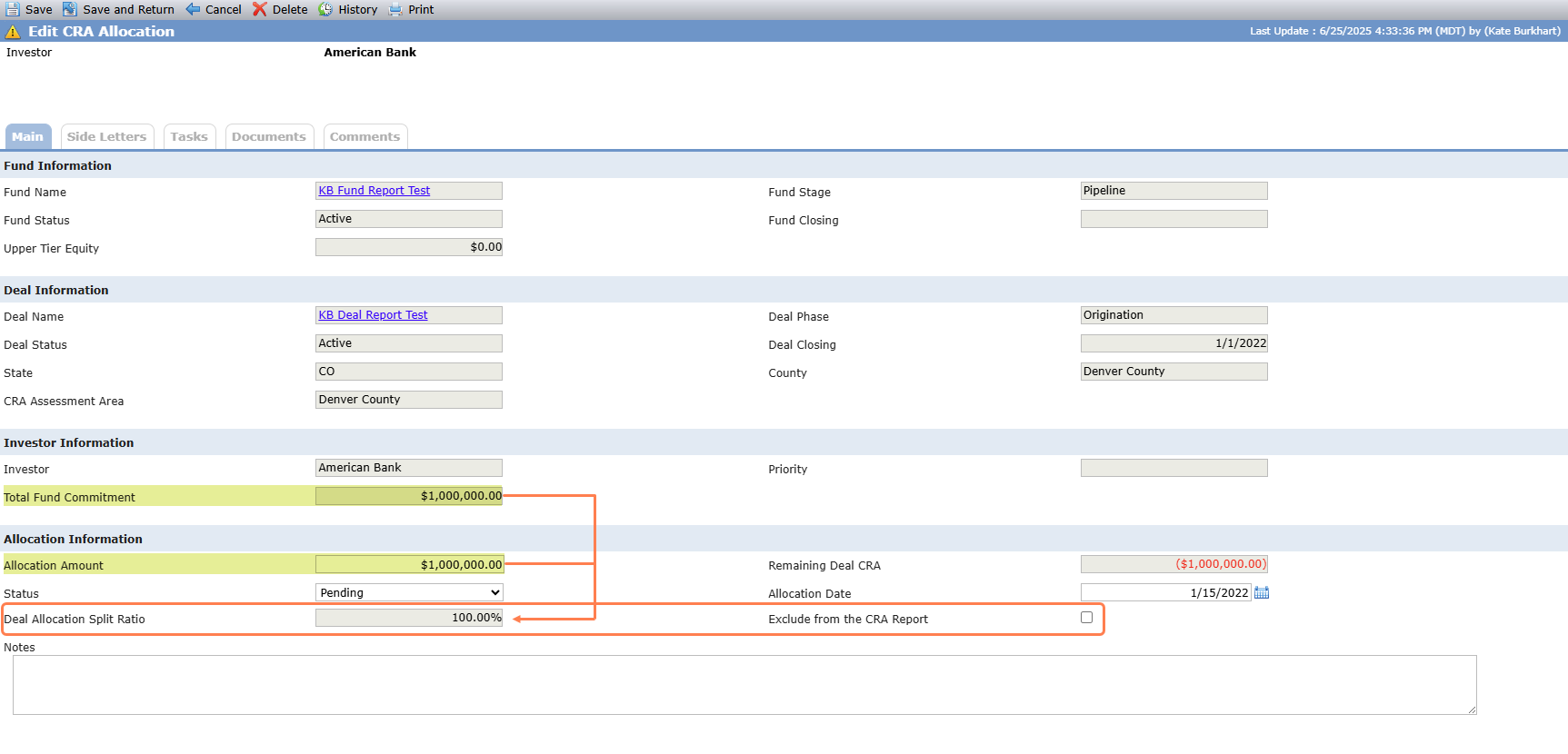
ProLink added a column to the Fund CRA overview grid showing the Deal Allocation Split Ratio.

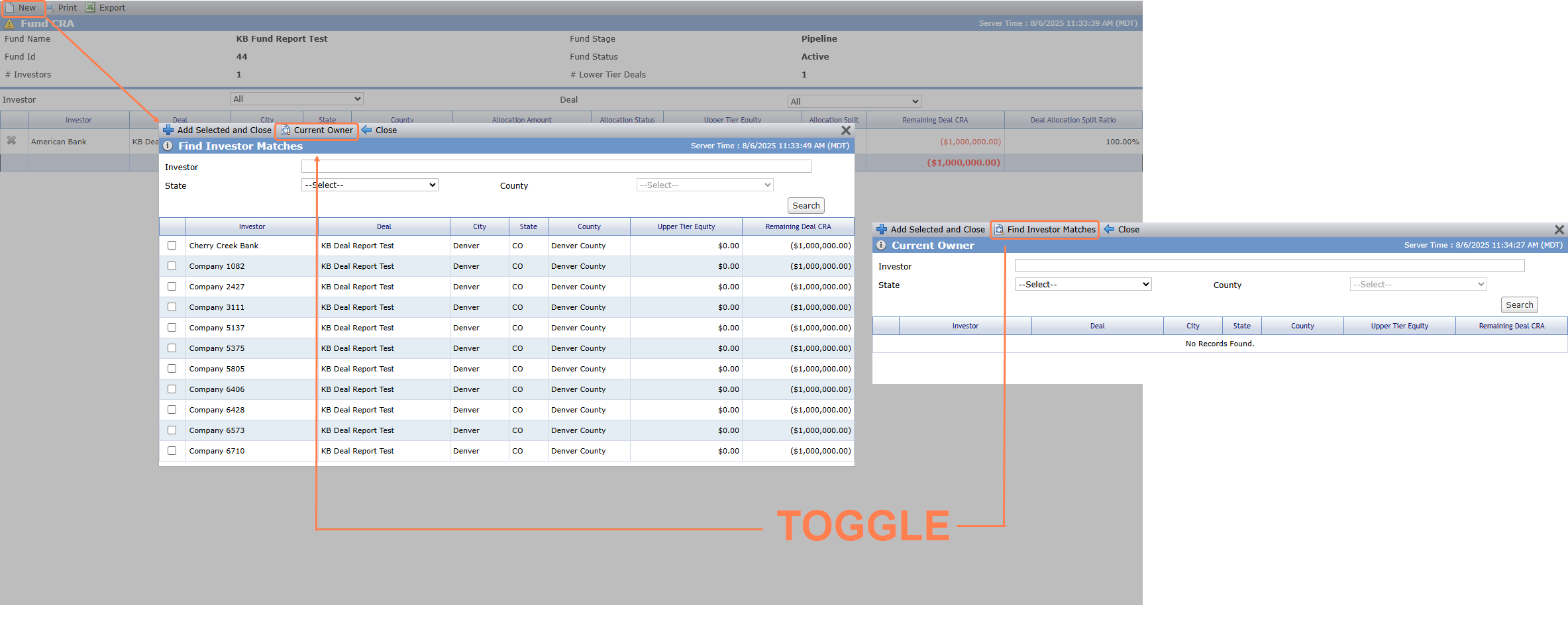
ProLink updated the popup that opens when you click New in the top toolbar of the Fund CRA screen. You can continue to Find Investor Matches (original grid view), or you can click Current Owner to display the deal-investor relationships for the investors that are part of any ownership schedule for the fund. Regardless of the popup view, entities displayed have the Primary Role of Investor, Investor Member, Investor Limited (Edit Entity).
Investment Allocation Report 5.0
ProLink introduces the Investment Allocation Report 5.0. The 5.0 report contains all existing functionality for deal-level investments. New to the 5.0 report is the ability to include investment data for CRA eligible investments made to tax credit funds in addition to direct investments at the deal level. The 5.0 report provides a full picture of CRA investments, regardless of whether those funds are recorded on deals or funds in ProLinkAIM.
Upper-tier investments are included on the report for Fund CRA Allocation records where:
The record has an associated fund, deal, and investor.
The record has an allocation amount.
A Fund CRA Allocation is greater than zero.
The Fund CRA Exclude from CRA Report checkbox is cleared.
The Investor entity's Is Bank Affiliated checkbox is selected.
The deal has an associated Committee Review record of the "Credit Approval" type with the Approved Date less than or equal to the End Date of the exam period.
If two bank-affiliated investors in a fund both have CRA Investment Allocations to the same deal, the report will include a separate line item for each investor and each property associated with the deal.
The report includes the following new columns:
Deal-Level Investments | Middle/Upper-Tier Investments | |
|---|---|---|
Investor | The name(s) of the bank-affiliated legal entities on the finalized ownership schedule for the associated deal | The name of the legal entity that is the associated investor for the Fund CRA Allocation |
Fund ID | Blank | The Fund ID for the fund from which the CRA Investment Allocation is derived |
AIM Fund Name | Blank | The Fund Name for the fund from which the CRA Investment Allocation is derived |
Fund Partnership Name | Blank | The Name for the legal entity representing the fund from which the CRA Investment Allocation is derived |
For middle/upper-tier investments, ProLink updated the following columns:
Program (Investment Type)—The value for the fund field Portfolio Type
Unfunded—The value for Unfunded Commitment in the fund's equity schedule Investor Summary grid for the associated investor multiplied by the Deal Split Ratio and the Property Split Ratio for the associated Fund CRA Allocation and Deal Property respectively
A Fund CRA Allocation is considered Current if the investor's Admission Date is within the Exam Period; otherwise, it is considered Prior. Prior Period Fund CRA Allocations are excluded from the report if the Ending Monthly Book Value for the associated investor is 0 or null for the month prior to the As of Date of the report. If the investor's Admission Date is after the As of Date, the investment is excluded from the report.
On the Investment As of Selected Date tab of the report, the Current Period Amount and CRA Credit Amount will show the Allocation Amount for a single CRA Allocation record multiplied by the CRA Allocation Deal Split Ratio and the Deal-Level Property Split Ratio. The Prior Period Amount will show the Ending Monthly Book Value for the investor on the Fund Impairment Schedule for the month prior to the As of Date, multiplied by the Deal Allocation Split Ratio for the associated deal and further multiplied by the Deal-Level Property Split Ratio.
On the Investment End of Cycle tab of the report, the Current Period Amount and CRA Credit Amount will show the Allocation Amount for a single CRA Allocation record multiplied by the CRA Allocation Deal Split Ratio and the Deal-Level Property Split Ratio. The Prior Period Amount will show the Projected CRA Period End Value for the investor on the Fund Impairment Schedule for the month prior to the As of Date, multiplied by the Deal Split Ratio and further multiplied by the Deal-Level Property Split Ratio.
A Fund CRA Allocation will be included on the Excluded Investments tab when the following criteria are met:
The Fund CRA Allocation Amount is greater than 0.
The Fund CRA Exclude from CRA Report checkbox is selected.
The Investor entity's Is Bank Affiliated checkbox is selected.
New Fund Impairment Security Privileges
ProLink created new security role privileges for managing fund impairment, so that fund impairment privileges are separate from deal impairment privileges.
Fund - Impairment Modify - Modify—When enabled for a user role, the user can edit Impairment Schedule records. When not enabled, the Impairment Schedule records are read-only.
Fund - Impairment Recalculation - Modify—When enabled for a user role, the user can click the Recalculate button on the Fund Impairment screen and recalculate impairment with an As of Date in the current month. When not enabled, the button is disabled.
Fund - Impairment Backdating - Modify—When enabled for a user role, the user can click the Recalculate button on the Fund Impairment screen and recalculate impairment with an As of Date in the current month or prior months from the current date.
Ability to Hide Upper-Tier Actual Credits
ProLink added a new configuration setting that provides the ability to show upper-tier actual credits on the deal's Benefits Schedule. For most organizations, UT Actual Credits will be hidden because the column is made redundant by the Income/Loss functionality added at the fund-level in the Quarter 2 release. In addition, ProLink consolidated the configuration for showing UT Actual Losses on Deals with the new setting.
New Deal Data View Fields
ProLink added the following fields to the Deals data view to provide more information about when the deal was created and updated:
Created Date
Created Time
Created By
Updated Date
Updated Time
Updated By
Tickets Delivered
The release includes the following items.
Ticket Number | Description |
|---|---|
30233 | ProLink resolved an issue that caused values entered in the user defined fields (UDFs) to fail to save in certain circumstances. |
N/A | ProLink resolved a minor issue causing the property MSA Title field to not display a value in certain conditions. |
N/A | ProLink improved Ownership Structure error messaging when ownership amounts do not total 100%. |