One-to-Many Relationships
This information is for system administrators or super users who are responsible for setting up the SmartDox templates.
A one-to-many relationship refers to when one record in the ProLink application is related to many records of a specific type in the ProLink application. For example, a Property may have multiple Buildings, a Project may have multiple Milestones, or an Asset Manager may be assigned to multiple Assets.
Using the SmartDox standard field mapping features, it may not be immediately clear to how to map fields when a one-to-many relationship exists between one Schema Group and a child Schema Group. However, it is possible to map this relationship.
If one Schema Group may be related to multiple records of a child Schema Group, and the first time fields from the child Schema Group are mapped, those fields will get or send data associated with the first record of the child Schema Group in the ProLink application. To map fields associated with the second record of that child Schema Group, simply map that Schema Group again by clicking on the child Schema Group in the Schema section of the Map for ProLink SmartDox window, and clicking the Add Group button.
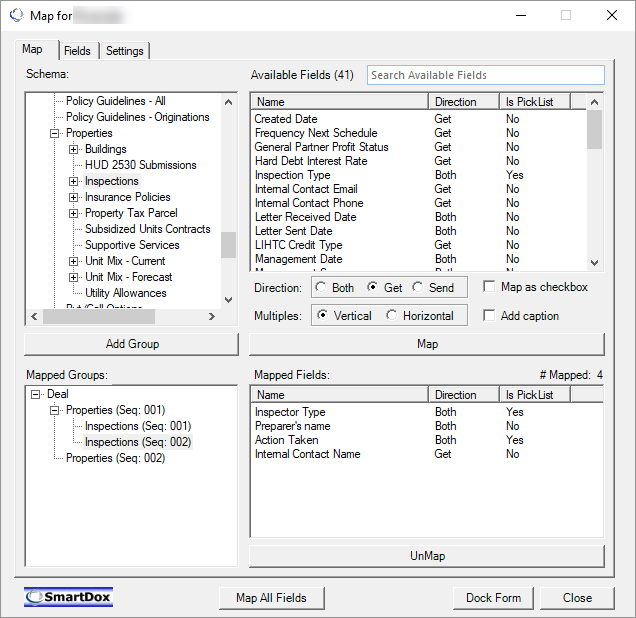
In the example, the Inspections Schema Group appears twice in the Mapped Groups section. Data points that are mapped to the template for the first Inspections Schema Group (Seq: 001) will represent data associated with the first Inspections record, while data points that are mapped to the template for the second Inspections Schema Group (Seq: 002) will represent data associated with the second Inspections record.
This can be repeated multiple times to display a fixed number of associated records with a one-to-many relationship.
Note
When one-to-many relationships are mapped using multiple copies of a Schema Group mapped to the template, the order that records will be retrieved from the ProLink application and placed into the template is determined by the configuration of the ProLink application.