GL Extract Processes and GL Extract Log Utility
Important
Your organization will need to work with ProLink to set up GL Extract functionality before you can use this functionality.
The GL Extract Log utility displays a history of the GL Extract processes—generation and transmission—over the past 120 days. The two GL Extract processes generate and transmit the GL Extract file, respectively. The generation process identifies entities to be reported in the GL Extract file and then generates the file, preparing it for transmission to the receiving system. The transmission process connects to the receiving SFTP server and delivers the file.
The GL Extract file contains financial data about entities that will be processed by your organization's accounting system to prepare financial reports. Information in the GL Extract file includes benefits, net equity, investment balance, unfunded commitment, and Investment Limited Partner (ILP) fee amounts received.
The GL Extract processes are console applications triggered by external scheduling software or a command line prompt. Each process will have its own log entries, which are listed in the GL Extract Log utility.
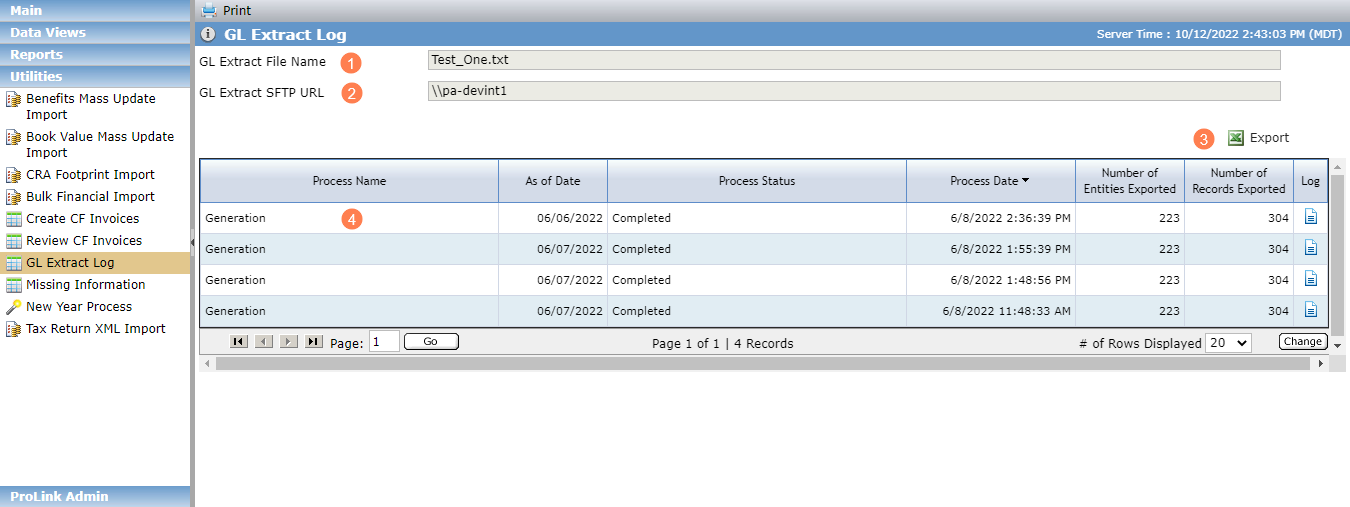
GL Extract File Name—Displays the GL Extract File Name from Config Settings.
GL Extract SFTP URL—Displays the GL Extract SFTP URL from Config Settings.
Export the grid details.
View the grid details (row click to download the latest GL Extract file generated for the As of Date of the row):
Process Name—Displays "Generation" for log rows created by the GL Extract Generation Process. Displays "Transmission" for log rows created by the GL Extract Transmission Process.
As of Date—The As of Date command line parameter passed to the console application.
Process Status—Processing, Completed, or Completed with Errors.
Process Date
Number of Entries Exported—Displays the total number of distinct entities represented in the generated or transmitted file.
Number of Records Exported—Displays the total number of Entity records (rows) in the generated or transmitted file, not including the header row or last row.
Click the log icon
 to download the log file.
The GL Extract Generation Process is a console application run by external scheduling software. On execution, the process will search the ProLinkAIM database for entity/deal combinations to be reported in the GL Extract file.
The console application accepts a single command-line parameter that represents the As of Date of the generated GL Extract file.
The system looks for distinct entity/deal combinations that meet the following criteria:
Deal is closed (Effective Date populated for the Actual Closing Admission Stage in the Status History grid on the Deal Details - Main tab).
Entity is on the finalized Ownership Schedule of the deal.
Exit Date for the entity is on or after the current system date.
For Admission Date for Sub-CDE, the earliest Admission Date of all the Sub-CDE's Owner entities in the Finalized Ownership Schedule is displayed.
The Exit Date for Sub-CDE is displayed only when all the Sub-CDEs in the finalized Ownership Schedule are exited (showing the latest Exit Date of all Sub-CDE Owner entities).
Entity has a populated GL Cost Center on the Edit Owner Entity or Edit Owned Entity popups.
Entity has Impairment Schedule selected on the Edit Owner Entity or Edit Owned Entity popups.
Using information from the associated deals, the process will create a pipe-delimited text file containing information necessary for the General Ledger.
The file will be stored in the system, waiting for the GL Extract Transmission Process to run to send the file to the receiving SFTP server.
The file will contain the following types of rows:
Federal Tax Credits—A single row for the deal/entity combination that displays the majority of information necessary for the deal/entity combination, including federal tax credit information.
State Tax Credits—One row for the deal/entity combination for each distinct State Tax Credit Sub-Type on the deal.
Other Tax Credits—One row for the deal/entity combination for each distinct Other Tax Credit Sub-Type on the deal.
Fee Amounts Received—One row for the deal/entity combination for each distinct Fee Type represented on Fee Distribution Priorities where the entity is the "Payable To."
In addition to generating the GL Extract file, the GL Extract Generation Process creates the snapshot GL account balances displayed on the Edit Impairments screen. The GL Account Balances grid on the Edit Impairments screen displays a row for the current information along with the snapshots from previous months. With each execution, a snapshot of GL account balances will be taken or updated, and snapshots over 120 days old will be deleted. See Impairments for more information about impairments.
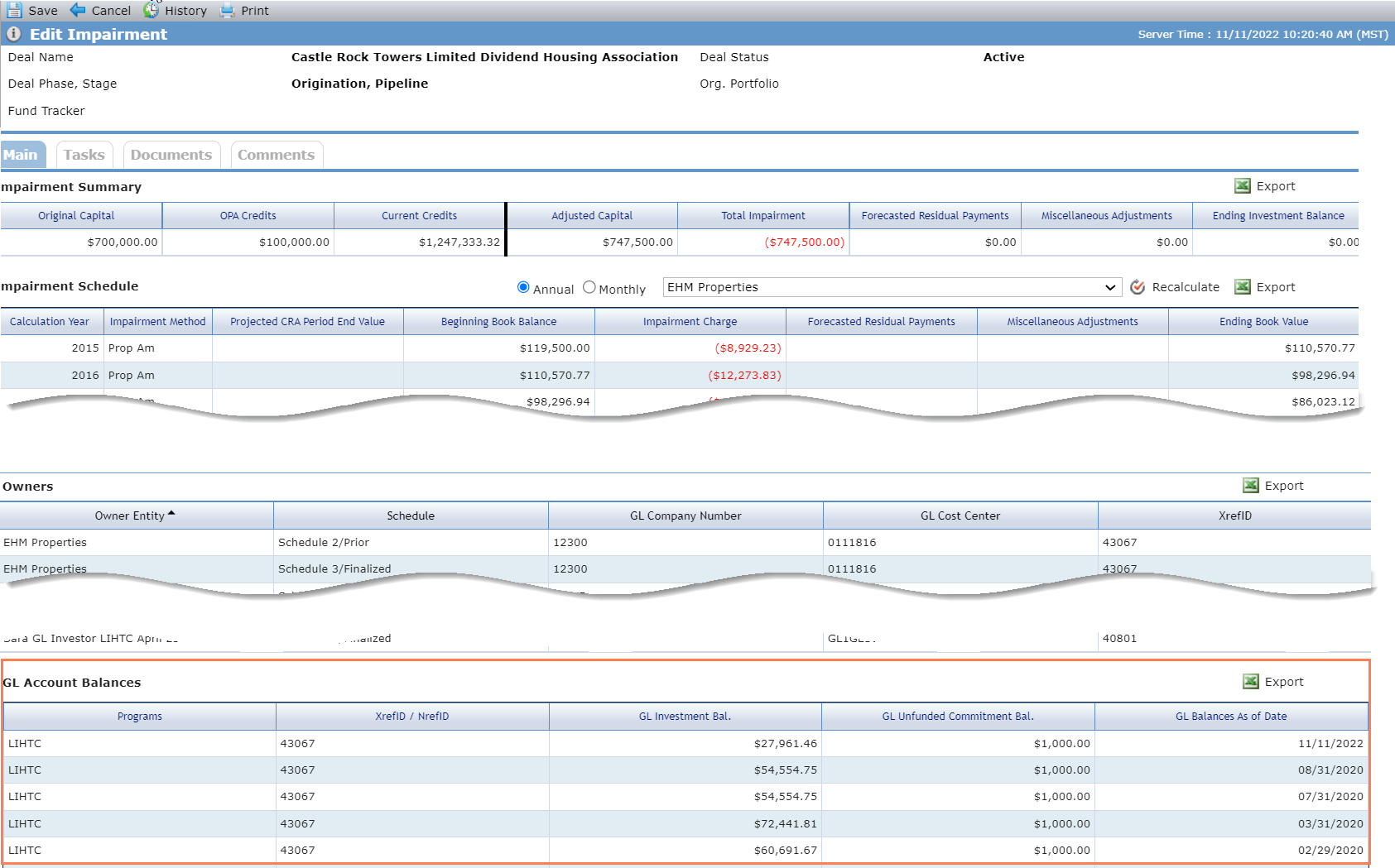
GL Account Snapshot on the Edit Impairments Screen
When the process runs with an As of Date that is the last calendar day of the month, the values of GL Investment Balance and GL Unfunded Commitment from the Federal Tax Credits row for each entity/deal will be snapshot as of the As of Date. The snapshot includes the following details:
GL Investment Balance
GL Unfunded Commitment
As of Date
Comma-delimited list of programs selected on the Benefits Schedule
XrefID/NrefID of the entity
Column | Description |
|---|---|
DIVISION | Hardcoded value |
PROCESS_STATUS | For all entity/deal rows, "N" For the last row, "T" for trailing |
STATUS_MESSAGE | Empty |
EVENT_CLASS | Hardcoded value |
EVENT_TYPE | Hardcoded value |
PROCESS_CATEGORY | PROLINK |
SOURCE_TRAN_CODE | PROLINK |
CURRENCY | USD |
TRANSACTION_DATE | The date passed to the GL Extract Generation process |
CHECK_VALUE | For all entity/deal rows, "1" For the last row, the number of entity/deal rows in the file |
CREATED_DATE | Empty |
CREATED_BY | Empty |
TRANSACTION_DESC | For all entity/deal rows, empty For the last row, CHECK_SUM |
DR_AMOUNT | Empty |
CR_AMOUNT | Empty |
AMOUNT | Empty |
STAT_AMOUNT | Empty |
GL_BUSINESS_UNIT | For all entity/deal rows, the GL Company Number from Edit Entity - Accounts tab for the entity For the last row, empty |
GL_ACCOUNT | Empty |
GL_DEPARTMENT | For all entity/deal rows, the GL Cost Center from the Edit Owner Entity/Edit Owned Entity popups (Ownership Structure) For the last row, empty |
GL_ACQ_ID | Empty |
GL_AFFILIATE | Empty |
GL_BOOK_CODE | Empty |
_START_CHARS_ | _SC_ |
XrefID or NRefID | For all entity/deal rows, the XRefID or NrefID of the entity from the Edit Owner Entity/Edit Owned Entity popups (Ownership Structure) For the last row, empty |
DEAL TYPE | For all entity/deal rows, the value of the Deal Type field from the Deal Details screen For the last row, empty |
OWNER ENTITY NAME | For all entity/deal rows, the name of the entity in the row from the Edit Entity - Main tab For the last row, empty |
DEAL NAME | For all entity/deal rows, the deal name of the deal in the row from the Deal Details - Main tab For the last row, empty |
FEE TYPE | For Fee Amounts Received rows, the Fee Type associated with the row (from Cash Flow Distribution Priority) For all other entity/deal rows and the last row, empty |
PAYABLE TO | For Fee Amounts Received rows, the Payable To associated with the Fee Distribution Priority of the row (from Cash Flow Distribution Priority) For all other entity/deal rows and the last row, empty |
STC SUB TYPE | For State Tax Credits rows, the Sub-Type from the Total Benefits - STC grid on the Benefits Schedule - Total Benefits tab For all other entity/deal rows and the last row, empty |
OTHER SUB TYPE | For Other Tax Credits rows, the Sub-Type from the Total Benefits - Other grid on the Benefits Schedule - Total Benefits tab For all other entity/deal rows and the last row, empty |
IMPAIRMENT METHOD | For all entity/deal rows, the Impairment Method from the Deal Details - Main tab For the last row, empty |
OTHER IMPAIRMENT METHOD | For all entity/deal rows, the Other Impairment Method from the Deail Details - Main tab For the last row, empty |
_END_CHARS_ | _EC_ |
_START_NUMS_ | _SN_ |
TOTAL CAPITAL | For the Federal Tax Credits entity/deal row, the Total Capital for the entity of the row from the Equity Schedule For all other entity/deal rows and the last row, empty |
ADJUSTERS APPLIED | For the Federal Tax Credits entity/deal row, the Adjusters Applied for the entity of the row from the Equity Schedule For all other entity/deal rows and the last row, empty |
ADJUSTED CAPITAL | For the Federal Tax Credits entity/deal row, the Adjusted Capital for the entity of the row from the Equity Schedule For all other entity/deal rows and the last row, empty |
FUNDED AMOUNT | For the Federal Tax Credits entity/deal row, the Funded Amount for the entity of the row from the Equity Schedule For all other entity/deal rows and the last row, empty |
UNFUNDED AMOUNT | For the Federal Tax Credits entity/deal row, the Unfunded Amountfor the entity of the row from the Equity Schedule For all other entity/deal rows and the last row, empty |
TOTAL CALCULATED ADJUSTERS | For the Federal Tax Credits entity/deal row, the Total Calculated Adjusters for the entity of the row from the Equity Schedule For all other entity/deal rows and the last row, empty |
APPLIED ADJUSTERS | For the Federal Tax Credits entity/deal row, the Applied Adjuster for the entity of the row from the Equity Schedule For all other entity/deal rows and the last row, empty |
WAIVED ADJUSTERS | For the Federal Tax Credits entity/deal row, the Waived Adjuster for the entity of the row from the Equity Schedule For all other entity/deal rows and the last row, empty |
UNAPPLIED ADJUSTER | For the Federal Tax Credits entity/deal row, the Unapplied Adjuster for the entity of the row from the Equity Schedule For all other entity/deal rows and the last row, empty |
NET EQUITY | For the Federal Tax Credits entity/deal row, the sum of the Net Equity field from Edit QEI - Main tab for all QEIs where the entity of the row is selected as the To Entity of the QEI For all other entity/deal rows and the last row, empty |
IMPAIRMENT CHARGE | For the Federal Tax Credits entity/deal row, the monthly Impairment Charge value for the month/year of the As of Date from the monthly Impairment Schedule for the entity of the row For all other entity/deal rows and the last row, empty |
LIHTC FEDERAL TAX CREDITS EXPECTED | For Federal Tax Credits entity/deal rows, the Expected Credits for the month/year of the As of Date from the monthly LIHTC Federal Credits grid for the row entity from the Benefits Schedule - Benefits Schedule tab For all other entity/deal rows and the last row, empty |
HISTORIC FEDERAL TAX CREDITS EXPECTED | For Federal Tax Credits entity/deal rows, the Current Credits for the month/year of the As of Date from the monthly HTC Federal Credits grid for the row entity from the Benefits Schedule - Benefits tab For all other entity/deal rows and the last row, empty |
NEW MARKETS FEDERAL TAX CREDITS EXPECTED | For Federal Tax Credits entity/deal rows, the Current Credits for the month/year of the As of Date from the monthly NMTC Federal Credits grid for the row entity from the Benefits Schedule - Benefits tab For all other entity/deal rows and the last row, empty |
STATE TAX CREDITS | For State Tax Credits rows, the Current Credits for the month/year of the As of Date from Edit Benefits Schedule - Monthly View tab for the STC Sub-Type of the row for the entity For all other entity/deal rows and the last row, empty |
OTHER TAX CREDITS | For Other Tax Credits rows, the Current Credits for the month/year of the As of Date from Edit Benefits Schedule - Monthly View tab for the Other Sub-Type of the row for the entity For all other entity/deal rows and the last row, empty |
ILP FEE AMOUNT RECEIVED | For Fee Amounts Received rows, the sum of Fee Amount Received from Edit Fee Distribution Priority - Main tab for all Fee Distribution Priority records (all years) on the deal with Fee Type equal to the row Fee Type and the Payable To entity equal to the row entity |
MISCELLANEOUS ADJUSTMENT | For Federal Tax Credits entity/deal rows, the monthly Miscellaneous Adjustments value for the month/year of the As of Date from the monthly Impairment Schedule for the entity of the row For all other entity/deal rows and the last row, empty |
GL INVESTMENT BALANCE | For Federal Tax Credits entity/deal rows: If the deal includes the LIHTC program, value calculated as Total Adjusted Capital + Unapplied Adjusters + <LTD Impairment> + <LTD Miscellaneous Adjustments>
<LTD Impairment> = sum of all monthly Impairment Charge values from the monthly Impairment Schedule for the row entity for all months/years prior to and including the month of the As of Date <LTD Miscellaneous Adjustments> = sum of all monthly Miscellaneous Adjustments values from the monthly Impairment Schedule for the row entity for all months prior to and including the month of the As of Date <Total Fee Amounts Received> = sum of all Fee Amount Received from Edit Fee Distribution Priority - Main tab for all Fee Distribution Priority records (all years) on the deal with the Payable To entity equal to the row entity, and the Fee Type equal to Preferred Returns, Priority Returns, Residual Cash Flow, Special Tax Distributions, or Exit Proceeds GL Investment balance cannot be less than zero. If the calculated value is less than zero, it is reported as zero. For all other entity/deal rows and the last row, empty |
GL UNFUNDED COMMITMENT BALANCE | For Federal Tax Credits entity/deal rows, calculated as Total Adjusted Capital + Unapplied Adjusters - Funded Amount Total Adjusted Capital, Unapplied Adjusters, and Funded Amount are the Owner-level values for the entity of the row (from the Equity Schedule) For all other entity/deal rows and the last row, empty |
_END_NUMS_ | _EN_ |
_START_DATES_ | _SD_ |
ADMISSION DATE | For entity/deal rows where the entity is an Owner entity on the deal, the Admission Date of the entity from the Edit Owner Entity popup (Ownership Structure) For Sub-CDE Owned entities, the earliest Admission Date from the Sub-CDE's Owners' date in the Finalized Schedule For the last row, empty |
EXIT DATE | For entity/deal rows where the entity is an Owner entity on the deal, the Exit Date of the entity from the Edit Owner Entity popup (Ownership Structure) For Sub-CDE Owned entities, the latest Exit Date of all owners, if all the Sub-CDE's Owners in the finalized schedule are exited For the last row, empty |
PLACED IN SERVICE DATE | For all entity/deal rows on deals that include the HTC or STC-HTC programs, the Placed In Service Date field from Deal Details - HTC tab |
_END_DATES_ | _ED_ |
The log file for the GL Extract Generation Process displays the deals and owners for which data is extracted. The log file includes a message indicating that the file was generated, the As of Date, the time the process started, and the time the process completed. Keep in mind that the data is not ordered by deal.
The GL Extract Transmission Process is a console application that will be executed by external scheduling software. With each execution, the process will look for the file, connect to the SFTP server, and send the file to the SFTP server location specified in the SFTP URL.
The console application accepts the As of Date of a generated GL Extract file to send to an SFTP server specified in Config Settings. The process connects to the SFTP server specified in the GL Extract SFTP URL field from Config Settings using the GL Extract SFTP Username and Password (also in ProLink Admin Config Settings).
If the process finds a GL Extract file has been generated by the GL Extract Generation Process for the As of Date, then the GL Extract Transmission Process sends the file to the location in the SFTP URL.
The log file for the GL Extract Transmission Process includes a message indicating if a file was generated by the GL Extract Generation Process, the As of Date, the SFTP URL, the SFTP Username, the time the process started, and the time the process completed.