Introduction to New Market Tax Credits (NMTC) in ProLinkAIM
The New Markets Tax Credit (NMTC) program is administered by the CDFI Fund, created in 1994 to promote economic revitalization in underserved communities. The program provides tax credit allocations to Community Development Entities (CDEs), which then attract private capital from investors and deploy it into Qualified Active Low‑Income Community Businesses (QALICBs). CDEs act as financial intermediaries, channeling investor equity into low‑income communities through Qualified Low‑Income Community Investments (QLICIs).
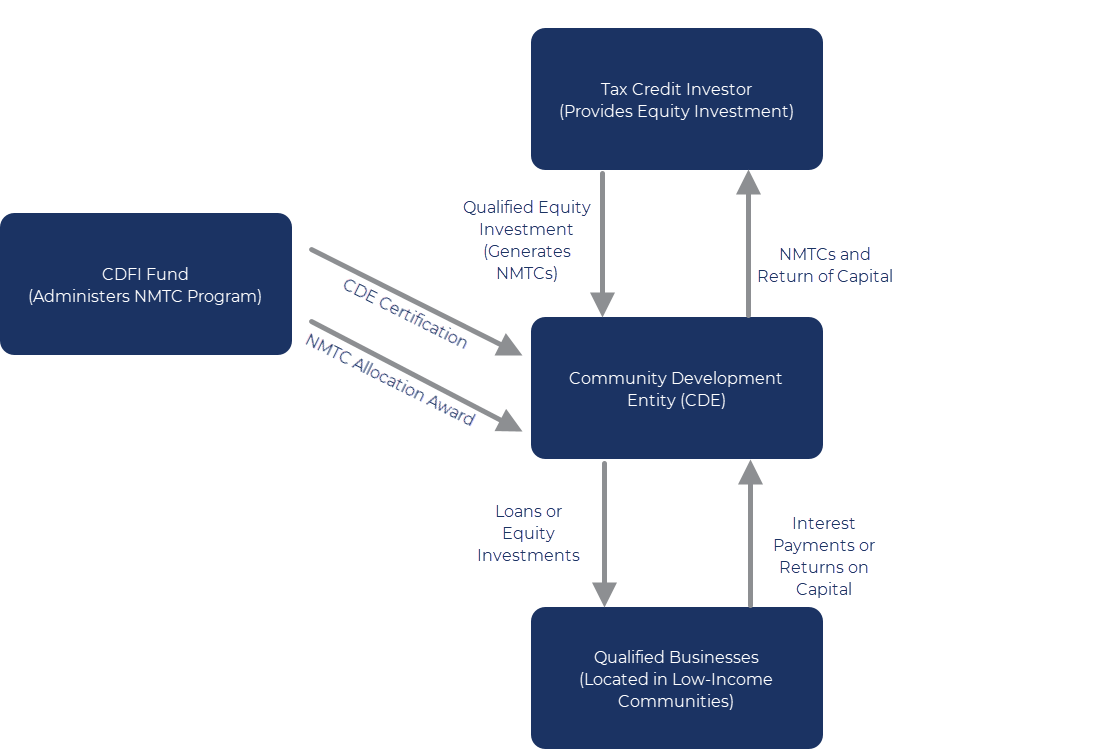
NMTC deals in ProLinkAIM can follow one of two execution methods:
Direct Investment Model—In this structure, the CDE receives a QEI directly from the investor and makes a QLICI to the QALICB.
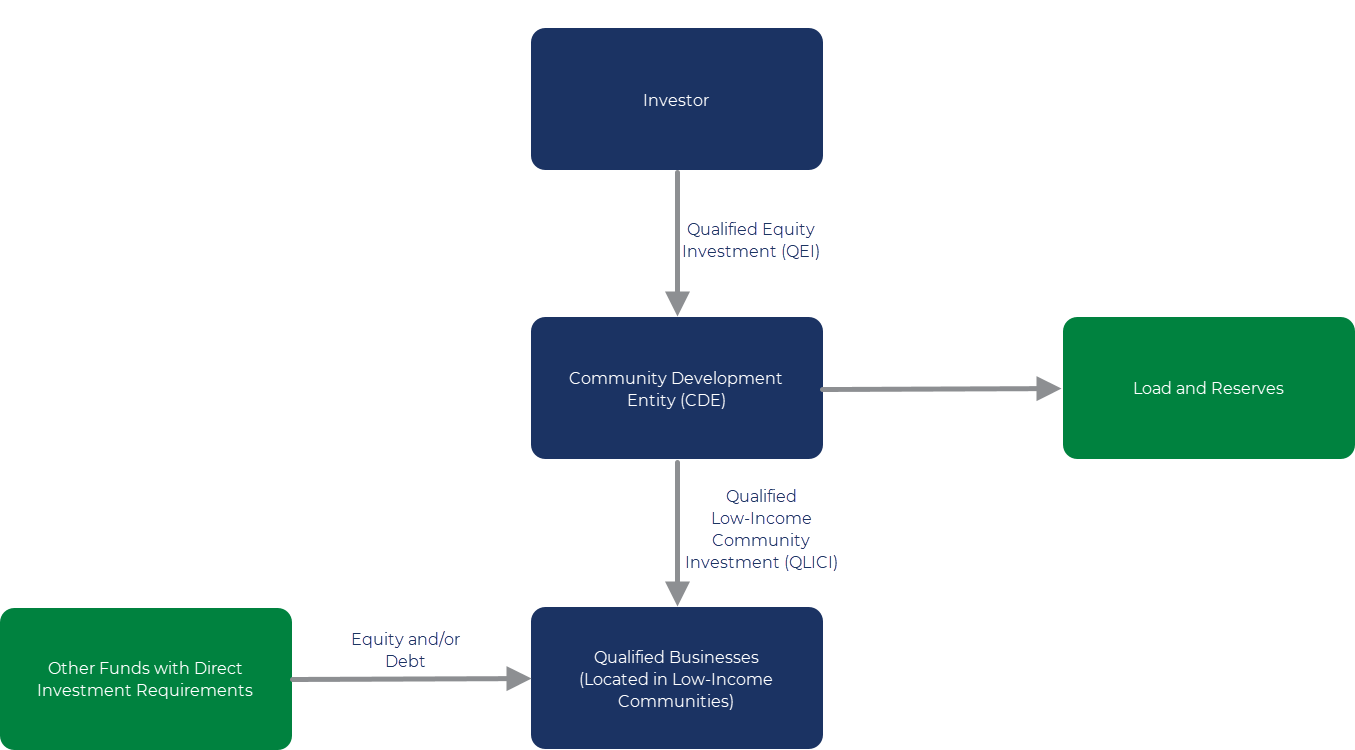
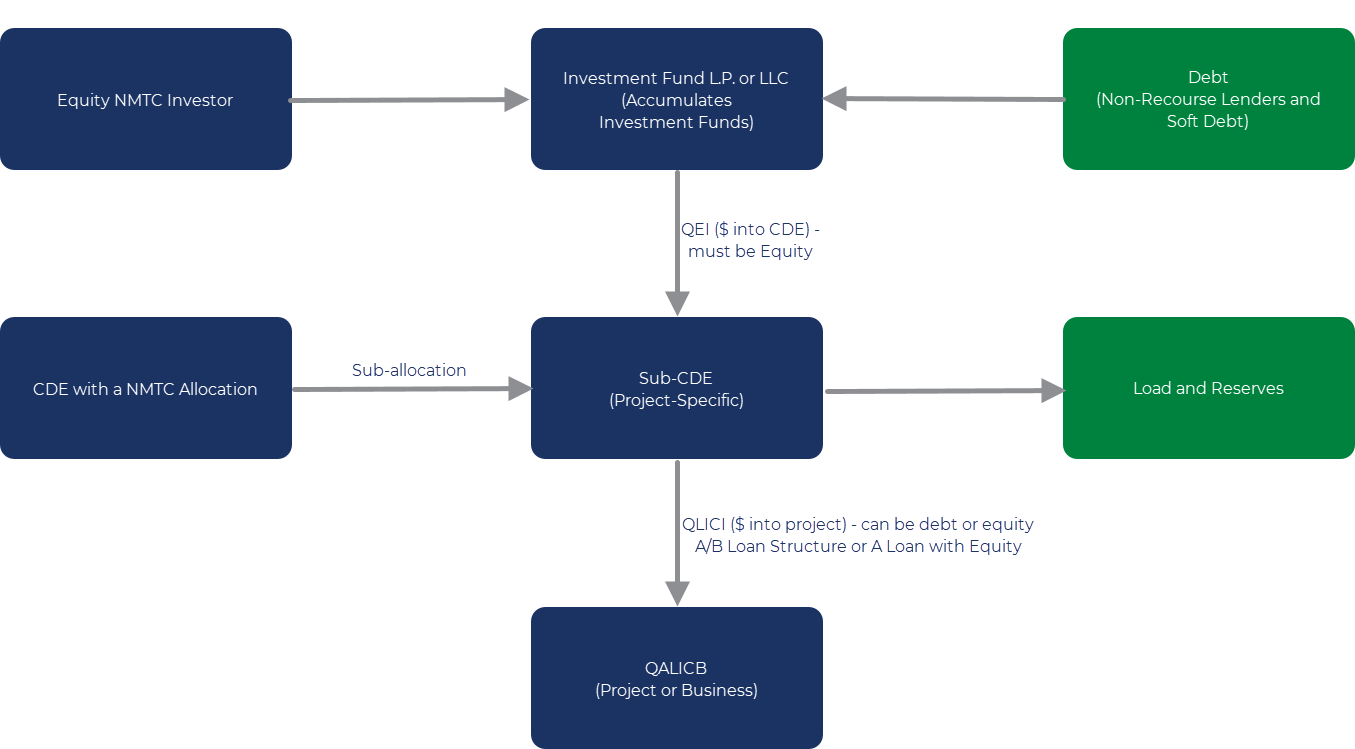
Leveraged Investment Model—This is the most common structure. It includes:
An investment fund that pools investor equity and leveraged debt
A Sub-CDE that receives the QEI
One or more QLICI loans or equity investments to the QALICB
NMTC Across ProLinkAIM
When a deal is created as NMTC, the system automatically adds NMTC-specific screens and tabs:
NMTC Summary
Important
Security privileges control whether you can add, modify, or delete QEIs and QLICIs.
The Deal – NMTC Summary – Modify security privilege is required to add or modify QEIs or QLICIs.
The Deal – NMTC Summary – Delete security privilege is required to delete QEIs or QLICIs.
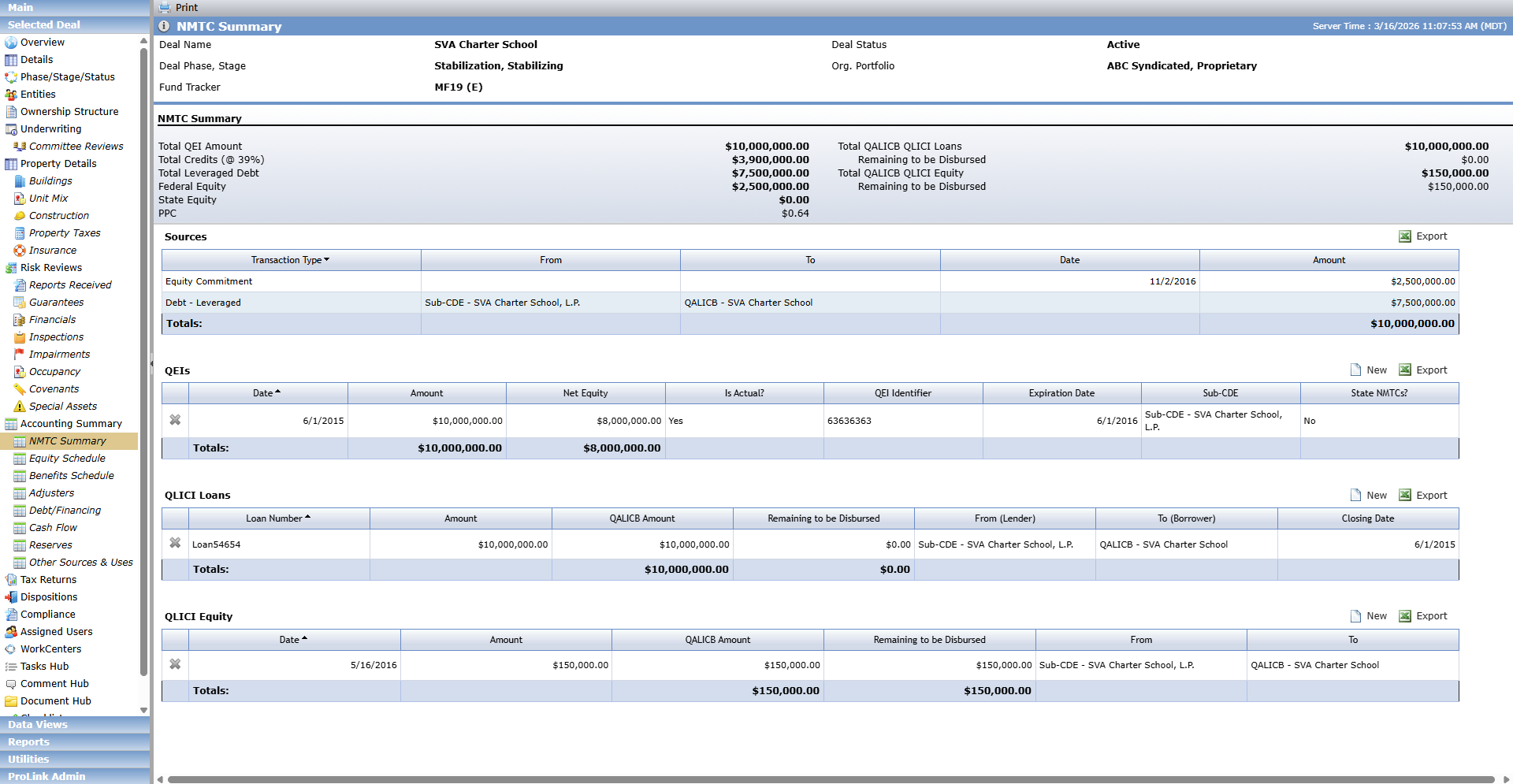
The NMTC Summary screen consolidates all NMTC-related financial components of the deal, including:
Summary Section
This section displays a summary view of the details in the grids on the screen.
Field | Description |
|---|---|
NoteIf applicable, the screen displays a warning message if the Remaining to be Disbursed Amount on any QEIs is negative. This condition can exist if the sum of all Source Amounts for the QEI on all Disbursements is greater than the Actual Amount, or the Projected Amount, on the QEI. The warning message will not prevent any action to be taken on the screen. | |
Total QEI Amount | The Total Amount from the QEIs grid. |
Total Credits (@NMTC Tax Credit Rate) | The calculated value of Total QEI. |
Total Leveraged Debt | The sum of the Amount column for all Debt – Leveraged records from the Sources grid. |
Federal Equity | The sum of the Amount column for all Equity Commitment records from the Sources grid minus the State Equity. |
State Equity | Basis times PPC (STC-NMTC grid on Total Benefits). |
PPC | The calculated value of the Federal Equity divided by Total Credits. |
Total QALICB QLICI Loans | The Total Amount from the QLICI Loans grid. |
Remaining to be Disbursed (QLICI Loans) | The Total Remaining to be Disbursed from the QLICI Equity grid. |
Total QALICB QLICI Equity | The Total Amount from the QLICI Equity grid. |
Remaining to be Disbursed (QLICI Equity) | The Total Remaining to be Disbursed from the QLICI Equity grid. |
Sources
The Sources grid on the NMTC Summary screen displays:
OPA Commitments where Program = NMTC
Click a row to navigate to the corresponding Edit OPA Commitment screen.
Debt records where Loan Type = Leveraged
Click a row to navigate to the corresponding Edit Debt Details screen.
QEIs
A QEI is the actual cash investment made by the investor to the CDE, which is the first step in defining a QEI. This cash investment eventually qualifies for the NMTC, provided that the CDE makes qualified low-income community investments (QLICIs). A QEI is, in general, any equity investment if:
Such investment is acquired by the investor at its original issue (directly or through an underwriter) solely in exchange for cash
Substantially all (at least 85%) of the cash is used by the CDE to make qualified low-income community investments (QLICIs)
The investment is designated by the CDE as a QEI on its books and records using any reasonable method.
The QEIs grid displays all QEIs on the deal, sorted by date.
The Date and Amount columns show actual values when available; otherwise, projected values are displayed.
Add a QEI
Click New above the grid to add a QEI record.
Edit a QEI
From the NMTC Summary screen, click a row in the QEI grid to navigate to the Edit QEI screen, which allows you to maintain the specific details of the QEI.
The Main tab includes a summary of the compliance information, which is used to validate that the equity investment continues to qualify as a QEI. QEI amounts and dates are used to calculate Benefits for the owners of the Sub-CDE on the QEI.
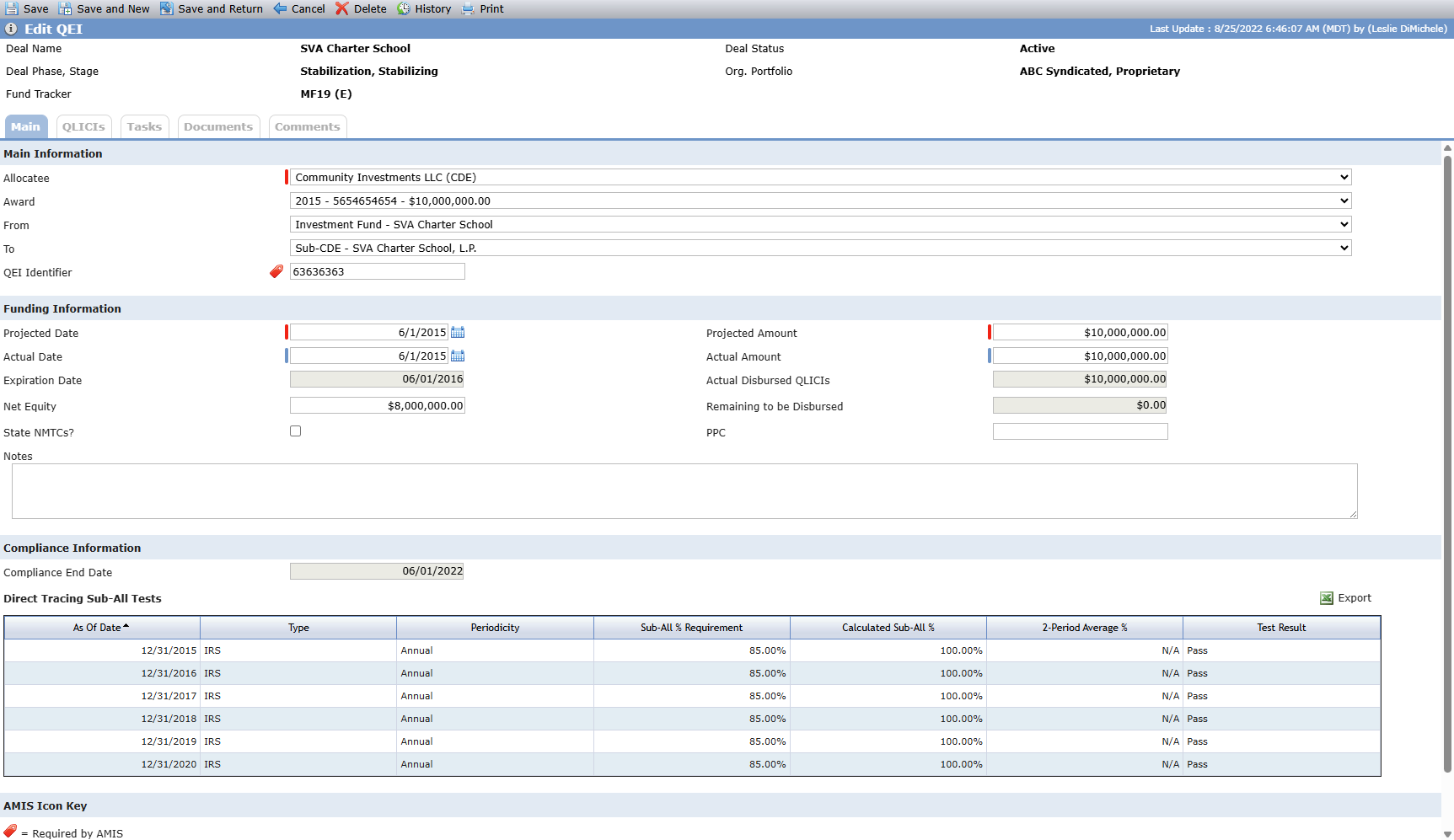
Field | Description |
|---|---|
Main Information | |
Allocatee | Required. Select from the deal's Associated Company entities with a Deal Role of Allocatee. |
Awards | Select from the list of the awards from the NMTC tab on the Allocatee's Entity record. |
From (entity) | Select from all deal entities. Typically the Investment Fund on the deal. |
To (entity) | Select from all deal entities. Typically a Sub-CDE on the deal. |
QEI Identifier | AMIS required field |
Funding Information When you update Projected Amount, Actual Amount, Projected Date, or Actual Date, the system will automatically recalculate the Benefits based on the updated information. | |
Projected Date | Required. |
Projected Amount | Required. |
Actual Date | Conditionally required when the Actual Amount is entered. |
Actual Amount | Conditionally required when the Actual Date is entered. |
Expiration Date | Read-only field. Populated by adding one year to the Actual Date. |
Actual Disbursed QLICIs | The sum of the Source Amount for the QEI on all Disbursements on the QLICI Loans and QLICI Equity where the QEI is selected. |
Remaining to be Disbursed | The Actual Amount (or Projected) minus the Actual Disbursed QLICIs. The screen displays a warning message if the Remaining to be Disbursed amount is negative. |
State NMTC | When selected, additional fields become available. |
Compliance Information | |
Compliance End Date | The Actual Date plus seven years. |
Direct Tracing Sub-All Tests | |
This section lists the Sub-All Test records that exist for the QEI, sorted by As of Date. You can add, edit, and delete these records through ProLinkAIM Compliance. Click a row in the grid to navigate to the corresponding Direct Tracing Sub-All Test record. | |
Edit QEI - QLICIs Tab
QLICIs (Qualified Low Income Community Investments) are the actual payments made to the QALICB (Qualified Active Low Income Community Business) by the Sub-CDE. A QLICI can either be a Loan that will be repaid to the QEI, or can be an investment that gives the QEI an ownership stake (equity) in the QALICB.
The QLICIs tab on Edit QEI displays the QLICI Equity and QLICI Loan records to which the QEI is related. The relationship between the QEI and a QLICI is established by selecting the QEI as the Source on a Disbursement record on a QLICI Loan or QLICI Equity transaction.
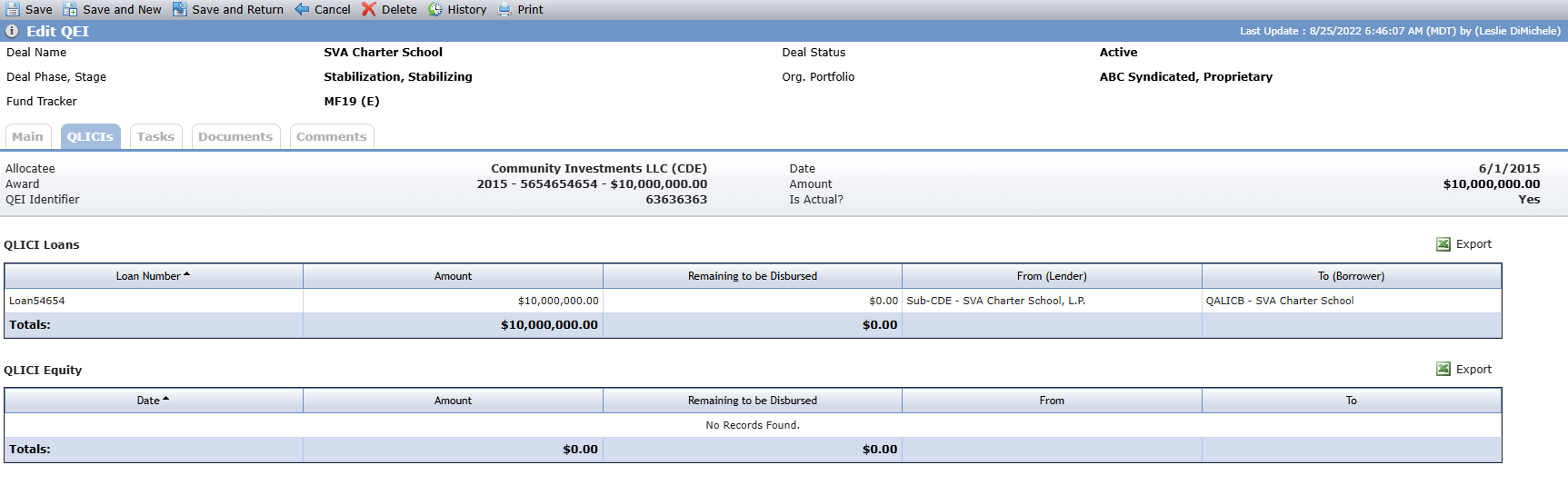
The QLICI Loan grid displays all Debt Detail records where at least one Disbursement exists, and the QEI is selected as a Source. The Remaining to be Disbursed displays the Amount minus the Total Amount from the Disbursements grid on the Edit Debt Details - Disbursements tab.
The QLICI Equity grid displays all QLICI Equity records where at least one Disbursement exists, and the QEI is selected as a Source. The Remaining to be Disbursed displays the Amount minus the Total Amount from the Disbursements grid on the Edit QLICI Equity screen.
Delete a QEI
One QEI is required on a NMTC deal. If only one QEI exists, it cannot be deleted.
Click the X in the row of the record to delete, and then confirm the deletion.
QLICI Loans
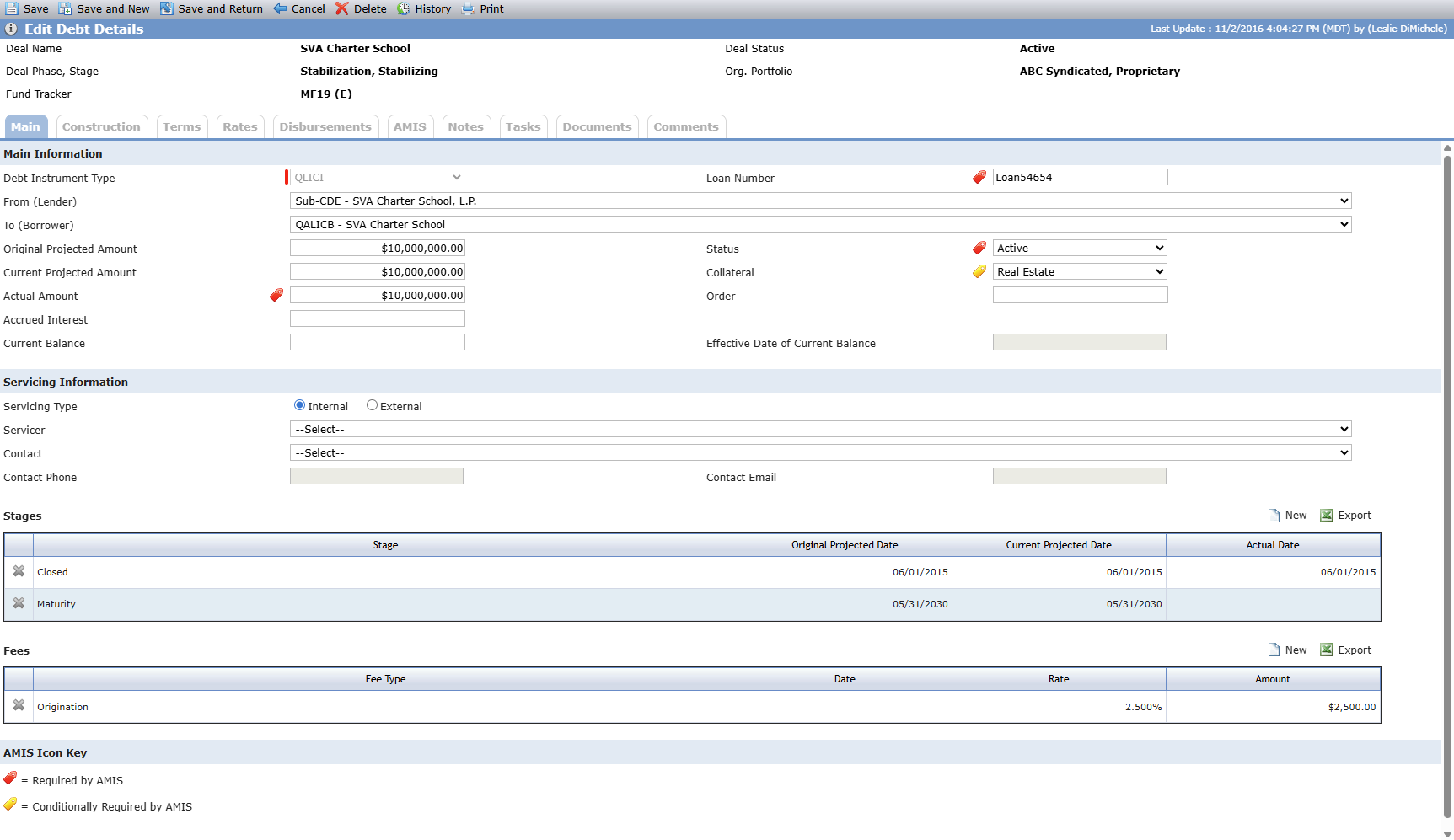
The QLICI Loans grid displays all the Debt Detail records with Loan Type = QLICI (QLICI, QLICI-A – QLICI-F) on the deal, sorted by Loan Number. For more information about Debt Details, see Debt/Financing.
Remaining to be Disbursed is a calculated field that displays the Amount (either Actual or Projected) minus the Total Amount from Disbursements on Edit Debt Details - Disbursements tab. It does not include negative disbursement amounts.
If the QLICI Loan detail record has a Stages record (on Edit Debt Details) with a Stage = Closed, the Close Date in the grid will be populated based on these scenarios:
Actual Date, if available
If Actual Date is not populated, Current Projected Date
If Current Projected Date is not populated, the Original Projected Date
Add a QLICI Loan
Click New above the grid to add a QLICI Loan record.
Edit a QLICI Loan
From the NMTC Summary screen, click a row in the QLICI Loans grid to navigate to the corresponding Edit Debt Details screen.
Delete a QLICI Loan
Click the X in the row of the record to delete, and then confirm the deletion.
QLICI Equity
QLICI Equity is normally given from the Sub-CDE, either directly to the QALICB, or to an Intermediary CDE. The Equity, if passed through an Intermediary CDE, will eventually go to the QALICB. The total amount of the QLICI is tracked in the Projected Amount and Actual Amount fields, and the actual movement of funds (e.g. wire transfers) is tracked for a single, or multiple, disbursements.
The QLICI Equity grid displays all the QLICI Equity records that exist on the deal, sorted by date.
Remaining to be Disbursed is a calculated field that displays the Amount (Actual or Projected) minus the Total Amount from the Disbursements grid on the Edit QLICI Equity screen. It does not include negative disbursement amounts.
The Total Amount in the Totals row is a calculated field that displays the sum of the Amount field for all records in the grid.
The Total Remain to be Disbursed in the Totals row is a calculated field that dispalys the sum of the Remaining to be Disbursed fields for all records in the grid.
Add a QLICI Equity Record
Click New above the grid to add a QLICI Equity record
Edit a QLICI Equity Record
From the NMTC Summary screen, click a row in the QLICI Equity grid to navigate to the Edit QLICI Equity screen.
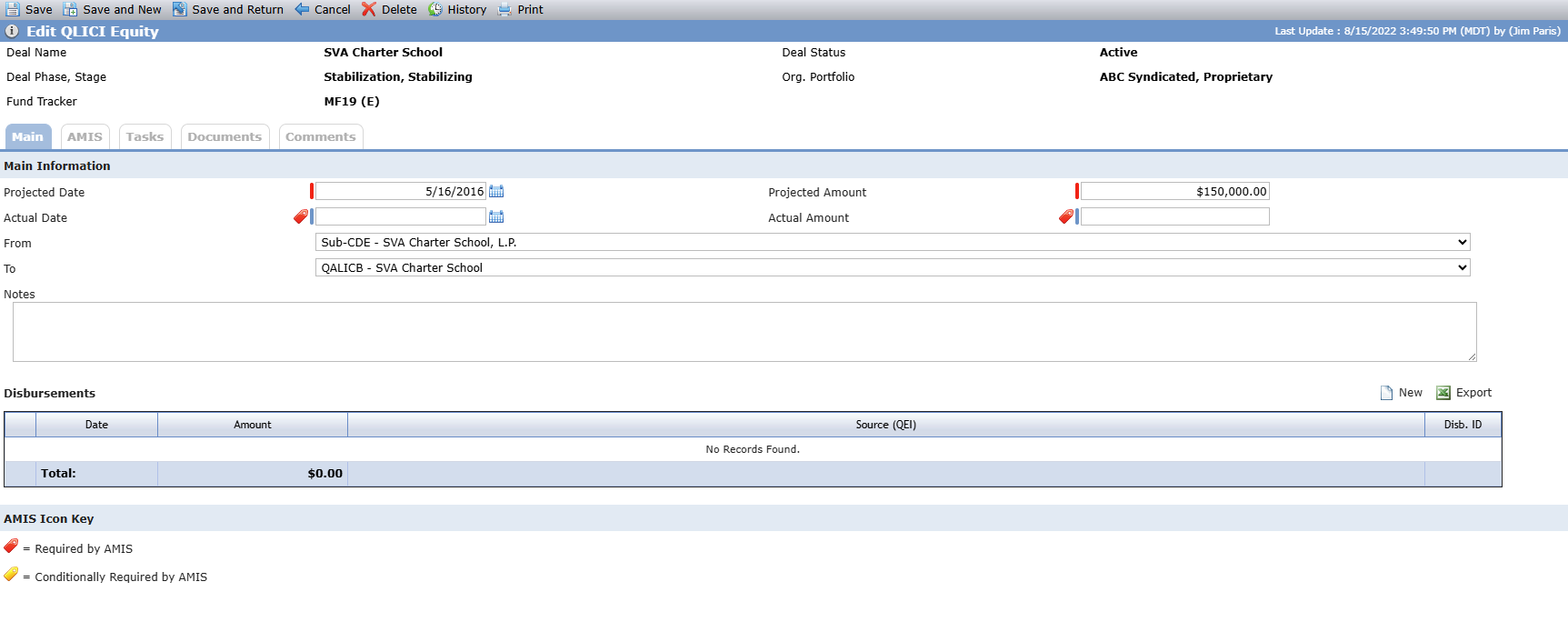
Field | Description |
|---|---|
Projected Date | Required. |
Projected Amount | Required. |
Actual Date | Required when the Actual Date is populated. AMIS required field |
Actual Amount | Required when the Actual Amount is populated. AMIS required field |
From (entity) | Select from all deal entities. Typically, the Sub-CDE on the deal. |
To (entity) | Select from all deal entities. Typically, an intermediary CDE or a QALICB on the deal. |
Edit QLICI Equity - Disbursements Grid
The Disbursements grid shows all disbursements that have been made for the QLICI.

Click New above the grid to add a Disbursement record.
Click a row to open the Disbursement record.
Click the X in the row of the record to delete, and then confirm the deletion.
The Edit Disbursement screen allows you to capture the details of the disbursement of the QLICI Equity to the Intermediary CDE or QALICB.
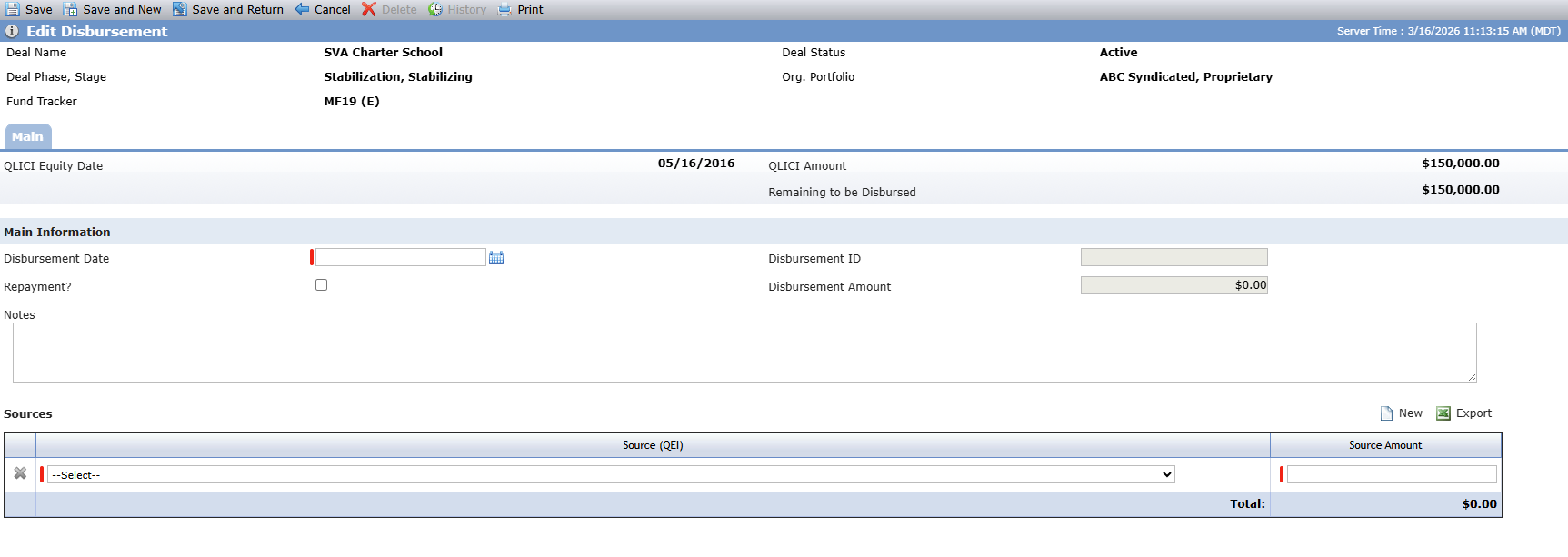
The screen displays warning messages when:
The sum of all Disbursement Amounts on the QLICI Equity is greater than the QLICI Equity Amount (Actual Amount, if populated, else Projected Amount).
The Remaining amount for any QEIs selected on the Disbursement is negative (the sum of all Source Amounts for the QEI on all Disbursements (on both QLICI Loans and QLICI Equity records) is greater than the Actual/Projected Amount on Edit QEI.
Field | Description |
|---|---|
QLICI Equity Date | Read-only field that displays the Actual Date from the QLICI Equity record; otherwise, the Projected Date. |
QLICI Amount | Read-only field that displays the Actual Amount from the QLICI Equity record; otherwise, the Projected Amount. |
Remaining to be Disbursed | The QLICI Amount minus the sum of all Disbursement Amounts on all Disbursements on the QLICI Equity. |
Disbursement Date | Required. |
Disbursement ID | Read-only field that is blank until you save the record. System-assigned, unique identifier for the disbursement. The ID is used for AMIS reporting when there is more than one disbursement for the QLICI. |
Repayment | Indicate whether the Disbursement should be included in the total amount disbursed, or whether the amount should be added back in to the Remaining Amount. The Repayment Amount must be entered as a negative amount in order for the Remaining Amount to calculate correctly and include (add back in) the repayment amount. Negative amounts are not included in either the Remaining to be Disbursed amount on the NMTC Summary screen or the Principal Balance Outstanding reported on the TLR. |
Disbursement Amount | Read-only field that is populated after a Source Amount is saved. |
Source (QEI) | Required. Select from the QEIs that exist on the NMTC Summary screen for the deal. |
Source Amount | Required. |
Edit QLICI Equity - AMIS Tab
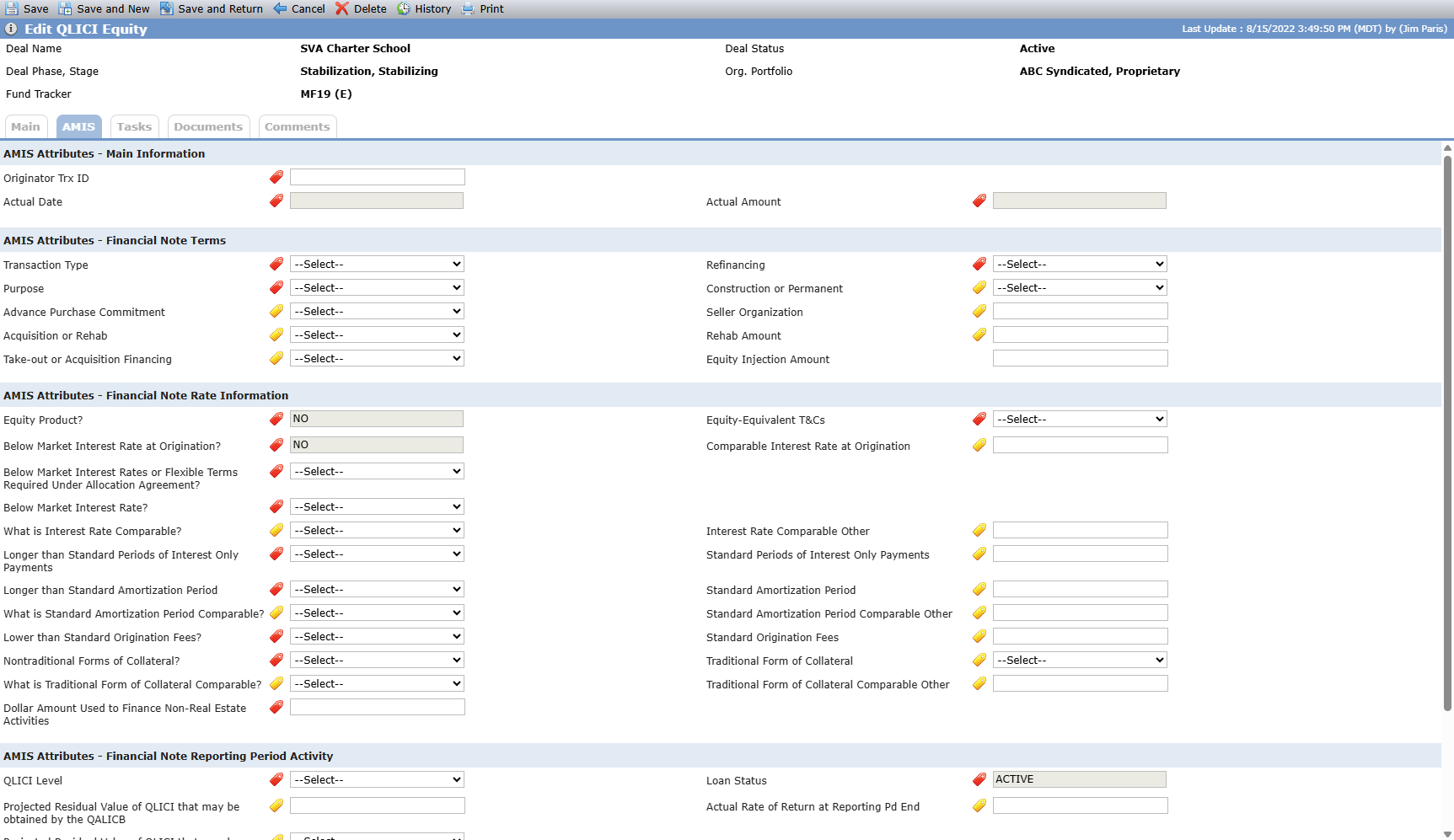
The Edit QLICI Equity – AMIS tab allows you to maintain information about a QLICI Equity that may be required for reporting to the Awards Management Information System (AMIS).
Fields that are required for AMIS reporting display the red icon  . Fields that are conditionally required display the yellow icon
  .
.
Field | Description |
|---|---|
Main Information | |
Originator Trx ID | AMIS required field |
Actual Date | AMIS required field Actual Date from Edit QLICI Equity - Main tab. |
Actual Amount | AMIS required field Actual Amount from the Edit QLICI Equity - Main tab. |
Financial Note Terms | |
Transaction Type | AMIS required field |
Refinancing | AMIS required field |
Purpose | AMIS required field |
Construction or Permanent | Conditionally required if the Purpose is RECOCOM. If Take-out or Acquisition Financing is ACQUISITION, this must be set to PERMANENT. |
Advanced Purchase Commitment | Conditionally required if the QLICI Type is QALICB. |
Seller Organization | Conditionally required if the Advance Purchase Commitment is YES. |
Acquisition or Rehab | Conditionally required if the Purpose is RERHCO. |
Rehab Amount | Conditionally required if the Acquisition or Rehabilitation is ACQUISITIONREHAB. |
Take-out or Acquisition Financing | Conditionally required if the Construction or Permanent Financing is PERMANENT or BOTH. |
Equity Injection Amount | User-entry field. |
Financial Note Rate Information | |
Equity Product | AMIS required field Read-only field that will be populated with YES if the Transaction Type is EQTYINV. If the Transaction Type is not EQTYINV, it will be populated with NO. |
Equity-Equivalent T&Cs | AMIS required field |
Below Market Interest Rate at Origination | AMIS required field Read-only field that will be populated with NA if the Equity Product field is YES. If the Equity Product field is not NA, this will be set to NO. The transaction will reject if the option is YES and the Interest Rate at Origination is greater than, or equal to, the Comparable Interest Rate at Origination. |
Comparable Interest Rate at Origination | Conditionally required field if the Below Market Interest Rate at Origination is YES. The Comparable Interest Rate at Origination must be greater than the Interest Rate at Origination. |
Below Market Interest Rates or Flexible Terms Required Under Allocation Agreement | AMIS required field |
Below Market Interest Rate | AMIS required field If the Transaction Type is Term Loan, Line of Credit, or Debt with Equity, the value must be YES or NO. |
What is Interest Rate Comparable | Conditionally required field if the Below Market Interest Rate is YES. |
Interest Rate Comparable Other | Conditionally required field if What is Interest Rate Comparable is OTHER. |
Longer than Standard Periods of Interest Only Payments | AMIS required field If the Transaction Type is Term Loan, Line of Credit, or Debt with Equity or Other, the value must be YES or NO. |
Standard Periods of Interest Only Payments | Conditionally required field if Longer than Standard Period of Interest Only Payments is YES. The Standard Period of Interest Only Payments must be less than the Period of Interest Only Payments. |
Longer than Standard Amortization Period | AMIS required field If the Transaction Type is Term Loan, Line of Credit, or Debt with Equity or Other, the Longer that Standard Period of Interest Only Payment value must be YES or NO. |
Standard Amortization Period | Conditionally required field if the Longer than Standard Amortization Period is YES. Standard Amortization Period must be less than Length of Amortization Period. |
What is Standard Amortization Period Comparable | Conditionally required field if Longer than Standard Amortization Period is YES. |
Standard Amortization Period Comparable Other | Conditionally required field if What is Standard Amortization Period Comparable is OTHER. |
Lower than Standard Origination Fees | AMIS required field |
Standard Origination Fees | Conditionally required field if Lower than Standard Origination Fees is YES. The value must not be between 0 and 15. |
Nontraditional Forms of Collateral | AMIS required field |
Traditional Form of Collateral | Conditionally required field if Nontraditional Forms of Collateral is YES. |
What is Traditional Form of Collateral Comparable | Conditionally required field if Nontraditional Forms of Collateral is YES. |
Traditional Form of Collateral Comparable Other | Conditionally required field if What is Traditional Forms of Collateral Comparable is OTHER. |
Dollar Amount Used to Finance Non-Real Estate Activities | AMIS required field |
Financial Note Reporting Period Activity | |
QLICI Level | AMIS required field This will report whether the financial note was funded with the original QEI funds, a reinvestment of repaid QLICI’s, or both. |
Loan Status | AMIS required field This read-only field will report the status of the loan/investment at the reporting period end. This field will default to ACTIVE. |
Projected Residual Value of QLICI that may be obtained by the QALICB | Conditionally required field if the QLICI type is QALICB and the Date Originated is greater than 12/31/2010. If the Loan Status is CLOSED, enter the value of the QLICI obtained by the QALICB through a put/call option or other arrangement. Numeric field. If a number is entered, the Projected Residual Value of the QLICI that may be obtained by the QALICB (Opt) field is unavailable. |
Actual Rate of Return at Reporting Pd End | Conditionally required field if the Transaction Type is Equity Investment. |
Projected Residual Value of the QLICI that may be obtained by the QALICB (Opt) | Conditionally required field if the QLICI type is QALICB and the Date Originated is greater than 12/31/2010. Picklist that contains "N/A" as the only option. If "N/A" is selected, the Projected Residual Value of the QLICI that may be obtained by the QALICB field is unavailable. |
Delete a QLICI Equity Record
Click the X in the row of the record to delete, and then confirm the deletion.