Edit an Entity - AMIS Tab
The AMIS tab on the Edit Entity screen is displayed only for entities that have a primary role of QALICB or Sub-CDE.
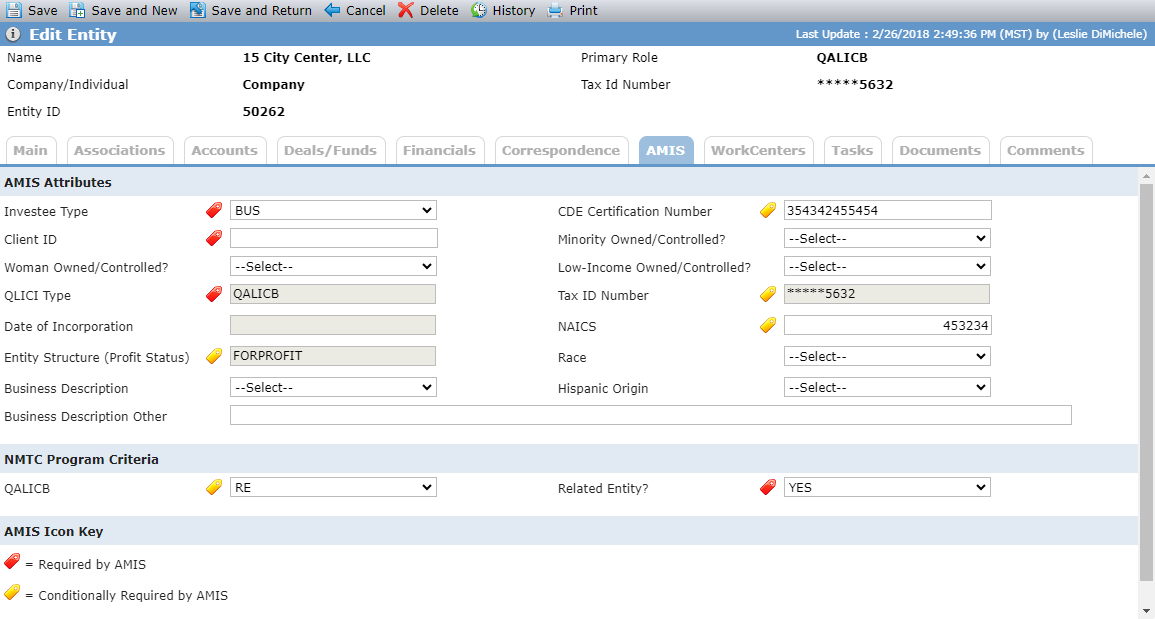
Fields that are required for AMIS reporting display the red icon  . Fields that are conditionally required display the yellow icon
  .
.
Tip
For more information about the Awards Management Information System (AMIS), see https://amis.cdfifund.gov/AMISHome.
Field | Description |
|---|---|
AMIS Attributes | |
Investee Type | AMIS required field. If the entity is a Sub-CDE, then select CDE. If the entity is a QALICB, then select BUS. |
Client ID | AMIS required field. The field can contain up to 20 characters. This should be a unique identifier and should not contain names, social security numbers, or any other person-identifyng information. |
QLICI Type | AMIS required field.Determines whether the QLICI is an investment in another CDE or QALICB. |
Entity Structure (Profit Status) | Conditionally required if the Date Originated is after 12/31/2010. Displays the value from Profit Status on the Main tab. |
CDE Certification Number | Conditionally required if the QLICI Type is CDE. |
Tax ID Number | Conditionally required when the QLICI Type is CDE. Displays the value from the Main tab (masked to show only the last four digits or characters). |
NAICS | Conditionally required when the QLICI Type is QALICB. This is a six-digit North American Industry Classification code of the QALICB. |
NMTC Program Criteria | |
QALICB | Conditionally required when the QLICI Type is QALICB. |
Related Entity | AMIS required field. Reports whether the investee is a related entity. |