Under Construction Watchlist Report
The Under Construction Watchlist Report is available in the Reports section of the Reports panel.
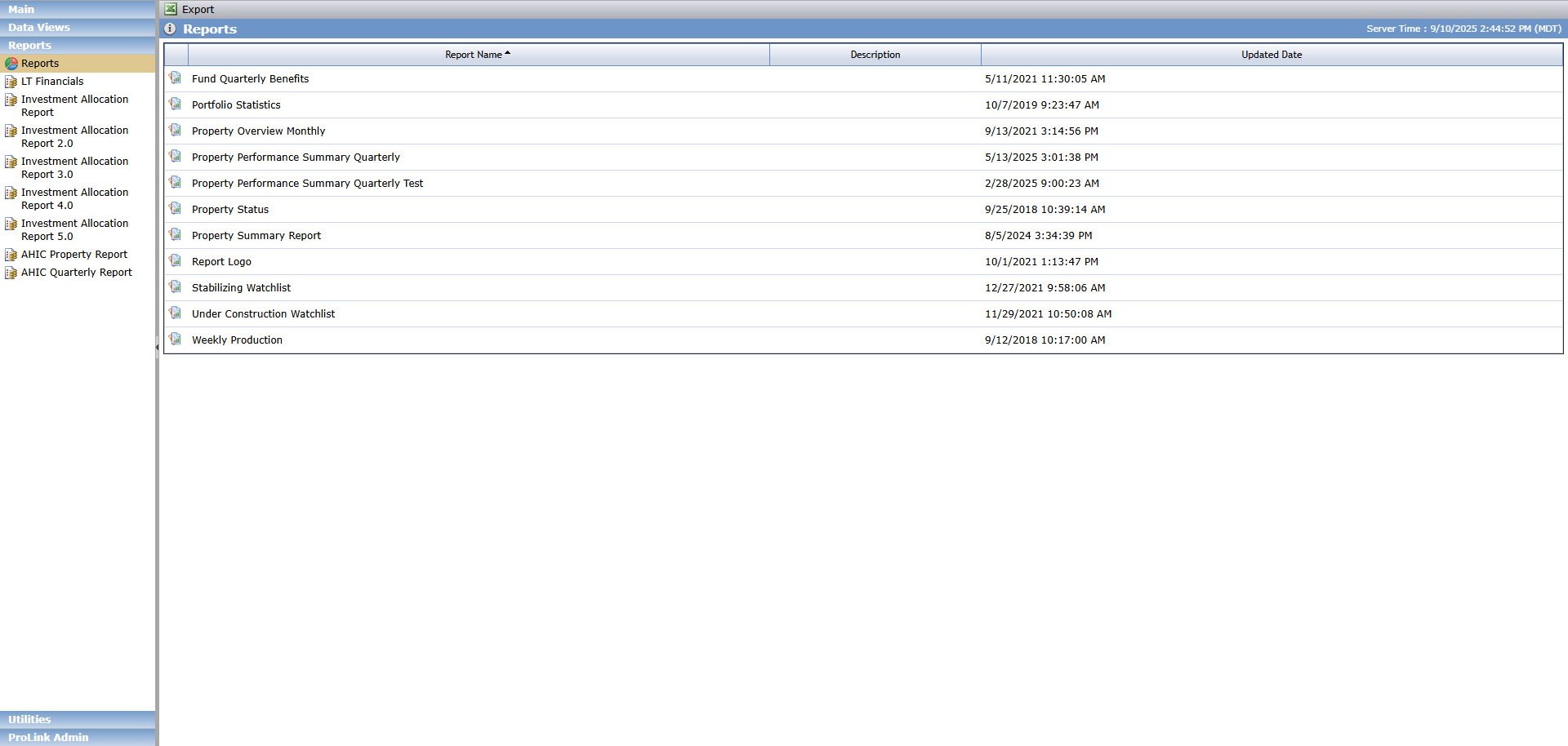
The Under Construction Watchlist Report can be run for one specific Property or all Properties associated with a specific Fund or Organizational Portfolio. The data is displayed separately for each Property. The report displays lower tier deals owned by funds directly or through a middle tier fund. Lower tier deals owned through a middle tier fund are only included when Include Child Funds equals Yes.
The report includes the picture uploaded to the Edit Construction Draw screen for the property (Reporting Graph). The system determines which draw record and picture to use based on the report month. If the construction budget includes multiple draws in one month, the report shows the picture from the earliest draw.
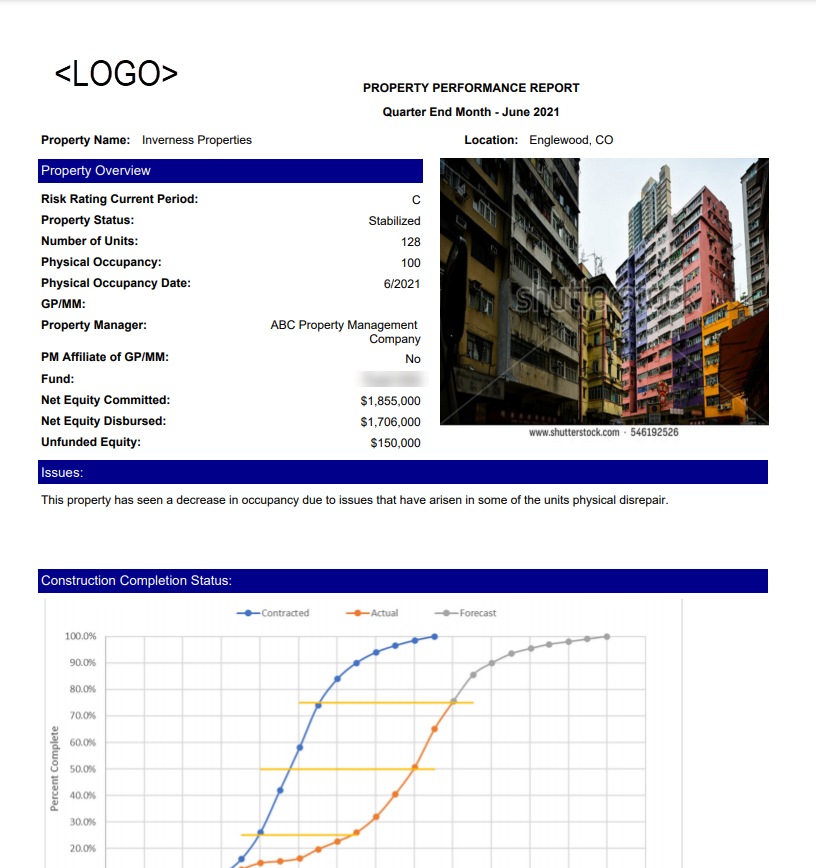
To generate the report:

Select whether to search by Property or Fund/Portfolio.
If searching by Property, select the property name.
OR
If searching by Fund/Portfolio, select the fund or portfolio name.
Select whether to include child funds in the results.
Select the Qtr End Month.
Select the Year.
Click View Report.
Save or print the report.
Field | Definition | |||
|---|---|---|---|---|
Quarter End Month | The date requested for the report, in MM/DD/YYYY format. | |||
Property Name | The Property Name. | |||
Location | The City and State from the Property - Main tab. | |||
Property Overview | ||||
Risk Rating Current Period | The Overall Rating on the most recent Risk Review record for the selected quarter, regardless of Risk Rating Status. NoteRisk Review records are by Year and Quarter. The report will use the most recent Year/Qtr for the year, based upon the FYEM on the Deal. For example, Report is requested for February 2018. Deal has a FYEM of December. There are Risk Review records for 2017 Q4 and 2018 Q1. The report will display the Overall Rating from the 2017 Q4 record. If the Deal has a FYEM of October, and the user requests a Report for May 2017, the Risk Review record for Q2 will be used for the report. Q1 Month end = January, Q2 Month end = April, Q3 Month end = July, Q4 Month end = October. | |||
Property Status | The Status from Property - Main tab. | |||
Number of Units | The Property Total Units from Property - Main tab. | |||
Physical Occupancy | The number of 10 Yr TC Units from Occupancy - Occupancy tab, for the quarter-end month selected for the report. | |||
Physical Occupancy Date | The quarter-end date in MM/YYYY format for the requested report date. | |||
GP/MM | The name of the Entity on the Deal with a Deal Role of General Partner. If there is no Entity with a Deal Role of General Partner this will display the name of the Entity with a Deal Role of Managing Member. | |||
Property Manager | The Active Associated Company with a Role of Property Manager. If there are multiples, the first one will be reported. | |||
PM Affiliate of GP/MM | If there is a Property Manager that is associated to the General Partner on the Deal Role then it shows Yes. If there is not a General Partner on the Deal, but there is Managing Member, and there is a Property Manager associated to the Managing Member, it will show Yes. | |||
Fund | Displays all active Entities on the Deal with a role of Syndicated Fund. | |||
Net Equity Committed | The Capital Amount from the Equity Schedule - Equity tab. | |||
Net Equity Disbursed | The total Adjusted Capital amount from the Equity Schedule - Equity tab, where Paid = Yes. | |||
Issues | Displays the Issues information from Risk Reviews, Investor Notes tab, for the corresponding Year and Quarter of the report. If the Risk Rating Current Period is A or B, this section will not display. | |||
Recapture | Displays the Guarantee Amount, Active status, and Actual Exp Date from the Guarantee record with a Type of Adjusters Compliance. Active will display Yes or No based upon the Actual Exp Date. If the date is equal to, or after today's date, the Active column will display Yes. If the date is before today, the report will display No. If the Unlimited checkbox is selected on the Guarantee record, the Amount column will display Unlimited. | |||
Unfunded Equity | Displays the Total where Paid = No. | |||
Construction Completion Status | Displays the graph from the Draw record where the Draw Received Date matches the report Quarter End Date. | |||
Qualified Occupancy Status | ||||
Underwritten | Actual (Projected) | Variance | ||
Lease-Up Start Date | Displays the Projected Lease-Up Start Date from Property - Main tab. | Displays the Actual Lease-Up Start Date from Property - Main tab. If the date is in the future it will be formatted with parentheses. | Displays the difference between the Underwritten and the Actual value. If the Actual Date is before the Underwritten Date, the variance will show as a positive number. If the Actual Date is after the Underwritten Date, the variance will show as a negative number. | |
Units Qualified | Displays the Forecast Units from Occupancy for the report month/year selected. | Displays the Actual Lease-Up Start Date from Property - Main tab. If the date is in the future it will be formatted with parentheses. | Displays the difference between the Actual and Underwritten values. | |
100% Qualified Occupancy Date | Displays the Projected 100% TC Occupancy from Property - Main tab. | Displays the Actual 100% TC Occupancy from Property - Main tab. | Displays the difference between the Underwritten and the Actual value. If the Actual Date is before the Underwritten Date, the variance will show as a positive number. If the Actual Date is after the Underwritten Date, the variance will show as a negative number. | |
Property Details | ||||
Date Closed | The Effective Date for Actual Closing from the Status History grid on Deal Details page. | |||
Placed In Service Date | The Actual PIS date from Edit Property - Main tab. | |||
End of Compliance | The LIHTC Compliance End Date from Property - LIHTC tab. | |||
Date of Last Site Visit | The Site Visit Date from the most recent Inspection record for the selected quarter for the Property from Inspection - Main tab. | |||
Property Type | The LIHTC Property Type from Property - LIHTC tab. | |||
Population Served | The Tenant Mix from Property - Main tab. | |||
Financing Information | ||||
Lender | The Lender name from Debt/Financing - Debt Details Main tab, for the Debt record that has an Order number of 1. | |||
Loan Type/Lien # | The Debt Instrument Type from Debt/Financing for the Debt record with Order of 1, followed by the Order # (1). | |||
Original Amount | The Actual Amount from Debt/Financing for the Debt record with Order of 1. | |||
Interest Rate | The Rate from Debt/Financing, Debt Details - Rates tab, for the Debt record with Order of 1. | |||
Guarantee Details | ||||
Recapture | Displays the Guarantee Amount, Active status, and Actual Exp Date from the Guarantee record with a Type of Adjusters Compliance. Active will display Yes or No based upon the Actual Exp Date. If the date is equal to, or after today's date, the Active column will display Yes. If the date is before today, the report will display No. If the Unlimited checkbox is selected on the Guarantee record, the Amount column will display Unlimited. | |||
Dev Deficit | Displays the Guarantee Amount, Active status, and Actual Exp Date from the Guarantee record with a Type of Development Completion. Active will display Yes or No based upon the Actual Exp Date. If the date is equal to, or after today's date, the Active column will display Yes. If the date is before today, the report will display No. If the Unlimited checkbox is selected on the Guarantee record, the Amount column will display Unlimited. | |||
Operating Deficit | Displays the Guarantee Amount, Active status, and Actual Exp Date from the Guarantee record with a Type of Operating Deficit. Active will display Yes or No based upon the Actual Exp Date. If the date is equal to, or after today's date, the Active column will display Yes. If the date is before today, the report will display No. If the Unlimited checkbox is selected on the Guarantee record, the Amount column will display Unlimited. | |||
Background | The Property Description from Property, Main tab. | |||
Market | Displays the Market information from Risk Reviews, Investor Notes tab, for the corresponding Year and Quarter of the report. | |||
Plan of Action | Displays the Actions information from Risk Reviews, Investor Notes tab, for the corresponding Year and Quarter of the report. If the Risk Rating Current Period is A or B, this section will not display. | |||
Recent Updates | Displays the Occupancy information from Risk Reviews, Investor Notes tab, for the corresponding Year and Quarter of the report. | |||